Content transferred from the public account Deepin by Ziggy
With the support of experience and templates, you can easily convert WeChat into Linyaps format with just a few lines of code
- PS: This article contains a lot of useful information. Although there is a lot of content, it is not a headline. To grow from a novice to a great master, you need to grow quietly!
- PS: The development technology used by the WeChat program or any unofficial announcement mentioned in this article has nothing to do with the WeChat development team. The accuracy of the information cannot be guaranteed. Please refer to WeChat official and WeChat development team announcements for all content.
Generating ideas
A few days ago, WeChat Linux launched a new version 4.x. It is rumored that this major version update has made a qualitative leap in cross-distribution experience [Doge]. Before I installed and tried it, there were rumors in the market that the main features include the following:
- Switch to Qt interface library in collaboration with Windows platform
- The Linux platform is fully open for public testing, ordinary users can log in directly through the WeChat Linux PC version
- It is suspected that more third-party distributions such as Ubuntu are supported, and it is no longer impossible to log in.
I have the impression that in the previous 1.x version, I tried to build the installation package of the Linyaps container for the Linux version of WeChat, but although it could be installed successfully, I could not log in normally. When these news came out, it ignited my fire as an ecological contributor of Linyaps open source community. Immediately, I couldn't wait to find the deb installation package of WeChat in the market, and opened my deepin 23Linyaps build system...
Analyze installation package
As soon as I got the installation package, I checked the format, runtime dependencies, and program binary type of the package, and tried my best to ensure that the success rate of this conversion was accurate and uninterrupted.
Dependency detection
As a traditional deb installation package, you can easily query the Depends item of this package and other contents recorded in the package through the dpkg package
 Maintainer: WeChat Team <>
 Installed-Size: 696820
 Description: wechat from Tencent wechat from Tencent
 Architecture: amd64
 Version: 4.0.0.21
 Pre-Depends: dpkg (>= 1.14.0)
 Priority: optional
 Package: com.tencent.wechat
 Depends: fonts-noto-cjk | google-noto-cjk-fonts, deepin-elf-verify (>= 1.1.10-1)
 Provides: wechat
 Section: default
It can be seen that this installation package generally only relies on font software packages and does not call too many third-party runtime libraries. Therefore, it is much more convenient for Linyaps application construction, and there is no need to manually add too many runtime libraries.
Format detection
For Linyaps application building projects, icons, desktop files, and binary file directories all have directional requirements. The directory of the application in the container will be generated based on the application ID in the container. For details, please check: Introduction to Linyaps build configuration files In this case, it can be simply understood as the following normative items:
- Linyaps build project configuration file
linglong.yamlmiddle.$PREFIXThe variable is understood to be the id of the Linyaps application, but in actual scenarios, you can use this variable directly and there is no need to modify it to a specific id. - Traditional
XDG_DATA_DIRSThe directory is mapped to the application container.$PREFIX/share, TraditionXDG_DATA_DIRSunder the directoryapplications、iconsDirectories need to be placed here - The icons directory needs to be placed according to the XDG specification and icon size, such as
/usr/share/icons/hicolor/scalable/apps. For details, please refer to UnionTech Application Packaging Specification Medium pairentries目录description
After learning about this specification, let's now look at how closely the content of the WeChat deb package fits the specification. Similarly, we can use the dpkg suite to analyze the contents of the package:
❯ dpkg -c com.tencent.wechat_4.0.0.21_amd64.deb
drwxr-xr-x root/root         0 2024-11-04 12:44 ./
drwxr-xr-x root/root         0 2024-02-01 13:58 ./opt/
drwxr-xr-x root/root         0 2024-03-05 12:18 ./opt/apps/
drwxr-xr-x root/root         0 2024-11-04 12:44 ./opt/apps/com.tencent.wechat/
drwxr-xr-x root/root         0 2024-03-12 14:13 ./opt/apps/com.tencent.wechat/entries/
drwxr-xr-x root/root         0 2024-03-12 14:12 ./opt/apps/com.tencent.wechat/entries/applications/
-rwxr-xr-x root/root       171 2024-03-12 16:48 ./opt/apps/com.tencent.wechat/entries/applications/com.tencent.wechat.desktop
drwxr-xr-x root/root         0 2024-03-12 12:13 ./opt/apps/com.tencent.wechat/entries/icons/
drwxr-xr-x root/root         0 2024-03-12 12:13 ./opt/apps/com.tencent.wechat/entries/icons/hicolor/
drwxr-xr-x root/root         0 2024-03-12 12:13 ./opt/apps/com.tencent.wechat/entries/icons/hicolor/128x128/
drwxr-xr-x root/root         0 2024-03-12 16:49 ./opt/apps/com.tencent.wechat/entries/icons/hicolor/128x128/apps/
-rwxr-xr-x root/root      6280 2024-03-12 12:13 ./opt/apps/com.tencent.wechat/entries/icons/hicolor/128x128/apps/com.tencent.wechat.png
drwxr-xr-x root/root         0 2024-03-12 12:13 ./opt/apps/com.tencent.wechat/entries/icons/hicolor/256x256/
drwxr-xr-x root/root         0 2024-03-12 16:49 ./opt/apps/com.tencent.wechat/entries/icons/hicolor/256x256/apps/
-rwxr-xr-x root/root      9387 2024-03-12 12:13 ./opt/apps/com.tencent.wechat/entries/icons/hicolor/256x256/apps/com.tencent.wechat.png
drwxr-xr-x root/root         0 2024-11-04 12:44 ./opt/apps/com.tencent.wechat/files/
-rwxr-xr-x root/root 155543928 2024-11-01 17:42 ./opt/apps/com.tencent.wechat/files/wechat
It can be seen from the results that this package is highly consistent with the specification, so the migration process will be more convenient and you can proceed to the next step.
Program type judgment
We can now start to determine the program type. Similarly, we can use the dpkg suite to decompress the contents of the deb package:
❯ dpkg -x com.tencent.wechat_4.0.0.21_amd64.deb ./
In this way, you can install the deb package data部分 Unzip it to this directory. After the decompression is complete, let’s take a look at the general components of the program directory:
- In order to save text space, I will not fully display all file contents here, and the actual content shall prevail.
opt
└── apps
└── com.tencent.wechat
└── entries
└── applications
└── icons
└── files
According to the current domestic mainstream commercial applications, most of them will develop clients based on different solutions such as Qt or Electron. Electron programs are usually accompanied by sandbox words such as chrome-sandbox in the program directory. We see that this file is not included in the WeChat program directory. In principle, it can be ruled out that the current version of WeChat client is developed based on Electron.
Dynamic runtime scanning
As mentioned earlier, in addition to Electron, current domestic mainstream commercial applications generally choose Qt as the client interface solution. Therefore, we can use the ldd tool to check whether the binary execution files and dynamic runtime libraries in the WeChat program directory have libraries that depend on Qt.
❯ ldd ./* |grep qt
ldd: ./ocr_model: 不是普通文件
ldd: ./RadiumWMPF: 不是普通文件
ldd: ./vlc_plugins: 不是普通文件
ldd: ./XEditor: 不是普通文件
ldd: ./XFile: 不是普通文件
❯ ldd ./* |grep Qt
ldd: ./ocr_model: 不是普通文件
ldd: ./RadiumWMPF: 不是普通文件
ldd: ./vlc_plugins: 不是普通文件
ldd: ./XEditor: 不是普通文件
ldd: ./XFile: 不是普通文件
But obviously it cannot be directly seen that there are points related to Qt [laughing and crying]
❯ ldd wechat |grep xcb
        libxcb-glx.so.0 => /lib/x86_64-linux-gnu/libxcb-glx.so.0 (0x00007fb45bfbc000)
        libxcb-xkb.so.1 => /lib/x86_64-linux-gnu/libxcb-xkb.so.1 (0x00007fb4526c2000)
        libxcb-randr.so.0 => /lib/x86_64-linux-gnu/libxcb-randr.so.0 (0x00007fb45bfaa000)
        libxcb-icccm.so.4 => /lib/x86_64-linux-gnu/libxcb-icccm.so.4 (0x00007fb4526bb000)
        libxcb-shm.so.0 => /lib/x86_64-linux-gnu/libxcb-shm.so.0 (0x00007fb4526b6000)
        libxcb-render.so.0 => /lib/x86_64-linux-gnu/libxcb-render.so.0 (0x00007fb4526a7000)
        libxcb-image.so.0 => /lib/x86_64-linux-gnu/libxcb-image.so.0 (0x00007fb4526a1000)
        libxcb-xfixes.so.0 => /lib/x86_64-linux-gnu/libxcb-xfixes.so.0 (0x00007fb452697000)
        libxcb-shape.so.0 => /lib/x86_64-linux-gnu/libxcb-shape.so.0 (0x00007fb452692000)
        libxcb-sync.so.1 => /lib/x86_64-linux-gnu/libxcb-sync.so.1 (0x00007fb452688000)
        libxcb-render-util.so.0 => /lib/x86_64-linux-gnu/libxcb-render-util.so.0 (0x00007fb452681000)
        libxcb-keysyms.so.1 => /lib/x86_64-linux-gnu/libxcb-keysyms.so.1 (0x00007fb45267a000)
        libxcb.so.1 => /lib/x86_64-linux-gnu/libxcb.so.1 (0x00007fb452650000)
        libX11-xcb.so.1 => /lib/x86_64-linux-gnu/libX11-xcb.so.1 (0x00007fb45264b000)
        libxcb-util.so.0 => /lib/x86_64-linux-gnu/libxcb-util.so.0 (0x00007fb4519ec000)
Looking at the dynamic runtime library required for the WeChat binary part alone, it is mainly the xcb library, and the third-party runtime library is not very complicated.
Linyaps project construction
Build preparation
After completing the previous preparation steps, you can start trying to add WeChat to the construction project. The following are the preparation steps:
- For convenience and to keep file permissions from being damaged, I will
filesDirectory renamed in advanceWeChatand compressed into an archive package - At the same time, in order to fit the general template mentioned later, I will
applicationsandiconsdirectory intotemplate_appin directory - Create a binary directory and compress the previously compressed
WeChatUnzip the binary directory here
Here I will introduce my universal build template [Doge], which is extremely attractive for binary programs without third-party runtime dependencies. Take a closer look Universal Linyaps build project configuration file template Let's make a small modification that will make a big difference. In order to prevent the article from being too long, I will only show the specific modification steps and the finished product this time. If you are sentimental about this template and ideas, you can leave a message below and update as you go. Here we need to change these main variables:
$PACKAGEReplace with the Linyaps application id (package name) you want to generate$NAMEUse the application name instead, English characters are recommended$VERSIONUse application version instead,requirements四位小数$commentApplication brief description
Special modifications
In addition to the above common variables, considering the previous evaluation of this program, it is necessary to --no-sandbox %U The parameters are removed and a runtime field is added, using a runtime of 23.
linglong.yaml should finally look like this:
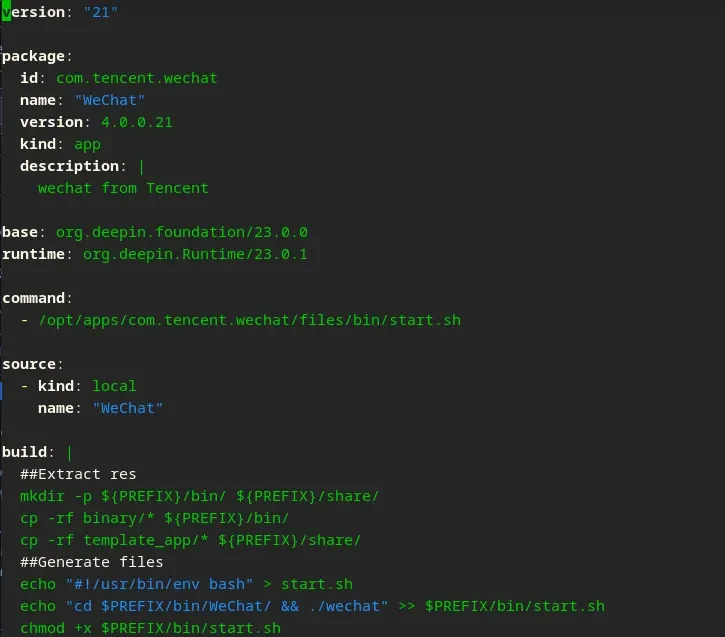
At this point, your Linyaps build project structure should be like this (this is a level 2 display, it does not mean that the directory is empty!):
.
├── binary
├── linglong.yaml
├── template_app
│ ├── applications
│ └── icons
Start building
After completing the above steps, you should now be able to directly execute the build, but of course you have already installed ll-builder and execute it in the root directory of the build project ll-builder build -v , seeing successfully means the build was successful, you can pass ll-builder export --layer Export it as a layer file, come and try it out
* The development technology used by WeChat programs or any unofficial information mentioned in this article has nothing to do with the WeChat development team, and the accuracy of the information cannot be guaranteed. The content of the article and the construction of Linyaps come from the Linyaps open source community.
- Big news! XDG officially supports Linyaps(Linyaps)
- When BMF meets Linyaps: An AI-supported audio and video conversion tool is launched like this
- Offline Events | COSCon’25 this weekend: Friends from Beijing, come and sit at the booth!
- Linyaps community test source is online, and there is no need to wait for the latest software and hardware!
- [Project Sharing] Runtime top update: Tauri and Flutter applications support native builds
English edition: Linglong · 18 October 2026. Original publication: 2024-11-06.