On this page
What OpenConverter offeredWhy use BMF?From the experiment to a distributed applicationWhat the example was intended to demonstrateVerify one conversion end to endOriginal publication: 2026-01-22. English edition and practical reading notes: Linglong, 18 October 2026. Chinese original.
The community’s 22 January 2026 article described how Jack Lau adapted OpenConverter to the Linyaps format. Its “download and use” experience was the article’s account of that integration, not a test performed by the site team.
What OpenConverter offered
OpenConverter was presented as an open-source, cross-platform tool for Windows, Linux and macOS, built with FFmpeg and BMF. The article listed media-information inspection, container-format and codec conversion, video trimming, audio extraction, image compression and batch processing. It also described AI super-resolution, with more AI functions planned. Both GUI and CLI use were available, with a choice of FFTool, FFmpeg or BMF processing cores.
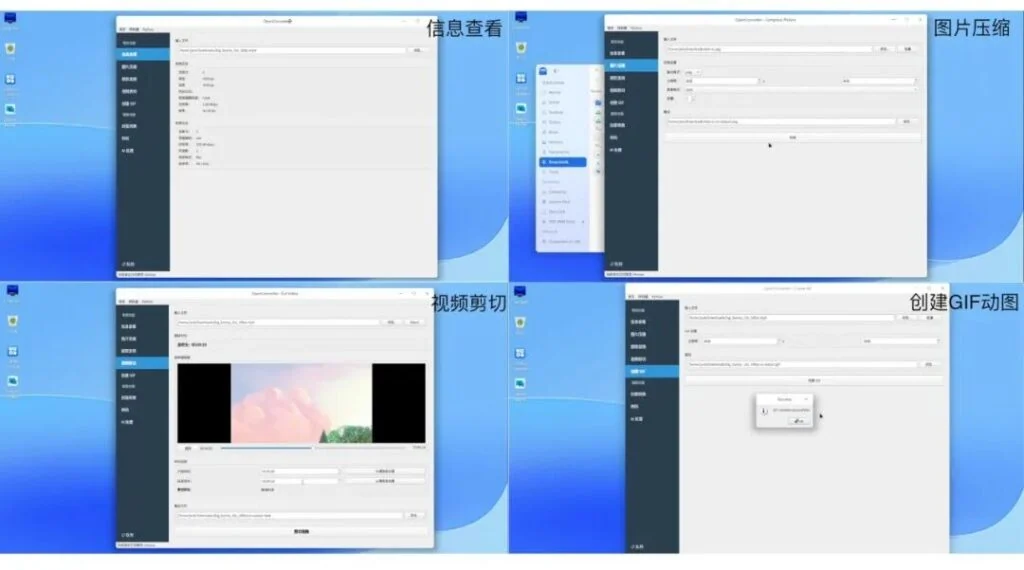
The original download routes were the deepin store for AMD64/ARM64, the Linyaps application store, and OpenConverter’s repository.
Why use BMF?
OpenConverter originally used the FFmpeg API directly. The article described FFmpeg’s broad support for formats, codecs, streaming and filters, while noting the learning curve for newcomers and the work needed to integrate AI.
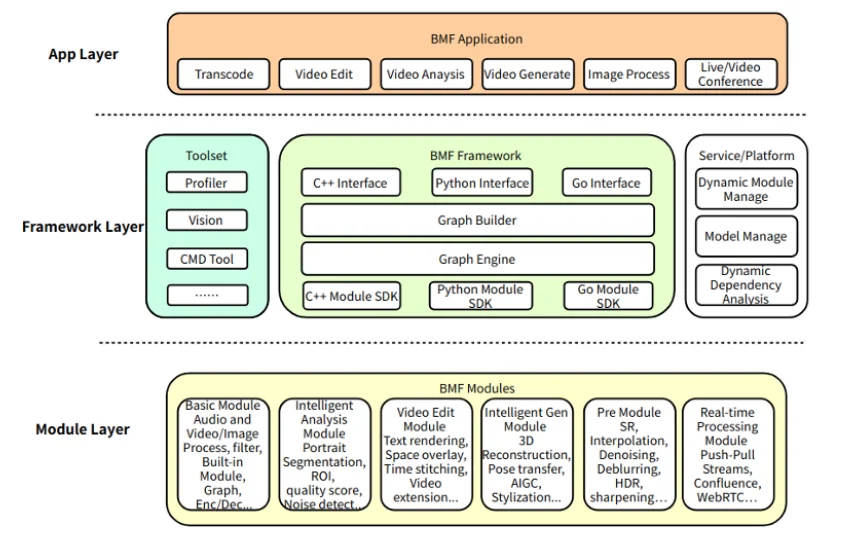
Babit Media Framework retained FFmpeg capabilities while allowing modules in C++, Python and Go. Its modular pipeline could combine media processing with AI components. The super-resolution example was:
BMF decoding module (C++)
→ AI super-resolution module (Python)
→ BMF encoding module (C++)
A different middle module could supply another operation such as denoising; more complex pipelines could be composed as required. The source referred readers to BMF’s documentation.
From the experiment to a distributed application
The author said he had begun compiling BMF inside a Linyaps container in late 2024 and established sig-linyaps-bmf, aiming to contribute a BMF-based GUI application. After almost a year of spare-time work, OpenConverter v1.5.3 had reached the deepin store for AMD64/ARM64, with automatically built Linyaps packages.
Because a ready-made workflow example was absent, the author wrote scripts in .github/workflows/build.yaml. They prepared the binary, linglong.yaml, desktop file and icon; ran ll-builder build; and exported a package with the options shown in the article:
ll-builder export --layer --no-developThe article reported that fetching the deepin base from the official source could be slow and time out. Preparing a Docker image with a cached deepin base improved that project’s build reliability. It linked to the author’s published package images. A cached image is still a dependency that must be identified and trusted.
What the example was intended to demonstrate
The article presented packaging FFmpeg, BMF and AI runtime dependencies into a manageable environment as a reusable reference for multimedia developers. Jack Lau, described there as an FFmpeg and BMF maintainer, intended to continue collaboration with the deepin and Linyaps communities. Readers were invited to report issues, contribute code and discuss multimedia/AI integration.
Verify one conversion end to end
Use a short, non-confidential media file that you have permission to process. Save the original. First select an ordinary conversion without AI, then inspect the output before adding another processing stage.
Application / package version:
Input container / codecs / duration:
Selected core and operation:
Output container / codecs / duration:
Video plays to the end:
Audio present and synchronized:
Expected dimensions / frame rate:
Actual error or result:
Changing container, re-encoding and AI upscaling are different operations. Do not infer faster processing, quality improvement or smaller output from the framework name. No throughput or quality benchmark is claimed here.
