On this page
Building Linyaps applications on Ubuntu 24.04Qt based application Linyaps compiled and builtBuilding Linyaps applications on Ubuntu 24.04
Qt based application Linyaps compiled and built
After completing the previous running demonstration, we are about to start showing the effect of Qt based application Linyaps compiled and built. The complete explanation here is Applications with Qt5 runtime as the core runtime and their source code . We choose here LibreCAD.
For general graphical applications, a good experience should also include desktop files and icon files to ensure that ordinary users can start the application through the launcher.
* Before compiling source code directly through Linyaps, you should first compile it successfully on a host in the same environment to ensure feasibility and save relevant build rules.
Material Requirements
Therefore, the following files will be used in this case:
- Applications that need to be compiled and installed into Linyaps containers
LibreCADSource code - Case application Icon file
- Case application desktop file
Preview of knowledge points
Before compiling the source code, we need to know the following knowledge points:
- When compiling and running tasks in the Linyaps build project, the actual path will be directed to
容器目录rather than the host directory. - In the Linyaps ecosystem, currently
org.deepin.RuntimeResponsible for providing most of the runtime libraries such asboostWait, includedinclude头文件and动态运行库.Map the directory in the container as/runtime/include,/runtime/libWait, the contents are all in/runtimemiddle - In the Linyaps ecosystem, currently
org.deepin.foundationResponsible for providing基本运行环境, includinginclude头文件and动态运行库.Map the directory in the container as/usr/include,/usr/libwait, The path is consistent with the host rules
According to the above information, we know that when the Linyaps build project performs build and run tasks, the include header file and lib dynamic runtime library will be distributed in two directories. /runtime /usr , this knowledge point is crucial for subsequent compilation operations.
Preparation
Because the Linyaps build tool still has the function of decompressing the tar archive compressed package, and it is convenient to dynamically modify the source code according to the compilation situation. Therefore, I recommend that you decompress the source code into the project in advance and prepare other materials before building the project.
In order to save time, I have prepared the above files and decompressed the source code here to show you the structure of several important directories.
Build directory structure:
ziggy@ziggy-Standard-PC:~/linglong-build$ tree -L 2
.
├── linglong.yaml
├── org.librecad.www-2.2.0.8-src.tar.bz2
├── src
│   └── org.librecad.www-2.2.0.8-src
├── template_app
│   ├── applications
│   └── icons
└── template_app.tar.bz2
Icon, desktop file resource directory structure (template_app):
template_app/
├── applications
│   └── org.librecad.www.desktop
└── icons
    └── hicolor
        ├── 128x128
        │   ├── apps
                └── librecad.png
During the whole process, we need to focus on two files that need to be changed:
desktop file.
The Exec field must match the path, application id, and execution command after the Linyaps project is built. The execution command is the same as mentioned below. yaml configuration file The "command" value in remains consistent.
**"command"** value in the case yaml configuration file:
command:
  - /opt/apps/org.librecad.www/files/bin/start.sh
The Icon field takes into account the current compatibility differences on different distributions, so it is recommended to fill it in directly here. Absolute path Otherwise, the icon may not be displayed
Directory paths for reference:
## desktop应用启动文件Exec
Exec=/opt/apps/$id/$version/files/bin/start.sh

## 应用Icon目录
Icon=/var/lib/linglong/layers/main/$id/$version/x86_64/binary/entries/share/icons/hicolor
Two points to note:
- Generally, icon files of different sizes are stored in the hicolor directory. It is recommended to fill in the path of the specific icon file in the Icon field of the desktop application startup file after selecting the appropriate size.
- ** here id *** refers to Linyaps application id , ***version** refers to the installed version number of the Linyaps application, and the specific actual value needs to be filled in
[Desktop Entry]
Name=LibreCAD
Comment=A professional CAD System.
Exec=/opt/apps/org.librecad.www/files/bin/start.sh %U
Icon=/var/lib/linglong/layers/main/org.librecad.www/2.2.0.8/x86_64/binary/
     files/share/icons/hicolor/128x128/apps/librecad.png
Type=Application
Categories=Graphics;Engineering;
MimeType=image/vnd.dxf;

Terminal=false
StartupNotify=true
Assess and adapt the build project
Before starting to formulate appropriate compilation rules (build) and configuration file linglong.yaml, we need to judge what type of build rules we should use based on the source code project structure.
For applications whose core runtime library is Qt, the commonly used compilation configuration generation tool is cmake、qmake.
When we enter the decompressed application source code directory, we can see that the source code root directory only contains the Qt project .pro file does not exist CMakeLists.txt or Makefile and other build configuration files, so we can quickly conclude that the process when compiling the project should be: qmake生成配置文件 ==> make编译 ==> make install
Since the PREFIX variable specified by qmake does not take effect on this project, we need to manually write operations in the build rules after compiling the binary to ensure that all related files can be written to the Linyaps container. $PREFIX middle
yaml configuration file.
We now see Linyaps build configuration files linglong.yaml , since we need to use include header files and some third-party libraries for this compilation, in addition to the default base settings, we need to add org.deepin.Runtime as runtime项目 use.
For the construction rules in the build phase, refer to the compilation sequence we summarized earlier, and you can set different operations in the rules in sequence: 进入源码目录 ==> 依次执行编译 ==> 安装操作 ==> 生成启动脚本
After the build rule modification is completed, we perform a build operation to see if the compilation operation can be completed normally.
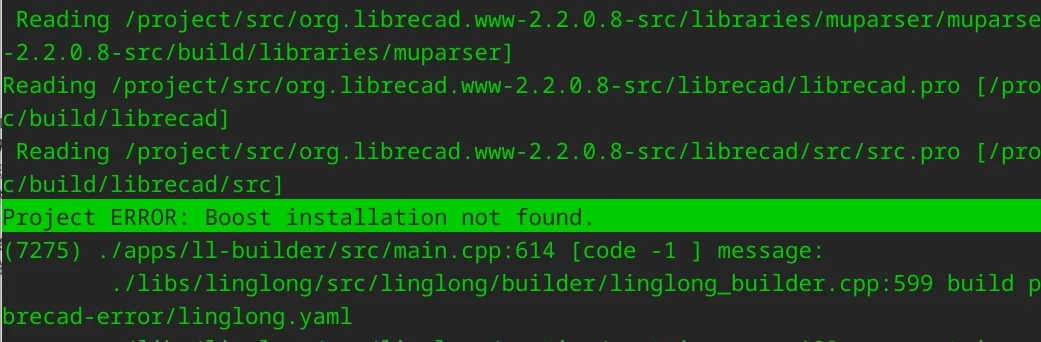
As you can see, when we execute ll-builder build -v After that, the final error message is Project ERROR: Boost installation not found. , meaning that the system cannot find the boost library. But when we enter the two directories mentioned above /usr/lib /runtime/lib /usr/include /runtime/include Search in boost When looking at related libraries, you can find related header files and dynamic runtime libraries.
ziggy@ziggy-Standard-PC:/project$ ls /usr/include/ |grep boost
ziggy@ziggy-Standard-PC:/project$ ls /runtime/include/ |grep boost
boost
ziggy@ziggy-Standard-PC:/project$ ls /usr/lib/x86_64-linux-gnu/ |grep boost
libboost_regex.so.1.74.0
However, considering that the upstream source code is not fully adapted to the Linyaps structure, it is possible that the compilation configuration file only takes into account the local compilation scenario of the host or other scenarios that comply with directory specifications. If a library appears in a non-traditional path, it may not be recognized.
At this point we enter the source code subdirectories at each level in order, and we can see boost A configuration file related to the library boost.pri , we open the file and use the compiled error report to search, and find that the error message is judged and output by the file.

Analyzing the details, we see that the reason for the error is that the specified directory cannot be found. boost The header file of the library, according to the context source code relationship, we see a variable BOOST_DIR Temporarily judge that the variable is defined boost Library directory.
It can be seen that the search path in this variable has /usr /usr/local , which further confirms our guess. According to the structural rules and boost The header file directory in the Linyaps container is /runtime/include , we will here /runtime Added to the search path so that the compiler can read boost The directory where the header file is located.
Origin:
BOOST_DIR = $$findBoostDirIn( /usr /usr/local /usr/pkg /opt/local )
Fixed:
BOOST_DIR = $$findBoostDirIn( /usr /usr/local /usr/pkg /opt/local /runtime )
Template linglong.yaml variable explanation:
| Variables need to be replaced | Explanation |
|---|---|
| LL_APPID | Linyaps application id |
| LL_NAME | Linyaps application name |
| LL_VERSION | Linyaps application version |
Temporary test
After modifying the source code, we recompile and build to see the effect.
The final test passes compilation, we can exit the container to modify the build rules based on our operation records, and reset the build directory to pass ll-builder build Execute tasks according to build rules.
After the build is completed, we perform debugging in the project directory to see if it runs normally
ziggy@ziggy-Standard-PC:~/linglong-build$ ll-builder run- Big news! XDG officially supports Linyaps(Linyaps)
- When BMF meets Linyaps: An AI-supported audio and video conversion tool is launched like this
- Offline Events | COSCon’25 this weekend: Friends from Beijing, come and sit at the booth!
- Linyaps community test source is online, and there is no need to wait for the latest software and hardware!
- [Project Sharing] Runtime top update: Tauri and Flutter applications support native builds
English edition: Linglong · 18 October 2026. Original publication: 2024-09-30.