Someone once asked the editor: What problem does Linyaps mainly hope to solve?
The editor replied: In order to promote the development of the Linux ecosystem!
That person argued: Although Linux has not developed in general, the ecosystem has always been prosperous (laughing but not saying anything)
is indeed prosperous. If you don’t believe it, just look at the software package formats: deb, rpm, Flatpak, Snap, AppImage...
International practice, if you can’t beat it, join it! So here we have: Linyaps !
We have newly added 1) layer format style (networked installation package) and 2) uab format (offline running package)
Of course, joining is not to make the Linux ecosystem more "prosperous", but to bring a truly efficient solution to the Linux ecosystem.
It is well known that traditional Linux package managers have these problems:
1) Both deb and rpm are strongly dependent package management systems that allow complex cross-dependencies (or cyclic dependencies) between components. This requires extremely professional knowledge to maintain the package management system. A little carelessness can lead to a complete system failure that cannot be repaired.
2) Installation dependencies and running dependencies are coupled, making it difficult to coexist with multiple versions. Although rpm and deb provide solutions to solve the problem of multi-version coexistence, these solutions require source code level changes and are not feasible to implement.
3) The Hook system is complex in design and has no restrictions. Many operations that damage the system can be done through the Hook system.
4) Insufficient reliability, no redundant recovery design, and lack of verification mechanism. Once the package management system fails, there is basically no possibility of repairing the system.
5) Deb and rpm permissions are loosely controlled, which may allow malware or unauthorized users to access sensitive data, posing greater security risks.
6) The current package update does not support incremental updates, which is a huge waste of resources.
When it comes to this, you will say:
Flatpak, Snap and AppImage can also solve some of the problems mentioned above. So what are the advantages of Linyaps?
The summary is: I have what others don’t have, and I have the advantage of what others have! For details please see:
| Features | Linyaps | Flatpak | Snap | AppImage |
|---|---|---|---|---|
| Packaging desktop applications | ✔ | ✔ | ✔ | ✔ |
| Packaging terminal applications | ✔ | ✔ | ✔ | ✔ |
| Handling server applications | ✔ | ✘ | ✔ | ✘ |
| Packaging system services (root permissions) | ✘ | ✘ | ✔ | ✘ |
| Theme functions properly | ✔ | ✔ | ✔ | ✔ |
| Provide library hosting services | ✔ | ✘ | ✘ | ✘ |
| Commercial support | ✔ | ✘ | ✔ | ✘ |
| Container support | ✔ | ✔ | ✔ | ◐ (not officially provided) |
| rootless containers | ✔ | ✔ | ✘ | ✘ |
| Run without installation | ✔ | ✘ | ✘ | ✔ |
| Run without decompression | ✔ | ✘ | ✔ | ✔ |
| Self-distribution/green format distribution | ◐ | ✘ | ✘ | ✔ |
| Support Wine application running | ◐ (Adapting) | ◐ (Theoretically feasible | ◐ (Theoretically feasible) | ◐ (poor compatibility) |
| Offline environment support | ✔ | ✔ | ✔ | ✔ |
| Permission management | ✔ | ✔ | ✔ | ✘ |
| Multi-version coexistence | ✔ | ✔ | ✔ | ✔ |
| Peer-to-peer distribution | ✔ | ✔ | ✔ | ✔ |
| Application upgrade | Repository upgrade | Repository upgrade | Repository upgrade | Official tool upgrade |
Linyaps mainly addresses common problems of the Linux software package management system, and has made targeted improvements and upgraded the following contents:
- Improve ease of use and resolve deb and rpm dependency conflicts
- Strengthen security protection and implement application permission management mechanism
- The package itself carries library/dependency sources, host system and SDK
- Provides Bundle mode, supports running without installation or decompression
- Support application incremental updates
- Support processing server applications
- Provide library hosting services
and in continued iteration...
Linyaps, more efficient and adaptable to different development scenarios
Linyaps has made special optimizations to solve the problems of application size expansion, slow startup speed and permission management by uniformly publishing and calling the existing runtime of the system. Compared to Flatpak and Snap, Linyaps requires significantly less disk space and boots faster.
Compared with traditional package management systems (such as those of Debian and Red Hat), Linyaps applications need to run in an independent sandbox environment. By limiting the interaction between applications and the system and optimizing permission management, application security is greatly improved.
In addition, Linyaps’ unique offline package format uab provides Bundle mode, which supports running software without installation or decompression.
In terms of development efficiency, Linyaps has also done something unique:
Unique application conversion tool: ll-pica, supports the rapid "Linyapsization" of other format packages
In the latest version 1.6.3 released by Linyaps, ll-pica has launched two new conversion tools:
1)ll-appimage-convert
2)ll-pica-flatpak
As of now, ll-pica now supports rapid conversion of deb, appimage and flatpak format applications.
● The tool is provided by linglong-pica, which supports generating the linglong.yaml file required to build Linyaps applications, and relies on ll-builder to build and export appimage or flatpak packages to Linyaps format (layer or uab).
● The conversion tool is only an auxiliary tool and does not guarantee that the converted application will be able to run. The installation path or other configuration path of the software itself may not be consistent with the internal path of Linyaps, resulting in the inability to run. You need to use the ll-builder run –exec bash command to enter container debugging.
● For specific application conversion tutorials, please visit Linyaps community official website www.linglong.space / Documentation Center View
● ll-pica mainly relies on Linyaps and golang. It is currently only compatible with deepin 23. Other distributions are theoretically available. You are welcome to explore by yourself.
New version 1.6.3 update instructions
● The current new version of Linyaps 1.6.3 is only available to deepin 23 internal beta users, who need to update the system to the latest version (this version has not been officially pushed to other releases yet).
● Join deepin internal testing: System Control Center-Update-Update Settings-Join the internal testing channel.
● Or install the "Linyaps conversion tool" through the deepin application store to use the latest version of ll-pica. Reference is as follows:
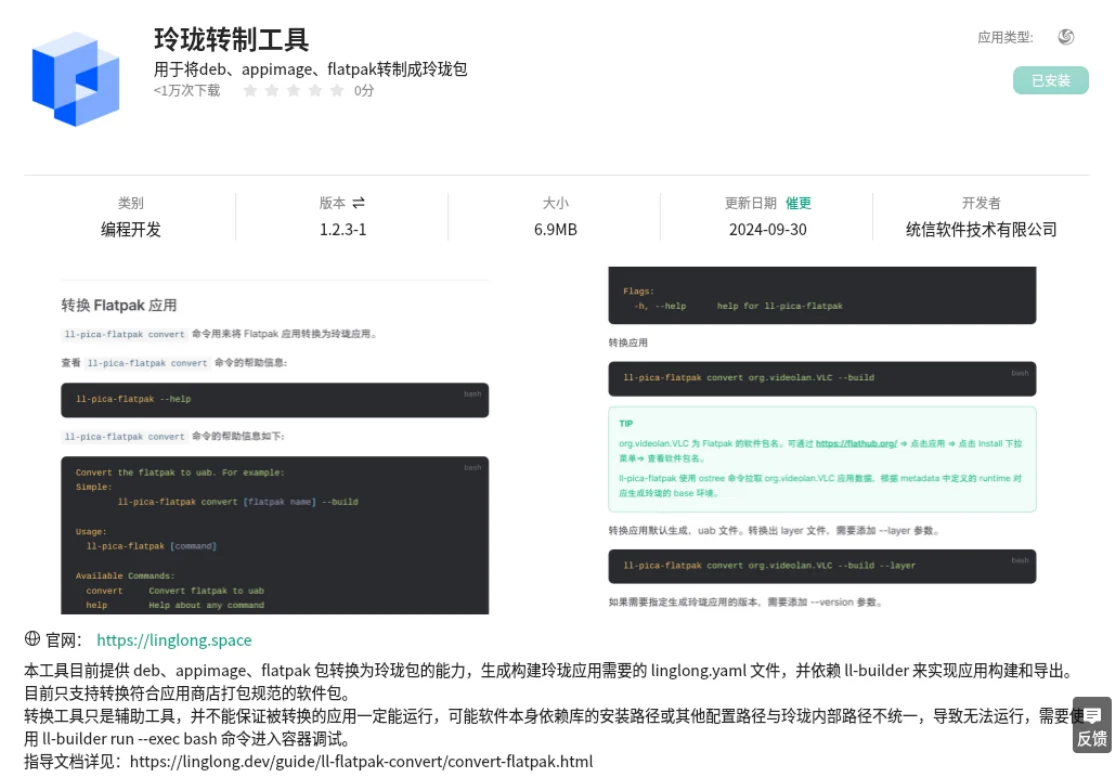
New version 1.6.3 update log
New features:
1) Linyaps application supports reading U disk directories and files;
2) Added ll-pica-flatpak tool to support conversion of flatpak format to Linyaps format;
Bug fixes:
1) Fixed the problem of script execution failure when upgrading Linyaps package;
2) Fixed the issue where executing other commands was blocked when installing the Linyaps application;
3) Fix the display problem of viewing the application list when the application name is too long;
- Big news! XDG officially supports Linyaps(Linyaps)
- When BMF meets Linyaps: An AI-supported audio and video conversion tool is launched like this
- Offline Events | COSCon’25 this weekend: Friends from Beijing, come and sit at the booth!
- Linyaps community test source is online, and there is no need to wait for the latest software and hardware!
- [Project Sharing] Runtime top update: Tauri and Flutter applications support native builds
English edition: Linglong · 18 October 2026. Original publication: 2024-10-24.