This article is reproduced from deepin forum-Linyaps area- Original link Author:deepin-superuser
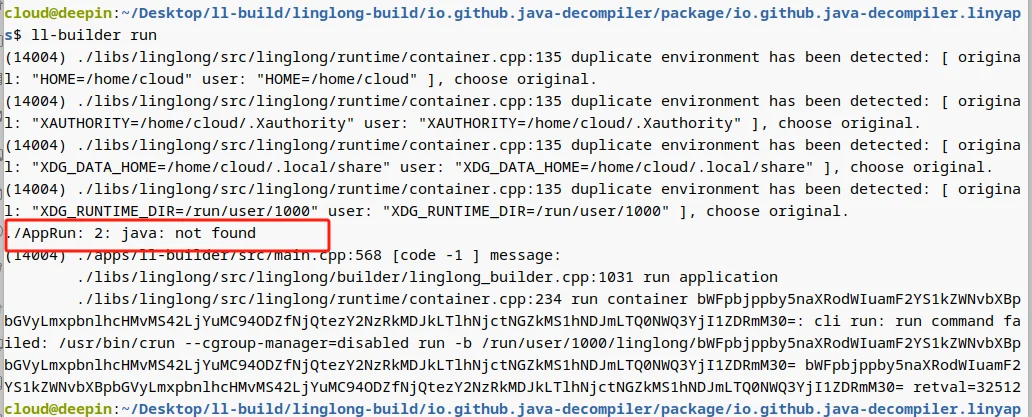
Solution
1. Complete JRE related dependencies
Open linglong.yaml We can find that only the dependencies are added openjdk-11-jre , so we have to make up for the remaining
ll-pica adep -d "ca-certificates-java,fonts-dejavu-extra,java-common,libatk-wrapper-java,libatk-wrapper-java-jni,libgif7,openjdk-11-jre-headless"
2. Copy jre to the bin directory
After completing the dependencies, we can find that java is not installed in the bin directory. Here we copy it and edit linglong.yaml Add a sentence at the end
cp -r $PREFIX/lib/jvm/java-11-openjdk-amd64/* $PREFIX

3. Fix startup command
Some run commands written in the startup script are absolute paths, but the paths have changed in Linyaps. Here we change it to the correct path
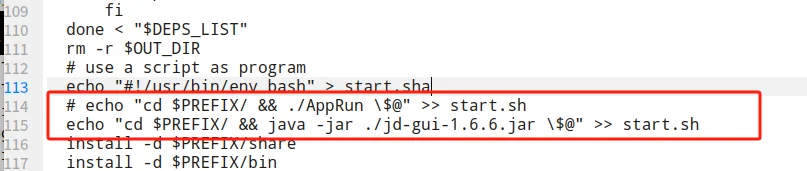
Then again as usual, run the test
ll-builder build
ll-builder export
ll-builder run
- Big news! XDG officially supports Linyaps(Linyaps)
- When BMF meets Linyaps: An AI-supported audio and video conversion tool is launched like this
- Offline Events | COSCon’25 this weekend: Friends from Beijing, come and sit at the booth!
- Linyaps community test source is online, and there is no need to wait for the latest software and hardware!
- [Project Sharing] Runtime top update: Tauri and Flutter applications support native builds
English edition: Linglong · 18 October 2026. Original publication: 2024-07-01.