linglong.yaml is the description file for Linyaps project engineering, which records relevant information needed for building, such as build artifact names, versions, source code addresses, build dependencies, etc.
Keep the manifest’s intended behaviour separate from the runtime observation, then follow the debugging guide. Record the configuration item, observed symptom and log location before changing one condition. This reading path does not claim that the commands were run on your system version.
Project Directory Structure
{project-root}
├── linglong.yaml
└── linglong

{user-home}
└── .cache
    └── linglong-builder
        ├── repo
        └── layers
Field Definitions
The linglong.yaml file structure follows specific specifications. First, the version of the configuration file needs to be declared at the top level of the file:
version: "1"
| Name | Description | Required |
|---|---|---|
| version | Version of the build configuration file, currently '1' | Yes |
Next are the main configuration blocks. Among them, package, base, and build must be defined.
Package Metadata Configuration (package)
Defines basic information about build artifacts. This package configuration block is required.
package:
  id: org.deepin.calculator
  name: deepin-calculator
  version: 5.7.21.0
  kind: app
  description: |
    calculator for deepin os.
  architecture: x86_64 # Optional
  channel: main # Optional
| Name | Description | Required |
|---|---|---|
| id | Unique name of build artifact (for example: org.deepin.calculator) |
Yes |
| name | Name of build artifact (for example: deepin-calculator) |
Yes |
| version | Version of build artifact, recommend four digits (for example: 5.7.21.0) |
Yes |
| kind | Type of build artifact: app (application), runtime (runtime) |
Yes |
| description | Detailed description of build artifact | Yes |
| architecture | Target architecture of build artifact (for example: x86_64, arm64) |
No |
| channel | Channel of build artifact (for example: main, dev) |
No |
Command (command)
Defines how to start the application. This is a list of strings. The first element in the list is usually the absolute path of the executable file (relative to inside the container), and subsequent elements are parameters passed to the executable.
command:
  - /opt/apps/org.deepin.calculator/files/bin/deepin-calculator
  # - --some-argument # Can add more parameters
| Name | Description | Required |
|---|---|---|
| command | Defines the executable file path and its parameter list for starting the application. Usually required for kind: app. |
No |
Base Environment (base)
Specifies the minimal root filesystem required for building and running. This field is required.
base: org.deepin.base/23.1.0
| Name | Description | Required |
|---|---|---|
| base | Identifier of the base, in the format id/version. Version numbers support three-digit fuzzy matching. |
Yes |
Runtime
Application runtime dependencies, also build dependencies.
runtime: org.deepin.runtime.dtk/23.1.0
| Name | Description |
|---|---|
| id | Unique name of the runtime |
| version | Version of the runtime, three digits can fuzzy match the fourth |
Sources (sources)
Describes source code information required by the project. sources is a list that can contain multiple source items. Fetched source code is stored by default in the linglong/sources directory at the same level as linglong.yaml.
git Type
sources:
  - kind: git
    url: https://github.com/linuxdeepin/deepin-calculator.git
    commit: d7e207b4a71bbd97f7d818de5044228c1a6e2c92 # Branch, tag or commit, used to precisely specify the commit
    name: deepin-calculator.git # Optional, specify the directory name after download
| Name | Description | Required (within single source) |
|---|---|---|
| kind | git, indicating using git tool to download. |
Yes |
| url | Source code repository address | Yes |
| commit | Source code repository branch, tag or hash value of a specific commit, used for precise checkout | Yes |
| name | Optional, specify the subdirectory name in linglong/sources directory after source code download. |
No |
file Type
sources:
  - kind: file
    url: https://example.com/some-file.dat
    digest: sha256:... # Recommend providing sha256 hash value
    name: my-data.dat # Optional, specify the filename after download
| Name | Description | Required (within single source) |
|---|---|---|
| kind | file, indicating direct file download. |
Yes |
| url | File download address | Yes |
| digest | Optional, sha256 hash value of the file, used for verification. | No |
| name | Optional, specify the filename in linglong/sources directory after download. |
No |
archive Type
sources:
  - kind: archive
    url: https://github.com/linuxdeepin/deepin-calculator/archive/refs/tags/6.5.4.tar.gz
    digest: 9675e27395891da9d9ee0a6094841410e344027fd81265ab75f83704174bb3a8 # Recommend providing sha256 hash value
    name: deepin-calculator-6.5.4 # Optional, specify the directory name after extraction
| Name | Description | Required (within single source) |
|---|---|---|
| kind | archive, download compressed package and automatically extract. Supports common compressed formats. |
Yes |
| url | Compressed package download address | Yes |
| digest | Optional, sha256 hash value of the compressed package file, used for verification. | No |
| name | Optional, specify the directory name in linglong/sources directory after extraction. |
No |
dsc Type
sources:
  - kind: dsc
    url: https://cdn-community-packages.deepin.com/deepin/beige/pool/main/d/deepin-calculator/deepin-calculator_6.0.1.dsc
    digest: ce47ed04a427a887a52e3cc098534bba53188ee0f38f59713f4f176374ea2141 # Recommend providing sha256 hash value
    name: deepin-calculator-dsc # Optional, specify the directory name after download and extraction
| Name | Description | Required (within single source) |
|---|---|---|
| kind | dsc, handle Debian source package description files and their associated files. |
Yes |
| url | .dsc file download address |
Yes |
| digest | Optional, sha256 hash value of the .dsc file, used for verification. |
No |
| name | Optional, specify the directory name in linglong/sources directory after download and extraction. |
No |
Export Trimming Rules (exclude/include)
After building the application and exporting to UAB package, files that need to be trimmed are as follows:
exclude:
  - /usr/share/locale # Trim entire folder
  - /usr/lib/libavfs.a # Trim single file

include:
  - /usr/share/locale/zh_CN.UTF-8 # Work with exclude to only export certain files in a folder
| Name | Description |
|---|---|
| exclude | Absolute paths inside the container, can be files or folders, used for exclusion. |
| include | Absolute paths inside the container, files that must be included in UAB package (even if parent directory is excluded). |
Build Rules (build)
Describes how to compile and install the project in the build environment. This field is required, and its content is a multi-line string that will be executed as a shell script.
Describe build rules.
build: |
  qmake -makefile PREFIX=${PREFIX} LIB_INSTALL_DIR=${PREFIX}/lib/${TRIPLET}
  make
  make install
| Name | Description | Required |
|---|---|---|
| build | Shell script executed during build phase. Script is executed inside the container build environment. | Yes |
Build Extensions (buildext)
Optional field, used to define extension behavior for specific build stages. Currently mainly supports apt extension, used to manage Debian package dependencies required for building and runtime.
buildext:
  apt:
    build_depends: # Build-time dependencies, only installed in build environment
      - build-essential
      - cmake
      - qt6-base-dev
    depends: # Runtime dependencies, will be included in final application or runtime
      - libqt6widgets6
      - libglib2.0-0
| Name | Description | Required |
|---|---|---|
| buildext | Container block for build extension configuration. | No |
| apt | Extension configuration using apt package manager. | No |
| build_depends | A list of strings, listing packages needed at build time, these packages will not enter the final artifact. | No |
| depends | A list of strings, listing packages needed at runtime, these packages will be included in the final artifact. | No |
Modules (modules)
Optional field, used to split files installed to ${PREFIX} directory into different modules. This is useful for on-demand downloads or providing optional functionality.
modules:
  - name: main # Main module name, usually same or related to package.id
    files: # List of files or directories included in this module (relative to ${PREFIX})
      - bin/
      - share/applications/
      - share/icons/
      - lib/ # Include all libraries
  - name: translations # Translation module
    files:
      - share/locale/
  - name: extra-data # Optional data module
    files:
      - share/my-app/optional-data/
| Name | Description | Required |
|---|---|---|
| modules | List of rules defining application module splitting. | No |
| name | Name of the module. Each module needs a unique name. | Yes (within each module item) |
| files | A list of strings, listing files or directories belonging to this module. Paths are relative to ${PREFIX} paths. |
Yes (within each module item) |
Note: All files installed to ${PREFIX} will be assigned to a module. When modules are not defined, the build system will automatically generate default binary and develop modules.
Variables
Variables that can be used during the build process.
| Name | Description |
|---|---|
| PREFIX | Environment variable used in the build field; provides installation path during build, such as /opt/apps/org.deepin.calculator |
| TRIPLET | Environment variable used in the build field; provides a triplet containing architecture information, such as x86_64-linux-gnu |
Complete Examples
Build Application
Calculator
version: "1"

package:
  id: org.deepin.calculator
  name: deepin-calculator
  version: 5.7.21.0
  kind: app
  description: |
    calculator for deepin os.

command:
  - /opt/apps/org.deepin.calculator/files/bin/deepin-calculator

base: org.deepin.base/23.1.0
runtime: org.deepin.runtime.dtk/23.1.0

sources:
  - kind: git
    url: https://github.com/linuxdeepin/deepin-calculator.git
    version: master
    commit: d7e207b4a71bbd97f7d818de5044228c1a6e2c92

  - kind: git
    url: https://github.com/linuxdeepin/dde-qt-dbus-factory.git
    version: master
    commit: d952e1913172c5507af080f644a654f9ba5fed95

build: |
  # build dde-qt-dbus-factory
  cd /project/linglong/sources/dde-qt-dbus-factory.git
  qmake -makefile \
        PREFIX=${PREFIX} \
        LIB_INSTALL_DIR=${PREFIX}/lib/${TRIPLET} \
        INSTALL_ROOT=${PREFIX}

  make
  make install

  # build calculator
  cd /project/linglong/sources/deepin-calculator.git
  cmake -Bbuild \
        -DCMAKE_INSTALL_PREFIX=${PREFIX} \
        -DCMAKE_INSTALL_LIBDIR=${PREFIX}/lib/${TRIPLET} \
        -DCMAKE_BUILD_TYPE=Release \
        -DCMAKE_SAFETYTEST_ARG="CMAKE_SAFETYTEST_ARG_OFF" \
        -DAPP_VERSION=5.7.21 \
        -DVERSION=5.7.21

  cmake --build build
  cmake --build build --target install

buildext:
  apt:
    # Additional dependencies at build time
    build_depends: []
    # Additional dependencies at runtime
    depends: []
Build Root Filesystem
git clone git@github.com:linglongdev/org.deepin.foundation.git
cd org.deepin.foundation
bash build_base.sh beige amd64
This project is used to build the root filesystem used by Linyaps. beige refers to the distribution code name, amd64 refers to the architecture.
| Distribution | Architecture |
|---|---|
| eagle (UOS 20) | amd64、arm64、loongarch64 |
| beige (deepin 23) | amd64、arm64 |
Build Runtime
git clone git@github.com:linglongdev/org.deepin.Runtime.git -b v23
cd org.deepin.Runtime
./depend-deb-list.sh | ./tools/download_deb_depend.bash
ll-builder build --skip-fetch-source
Adds Qt and other basic environments on top of the root filesystem.
Documentation adapted from the versioned OpenAtom-Linyaps source. Examples describe the documented workflow; they are not a claim of a local Linux test.
© UnionTech Software Technology Co., Ltd. · LGPL-3.0-or-later
Read the calculator recipe as three different versioned layers
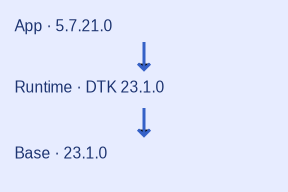
The complete calculator example above contains three different identities. Its application version is not the Base version, and a package’s display name is not a Runtime identifier. Use this review before adapting the recipe; it does not install or build anything.
- Record the document revision. This exercise uses upstream commit
ed888bbe8007a40bbd056d534b75b2039335df42, also used for this documentation edition. Keep the complete source recipe and its licence with your notes. - Read
package: identifierorg.deepin.calculator, version5.7.21.0, kindapp. This describes the application artifact; it does not request a Base numbered 5.7.21.0. - Read the two dependency lines separately:
runtime: org.deepin.runtime.dtk/23.1.0andbase: org.deepin.base/23.1.0. In this example DTK supplies framework support and the Base supplies the fundamental environment. - Compare that pair with the Base/Runtime reference from the same edition. Its table pairs DTK 23.1.0 with Base 23.1.0, but marks that Base unsupported; it lists 25.2.2 as maintained. This is a statement about that versioned document, not a live repository or installation check.
- Keep the old example intact when explaining it. A new adaptation needs its own compatible Base/Runtime pair, architecture check, source revisions and build verification. Changing only the Base to 25.2.2 does not establish compatibility with the old Runtime or calculator sources.
Completed review: application = calculator 5.7.21.0; framework = DTK 23.1.0; foundation = Base 23.1.0; documented pair = matched in the pinned table; current-installation recommendation = no; migration/build result = not tested. The source recipe pins calculator commit d7e207b4a71bbd97f7d818de5044228c1a6e2c92 and dde-qt-dbus-factory commit d952e1913172c5507af080f644a654f9ba5fed95. A familiar package name alone does not identify those inputs.
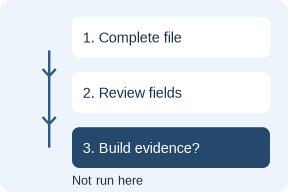
Review card: document commit ___; application ID/version/kind ___; Runtime ID/version or explicitly absent ___; Base ID/version ___; exact compatibility-table entry ___; architecture evidence ___; source commits ___; unsupported or unresolved condition ___; build/run evidence or “not tested” ___. If the Runtime is omitted in another recipe, record that fact rather than inventing a missing DTK dependency. The upstream guide permits an application without a Runtime.