On this page
Finally, I would like to share the real experience video of running Linyaps on Kylin V10 SP1. Welcome to like and follow~~https://www.bilibili.com/video/BV1ffgVz1EWAfter recently changing the main system to Kylin, “It is difficult to find applications and even harder to install them” has become a daily pain point - either there are few adapted versions, or there are a lot of dependency errors when installing, and it may not work after a long time. Until we meet by chance Linyaps , these hurdles have been slowly smoothed out. Share your real experience and avoid pitfalls for friends who also use Kylin~
1. First understand: What are Linyaps?
Simply put, it is Application ecosystem across Linux distributions : Whether you use Kylin, Ubuntu, Fedora, or Arch, you can use it to uniformly install and run applications, completely getting rid of the nightmare of "system adaptation" and "dependency conflicts". For ordinary users, this is simply a "hands-free" existence.
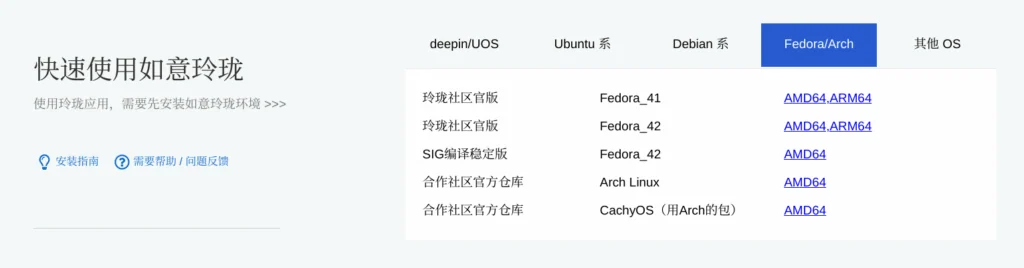
2. Installation: Just unzip the Deb package, but don’t ignore key settings
▶ Installation steps (taking Kylin as an example):
- Download environment package : Go to the Linyaps community and find the corresponding Kylin Installation package ;
- Unzip and install : Extract the downloaded package and execute
sudo dpkg, or directly double-click the graphical installation (the system will automatically handle dependencies).
▶ The must-step "startup pit": the restrictions of the security center!
When launching the application for the first time after installation, I directly encountered "Startup failed" —— After a long time of troubleshooting, I discovered: Kylin Security Center’s “Application Protection” blocks Linyaps applications by default ! Must be adjusted according to the following steps (corresponding to the screenshot, all set to "off"):
- Open "Security Center" → click "Application Protection" on the left;
- Put these four items Set all to "Off" :
- Application source checking (allow installation from any source);
- Application access control (allow any application to access private resources);
- Application execution control (allow execution of any application);
- Apply protection controls (turn off real-time protection).
After adjustment, it can start normally~ Although the security restrictions are temporarily turned off, Linyaps is essentially a container and will not damage the system. It is said to be very safe. It is very safe to use.
3. Core surprise: more “smart” dependency processing and lighter running experience than Flatpak
Friends who have used Flatpak know that it can solve dependency problems, but Large package size and slow startup . And Linyaps has achieved "better than blue" in this regard:
- Dependency "Package without fighting" : It packages the application and necessary dependencies together, but through optimization, the package size is smaller, and it can also "coexist peacefully" with the existing libraries of the system - no more crashes due to "dependency version conflicts"!
- Run more lightweight : Comparing Flatpak, Linyaps application Faster startup and lower memory usage . For example, the Flatpak version of my commonly used markdown editor takes 3 seconds to start, but the Linyaps version starts in almost a second. The experience is completely different.
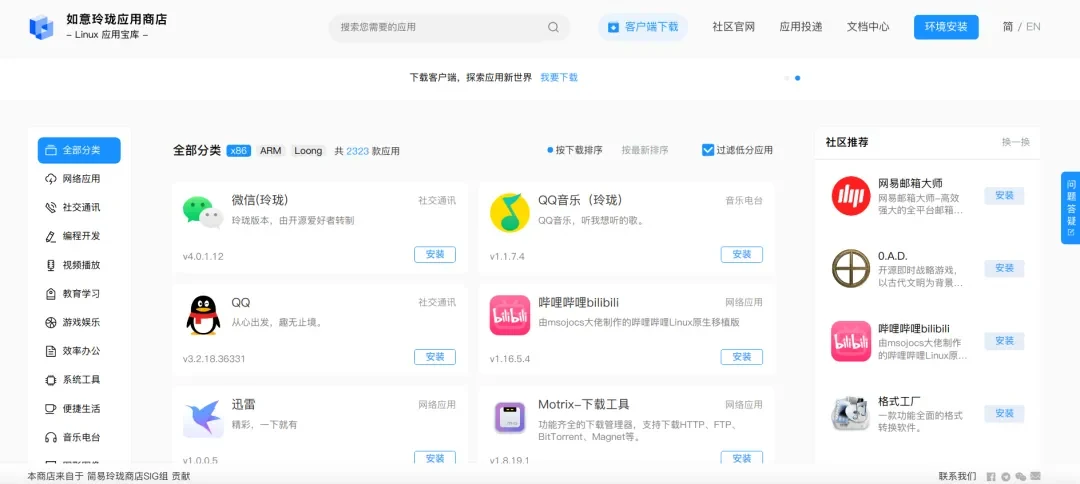
- Moreover, application installation is very convenient. The Linyaps community officially has a web version store:
4. Practical suggestions for Kylin users
If you are also tortured by "difficulty installing applications and dependency conflicts", try Linyaps:
✅ Easy to install : The Deb package can be decompressed and used immediately, follow the documentation and avoid any pitfalls;
✅ Security restrictions must be turned off : Follow the steps to turn off the application protection of the security center (otherwise it cannot be started);
✅ Ecology is growing : Currently there are 5000+ applications, basically covering office and entertainment scenarios;
✅ Technology is more considerate : Dependency handling and performance optimization are more friendly and easier to use than Flatpak.
Finally, I would like to share the real experience video of running Linyaps on Kylin V10 SP1. Welcome to like and follow~~
https://www.bilibili.com/video/BV1ffgVz1EW
English edition: Linglong · 18 October 2026. Original publication: 2025-07-22.