On this page
ll-killer-go – ll-killer-goPrefaceProject IntroductionTable of contentsCommand OverviewQuick packaging tutorialAdvanced usageEndingThis article is reproduced from community contributor System233 and the project linglong-killer-self-service , Original link>>>
ll-killer-go – ll-killer-go
Preface
This project is Linglong Killer Self-Service (ll-killer Linyaps killer) A reconstructed version of the Go language that re-implements the shell script in the original build phase in Go to more reliably Local offline operation and added many enhancements.
Project home page: https://github.com/System233/ll-killer-go
What is ll-killer-go?
- ll-killer-go is a Run locally is a single-file command line tool. Its predecessor is the core dependency in the online packaging service and is used to Redefine the root file system 。
- ll-killer-go Essentially reimplemented "containers" so that root filesystems can be redefined within Linyaps containers without Not limited by Linyaps 。
- ll-killer-go is a set of Linyaps application building solutions that provide common functional requirements in packaging, such as apt/deb Package installation, Ghost dependency / Missing library search and completion, Icon/Shortcut Path fix, Reentrant build environment, Free The root file system of .
This article mainly includes ll-killer-go A brief introduction and an Ubuntu source GIMP Application migration example tutorial.
Project Introduction
ll-killer-go It is a command line tool specially designed to solve Linyaps container application building problems. It helps developers quickly create, build and generate Linyaps container application projects, while providing a complete set of auxiliary building and debugging functions. Using this tool, users can get the same benefits in Linyaps containers as traditional containers such as docker )-like build experience, including support for privileged commands and apt Installation and other functions eliminate the need to manually decompress software packages (such as deb ) and fix the cumbersome operation of searching paths for dependent libraries. ll-killer-go By rebuilding a free container environment, the consistency and reliability of the build process are ensured, which greatly improves development efficiency and maintainability.
Features
- Isolated APT environments : You can create a project-independent apt environment that does not interfere with the host and other projects, making it easy to find packages and dependencies.
- Reentrant build environment : Avoid clearing the file system every time you enter the build environment. You can repeatedly enter the build environment to adjust. Until you are satisfied 。
- rootless permissions : You can build the environment with Virtual root identity Execute privileged commands (such as
apt install), but there is no need to worry about safety issues. - Free container environment : In the build environment you can Freely modify any position , providing flexible operating space for easy debugging and adjustment.
- Automatically repair icons and shortcuts :
build-auxto automatically handle icons/shortcuts and relative directory symlinks OpenAtom-Linyaps/linyaps#1039 Question. - Automatically fix ghost dependencies and missing libraries : Provided via build-aux
ldd-check/ldd-searchA checking tool that can automatically scan for missing runtime library files, find the package name and install it to ensure that the application can run normally. - Support host device files : The host is mounted by default
Part of
/devdevice file, which can access the device directly in the container environment (this behavior is as canceled in Free container environment can be seen inentrypoint.sh).
Architecture support
- amd64/x86_64
- arm64/aarch64
- loong64
- Other architectures can compile themselves, but not
ptracefeature support.
Table of contents
- Command Overview
- Quick packaging tutorial
- 1. Obtain and configure
ll-killer- Global installation
ll-killer(optional)
- Global installation
- 2. Start packaging the GIMP sample application
- Create working directory
- Configuring software sources
- Create linglong.yaml project file
- Enter the build environment and install the package using APT
- Check and fix ghost dependencies
- Export layer file
- Test build results
- Install build results
- Command summary
- 1. Obtain and configure
- Advanced usage
- 1. Customize the root file system and mount mode
- 2. Root file system mount mode
fuse-overlayfsModemergemode (default fallback)- Mode comparison
- 3. Use ll-killer to assist in processing deb dependencies but not installing them
- 4. Use ll-killer to assist in processing ghost dependencies
- Ending
Command Overview
ll-killer-go provides some core commands to help build and manage Linyaps container applications:
apt: Enter an isolated APT environment.build: Build or enter the build environment.exec: Enter the runtime environment.run: Start the container and execute the application.commit: Submit build content to Linyaps container.clean: Clear build content.build-aux: Create auxiliary build scripts.ptrace: Fix system call (currently only supportschowncall).script: Execute a custom build process.help: Display help information.
Tips: Each subcommand of ll-killer has built-in detailed help information, which is recommended.
Quick packaging tutorial
This chapter will show how to use ll-killer Quick packaging Ubuntu Source GIMP software package, I hope it can be combined with actual cases to let everyone understand more intuitively ll-killer Packaging process.
The entire process does not require configuring environment variables of library files or patching library files, everything is left to the package manager. []~( ̄▽ ̄)~ *
Tips: This tutorial uses by default merge mode to mount the root file system, which will significantly increase the startup time in the case of serious file conflicts. If you want better performance, please continue to check after completing this tutorial. Advanced usage Chapter.
1. Obtain and configure ll-killer
First, make sure the system has the necessary dependencies installed:
sudo apt install apt-file fuse-overlayfs Then, download the latest version of ll-killer and grant execution permissions (currently the latest is v1.1.1):
wget https://github.com/System233/ll-killer-go/releases/latest/download/ll-killer-amd64 -O ll-killer
chmod +x ll-killer
The above script downloads amd64 Architecture, ll-killer-go also supports arm64 and loong64 Schema, you can modify the link in amd64 To other versions, or enter the project Releases Page manual download.
If the link above does not work, you can search online github release download acceleration , then paste the link in to speed up downloading, and then put the file into the corresponding location.
⚠Warning: When accelerating downloads from third-party addresses, pay attention to the security of the files. Releases The page provides the SHA1 check code of each file, which must be used after the file is downloaded. sha1sum Verify file integrity.
Global installation ll-killer (optional)
For convenience of use, you can ll-killer Install to ~/.local/bin:
mkdir -p ~/.local/bin
mv ll-killer ~/.local/bin
ll-killer -v
If ~/.local/bin not added to PATH , or it prompts that the ll-killer command cannot be found, please execute:
echo 'export PATH=$HOME/.local/bin:$PATH' >>~/.bashrc
source ~/.bashrc
2. Start packaging the GIMP sample application
The next steps are by default ll-killer Installed globally (added PATH environment variables).
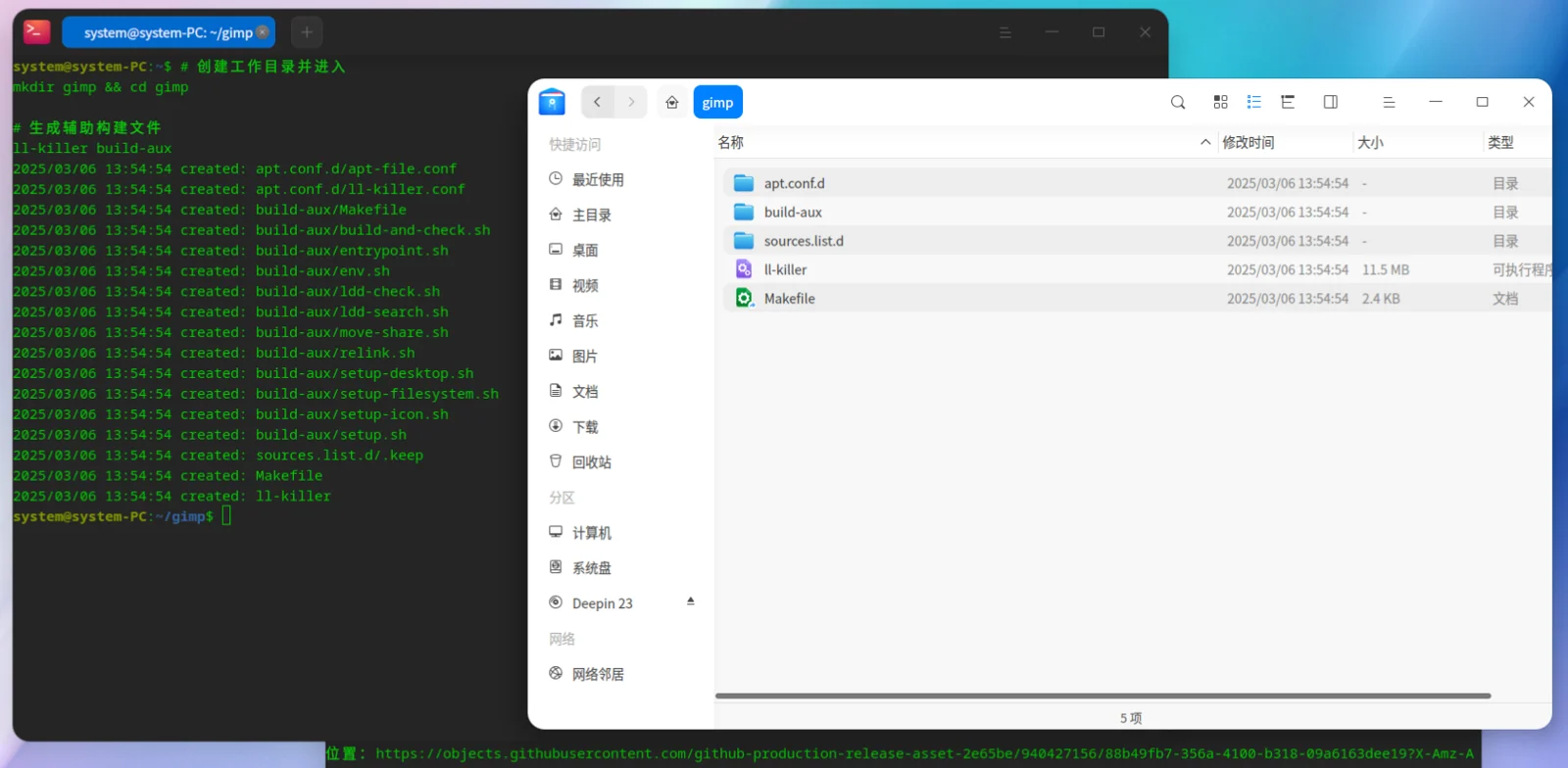
Create working directory
This folder will be used as the Linyaps project folder.
# 创建工作目录并进入
mkdir gimp && cd gimp

# 生成辅助构建文件
ll-killer build-aux
Configuring software sources
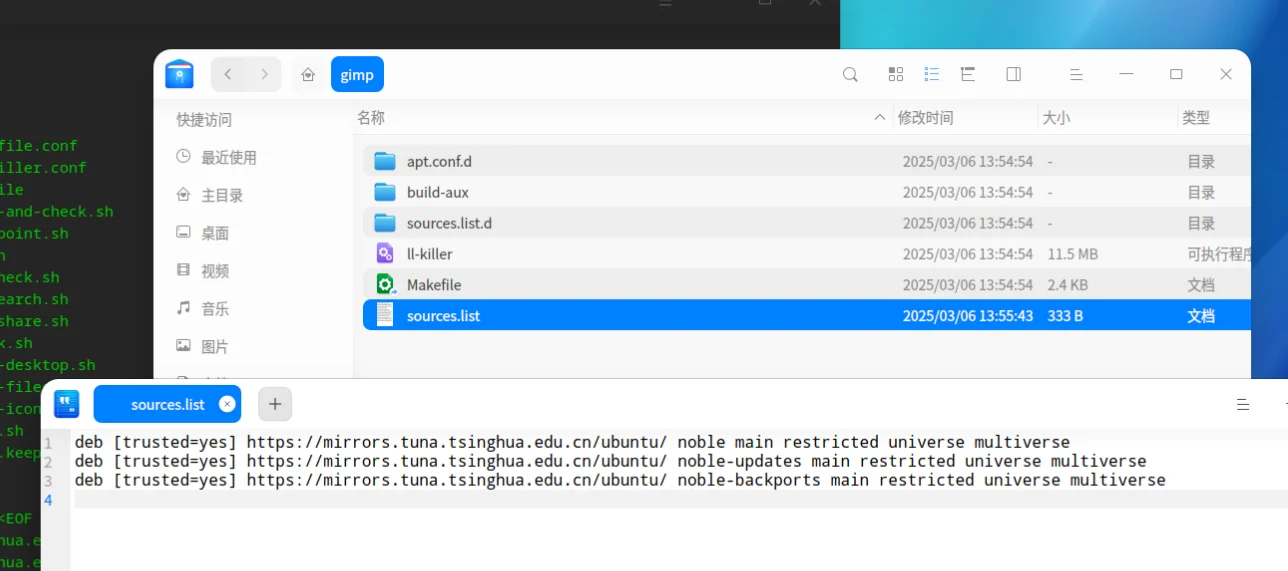
Create sources.list and populate the software sources of Ubuntu 24.04 noble (you can also use Notepad to create this file):
cat >sources.list <<EOF
deb [trusted=yes] https://mirrors.tuna.tsinghua.edu.cn/ubuntu/ noble main restricted universe multiverse
deb [trusted=yes] https://mirrors.tuna.tsinghua.edu.cn/ubuntu/ noble-updates main restricted universe multiverse
deb [trusted=yes] https://mirrors.tuna.tsinghua.edu.cn/ubuntu/ noble-backports main restricted universe multiverse
EOF
Create linglong.yaml project file
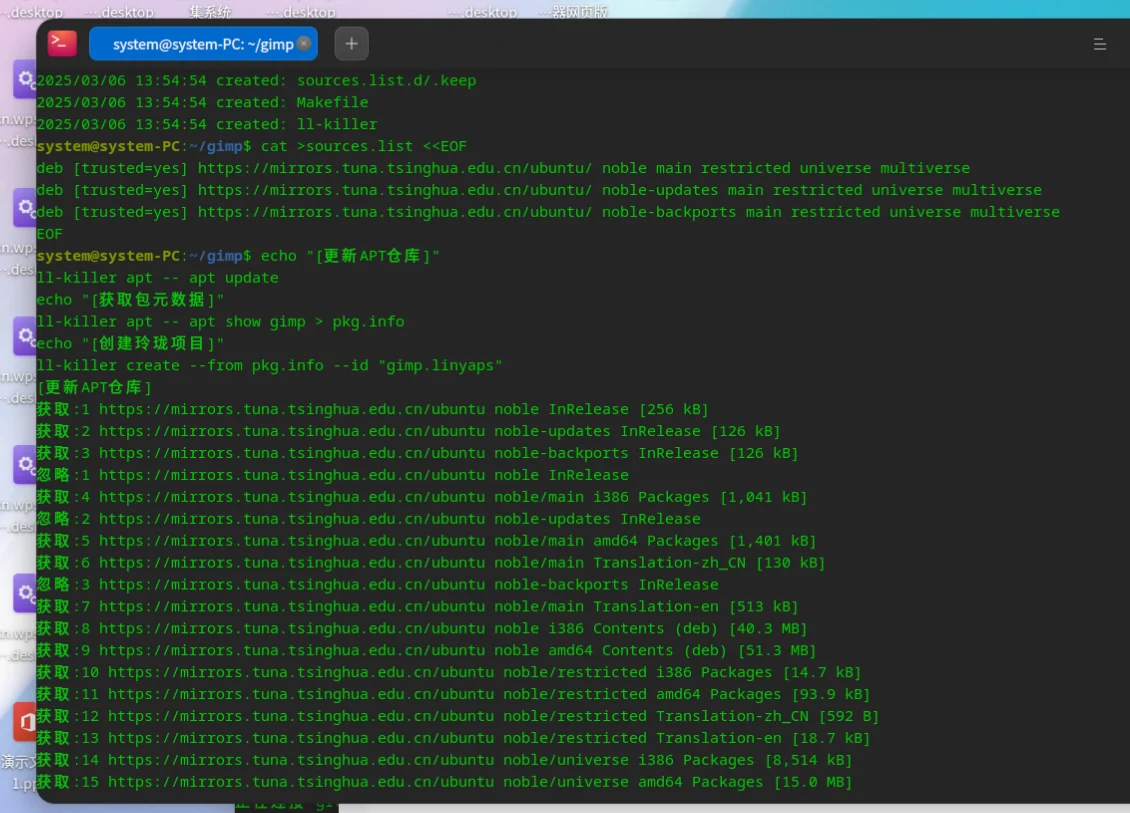
This step will gimp Package metadata output to pkg.info , and then ll-killer Create a project through metadata and specify the package name gimp.linyaps。
echo "[更新APT仓库]"
ll-killer apt -- apt update
echo "[获取包元数据]"
ll-killer apt -- apt show gimp > pkg.info
echo "[创建玲珑项目]"
ll-killer create --from pkg.info --id "gimp.linyaps"
- Run output
system@system-PC:~/gimp$ echo "[更新APT仓库]"
ll-killer apt -- apt update
echo "[获取包元数据]"
ll-killer apt -- apt show gimp > pkg.info
echo "[创建玲珑项目]"
ll-killer create --from pkg.info --id "gimp.linyaps"
[更新APT仓库]
获取:1 https://mirrors.tuna.tsinghua.edu.cn/ubuntu noble InRelease [256 kB]
获取:2 https://mirrors.tuna.tsinghua.edu.cn/ubuntu noble-updates InRelease [126 kB]
获取:3 https://mirrors.tuna.tsinghua.edu.cn/ubuntu noble-backports InRelease [126 kB]
忽略:1 https://mirrors.tuna.tsinghua.edu.cn/ubuntu noble InRelease
获取:4 https://mirrors.tuna.tsinghua.edu.cn/ubuntu noble/main i386 Packages [1,041 kB]
忽略:2 https://mirrors.tuna.tsinghua.edu.cn/ubuntu noble-updates InRelease
获取:5 https://mirrors.tuna.tsinghua.edu.cn/ubuntu noble/main amd64 Packages [1,401 kB]
获取:6 https://mirrors.tuna.tsinghua.edu.cn/ubuntu noble/main Translation-zh_CN [130 kB]
忽略:3 https://mirrors.tuna.tsinghua.edu.cn/ubuntu noble-backports InRelease
获取:7 https://mirrors.tuna.tsinghua.edu.cn/ubuntu noble/main Translation-en [513 kB]
获取:8 https://mirrors.tuna.tsinghua.edu.cn/ubuntu noble i386 Contents (deb) [40.3 MB]
获取:9 https://mirrors.tuna.tsinghua.edu.cn/ubuntu noble amd64 Contents (deb) [51.3 MB]
获取:10 https://mirrors.tuna.tsinghua.edu.cn/ubuntu noble/restricted i386 Packages [14.7 kB]
获取:11 https://mirrors.tuna.tsinghua.edu.cn/ubuntu noble/restricted amd64 Packages [93.9 kB]
获取:12 https://mirrors.tuna.tsinghua.edu.cn/ubuntu noble/restricted Translation-zh_CN [592 B]
获取:13 https://mirrors.tuna.tsinghua.edu.cn/ubuntu noble/restricted Translation-en [18.7 kB]
获取:14 https://mirrors.tuna.tsinghua.edu.cn/ubuntu noble/universe i386 Packages [8,514 kB]
获取:15 https://mirrors.tuna.tsinghua.edu.cn/ubuntu noble/universe amd64 Packages [15.0 MB]
获取:16 https://mirrors.tuna.tsinghua.edu.cn/ubuntu noble/universe Translation-en [5,982 kB]
获取:17 https://mirrors.tuna.tsinghua.edu.cn/ubuntu noble/universe Translation-zh_CN [574 kB]
获取:18 https://mirrors.tuna.tsinghua.edu.cn/ubuntu noble/multiverse i386 Packages [126 kB]
获取:19 https://mirrors.tuna.tsinghua.edu.cn/ubuntu noble/multiverse amd64 Packages [269 kB]
获取:20 https://mirrors.tuna.tsinghua.edu.cn/ubuntu noble/multiverse Translation-zh_CN [4,640 B]
获取:21 https://mirrors.tuna.tsinghua.edu.cn/ubuntu noble/multiverse Translation-en [118 kB]
获取:22 https://mirrors.tuna.tsinghua.edu.cn/ubuntu noble-updates/main amd64 Packages [914 kB]
获取:23 https://mirrors.tuna.tsinghua.edu.cn/ubuntu noble-updates/main i386 Packages [435 kB]
获取:24 https://mirrors.tuna.tsinghua.edu.cn/ubuntu noble-updates/main Translation-en [206 kB]
获取:25 https://mirrors.tuna.tsinghua.edu.cn/ubuntu noble-updates i386 Contents (deb) [22.6 MB]
获取:26 https://mirrors.tuna.tsinghua.edu.cn/ubuntu noble-updates amd64 Contents (deb) [46.4 MB]
获取:27 https://mirrors.tuna.tsinghua.edu.cn/ubuntu noble-updates/restricted amd64 Packages [724 kB]
获取:28 https://mirrors.tuna.tsinghua.edu.cn/ubuntu noble-updates/restricted i386 Packages [14.3 kB]
获取:29 https://mirrors.tuna.tsinghua.edu.cn/ubuntu noble-updates/restricted Translation-en [144 kB]
获取:30 https://mirrors.tuna.tsinghua.edu.cn/ubuntu noble-updates/universe i386 Packages [627 kB]
获取:31 https://mirrors.tuna.tsinghua.edu.cn/ubuntu noble-updates/universe amd64 Packages [1,036 kB]
获取:32 https://mirrors.tuna.tsinghua.edu.cn/ubuntu noble-updates/universe Translation-en [259 kB]
获取:33 https://mirrors.tuna.tsinghua.edu.cn/ubuntu noble-updates/multiverse i386 Packages [3,484 B]
获取:34 https://mirrors.tuna.tsinghua.edu.cn/ubuntu noble-updates/multiverse amd64 Packages [23.4 kB]
获取:35 https://mirrors.tuna.tsinghua.edu.cn/ubuntu noble-updates/multiverse Translation-en [5,308 B]
获取:36 https://mirrors.tuna.tsinghua.edu.cn/ubuntu noble-backports i386 Contents (deb) [19.9 kB]
获取:37 https://mirrors.tuna.tsinghua.edu.cn/ubuntu noble-backports amd64 Contents (deb) [35.9 kB]
获取:38 https://mirrors.tuna.tsinghua.edu.cn/ubuntu noble-backports/universe i386 Packages [8,976 B]
获取:39 https://mirrors.tuna.tsinghua.edu.cn/ubuntu noble-backports/universe amd64 Packages [14.2 kB]
获取:40 https://mirrors.tuna.tsinghua.edu.cn/ubuntu noble-backports/universe Translation-en [12.1 kB]
已下载 199 MB,耗时 25秒 (7,961 kB/s)
正在读取软件包列表... 完成
正在分析软件包的依赖关系树... 完成
有 1646 个软件包可以升级。请执行 ‘apt list --upgradable’ 来查看它们。
W: GPG 错误:https://mirrors.tuna.tsinghua.edu.cn/ubuntu noble InRelease: 由于没有公钥,无法验证下列签名: NO_PUBKEY 871920D1991BC93C
W: GPG 错误:https://mirrors.tuna.tsinghua.edu.cn/ubuntu noble-updates InRelease: 由于没有公钥,无法验证下列签名: NO_PUBKEY 871920D1991BC93C
W: GPG 错误:https://mirrors.tuna.tsinghua.edu.cn/ubuntu noble-backports InRelease: 由于没有公钥,无法验证下列签名: NO_PUBKEY 871920D1991BC93C
[获取包元数据]

WARNING: apt does not have a stable CLI interface. Use with caution in scripts.

[创建玲珑项目]
2025/03/06 13:57:16 skip: apt.conf.d/apt-file.conf
2025/03/06 13:57:16 skip: apt.conf.d/ll-killer.conf
2025/03/06 13:57:16 skip: build-aux/Makefile
2025/03/06 13:57:16 skip: build-aux/build-and-check.sh
2025/03/06 13:57:16 skip: build-aux/entrypoint.sh
2025/03/06 13:57:16 skip: build-aux/env.sh
2025/03/06 13:57:16 skip: build-aux/ldd-check.sh
2025/03/06 13:57:16 skip: build-aux/ldd-search.sh
2025/03/06 13:57:16 skip: build-aux/move-share.sh
2025/03/06 13:57:16 skip: build-aux/relink.sh
2025/03/06 13:57:16 skip: build-aux/setup-desktop.sh
2025/03/06 13:57:16 skip: build-aux/setup-filesystem.sh
2025/03/06 13:57:16 skip: build-aux/setup-icon.sh
2025/03/06 13:57:16 skip: build-aux/setup.sh
2025/03/06 13:57:16 skip: sources.list.d/.keep
2025/03/06 13:57:16 skip: Makefile
2025/03/06 13:57:16 skip: ll-killer
2025/03/06 13:57:16 skip:  sources.list
2025/03/06 13:57:16 created: linglong.yaml
[Build Target]
  gimp.linyaps
[Project Info]
  Package Name: gimp
  Version: 2.10.3812.0
  Package Type: app
  Build Arch: x86_64
[Current Repo]
  Name: stable
  Url: https://mirror-repo-linglong.deepin.com
[Processing Dependency]
  Package                  Version        Module         Status
  org.deepin.base          23.1.0.3       binary         complete
  org.deepin.base          23.1.0.3       develop        complete
[Start Build]
[Install Files]
  Package          Version        Module         Status
  gimp.linyaps     2.10.3812.0    develop        complete
  gimp.linyaps     2.10.3812.0    binary         complete

[Commit Contents]
  Package          Version        Module         Status
  gimp.linyaps     2.10.3812.0    binary         complete
  gimp.linyaps     2.10.3812.0    develop        complete
Successfully build gimp.linyaps
Enter the build environment and install the package using APT
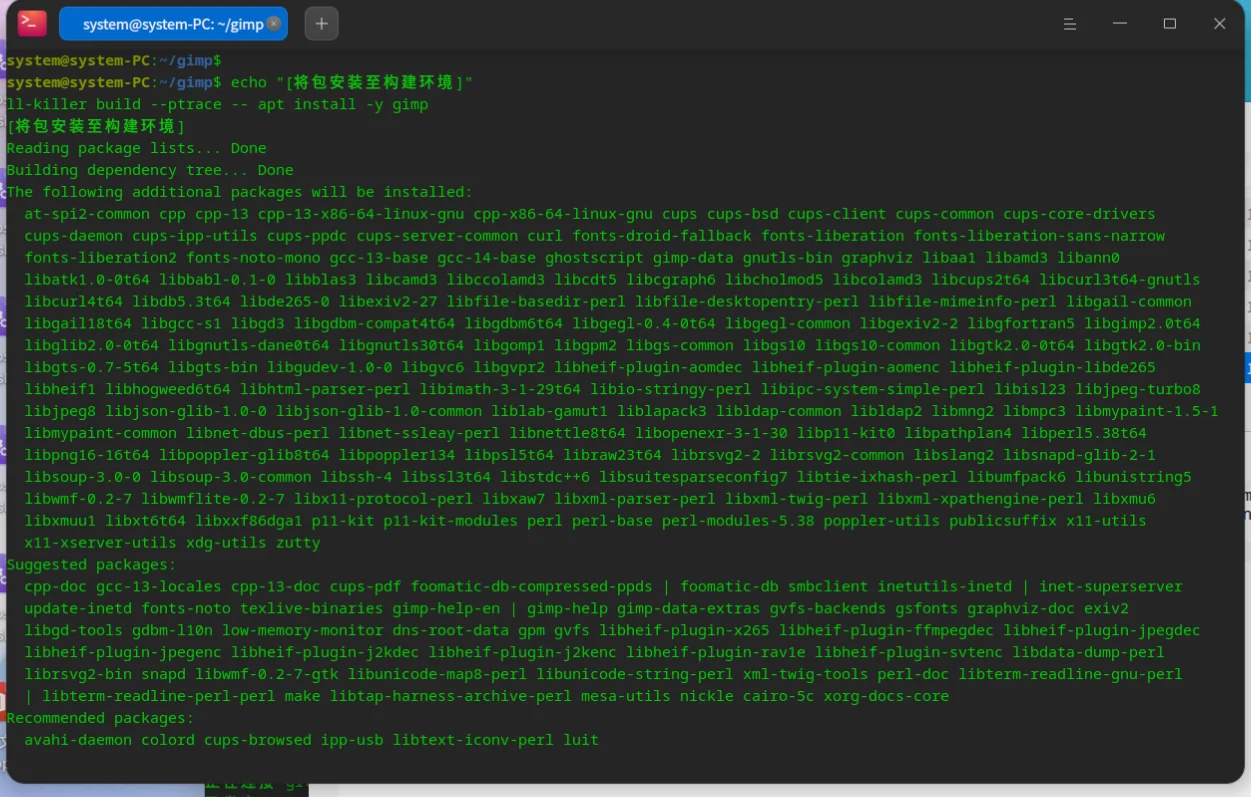
Use ll-killer build command to enter the Rootless build environment (virtual root identity), where --ptrace Parameters can solve the file ownership problem that occurs when Rootless installs deb packages.
echo "[将包安装至构建环境]"
ll-killer build --ptrace -- apt install -y gimp
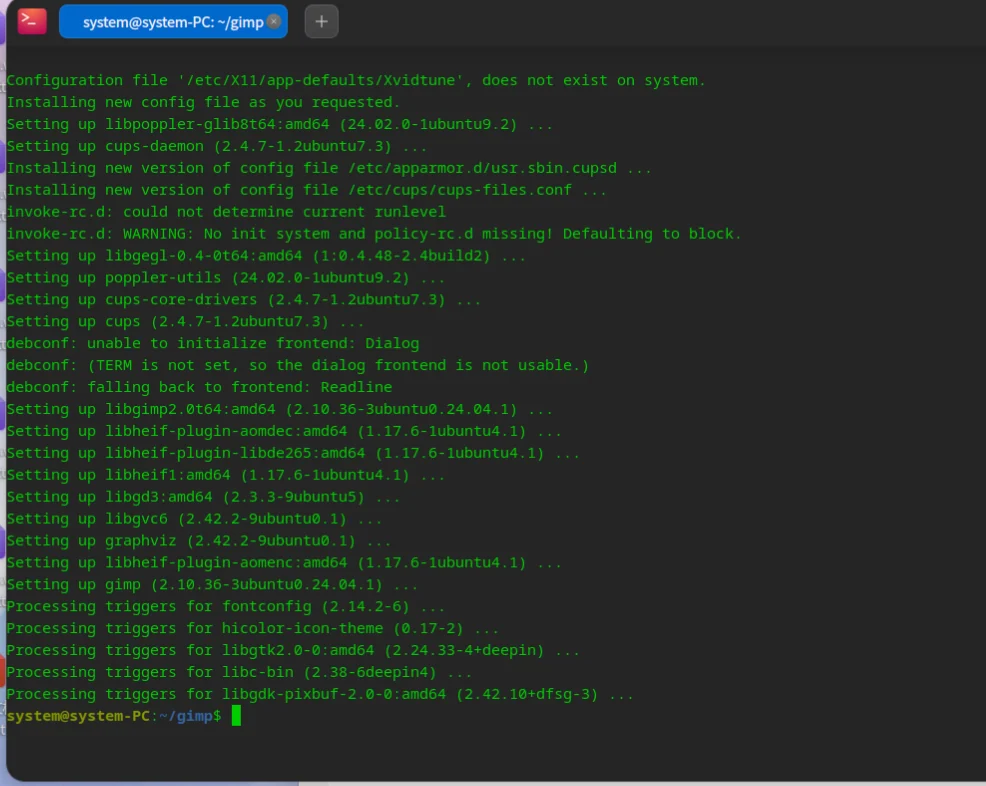
IMPORTANT NOTE:
- Use directly
ll-killer build --ptrace -- bashCan enter interactive shell environment. - can pass
ll-killer buildThe command repeatedly enters the build environment and does not behave likell-builder buildThat way the environment is reset every time it is run. ll-killer buildcommand enabled by default--strictStrict mode ensures that the build environment and runtime environment are completely consistent and will not appear The issue of build dependencies was introduced inll-builder build. Build dependencies belong to Ghost dependency , will disappear at runtime, so it is necessary to eliminate the hidden danger.
Check and fix ghost dependencies
This script performs the following steps:
- This script calls build-aux in
ldd-check.shTool to check for missing dependencies in the environment, missing file names are output toldd-check.log。 - call
ldd-search.shTool lookup files listed inldd-check.logand writes the found packages toldd-found.log, files still not found are output to The build container forldd-notfound.log。 - Install found libraries.
echo "[检查缺失库]"
ll-killer build -- build-aux/ldd-check.sh > ldd-check.log
echo "[搜索缺失库所在包]"
ll-killer apt -- build-aux/ldd-search.sh ldd-check.log ldd-found.log ldd-notfound.log;
echo "[安装找到的缺失库]"
ll-killer build --ptrace -- apt install -y $(cat ldd-found.log)
- Run output. Since there are no missing libraries here, no packages are newly installed.
system@system-PC:~/gimp$ echo "[检查缺失库]"
ll-killer build -- build-aux/ldd-check.sh > ldd-check.log
echo "[搜索缺失库所在包]"
ll-killer apt -- build-aux/ldd-search.sh ldd-check.log ldd-found.log ldd-notfound.log;
echo "[安装找到的缺失库]"
ll-killer build --ptrace -- apt install -y $(cat ldd-found.log)
[检查缺失库]
[搜索缺失库所在包]
[安装找到的缺失库]
Reading package lists... Done
Building dependency tree... Done
Reading state information... Done
0 upgraded, 0 newly installed, 0 to remove and 419 not upgraded.
system@system-PC:~/gimp$ cat ldd-found.log
Export layer file
Import files ll-builder also uses --skip-output-check Skip ll-builder Built-in ldd check, use --skip-strip-symbols Skip binary strip , and finally export the layer file.
- The ll-killer file system is independent of ll-builder, so if you need to export the layer file, you need to import the file into the container environment (ostree), and then ll-builder exports the layer file. Theoretically, ll-builder can generate layers without importing ostree, and can also avoid errors caused by copying logic. OpenAtom-Linyaps/linyaps#1039 。
echo "[提交文件到容器中]"
ll-killer commit -- --skip-output-check --skip-strip-symbols
echo "[导出layer文件]"
ll-killer export -- --layer
- Run output
system@system-PC:~/gimp$ echo "[提交文件到容器中]"
ll-killer commit -- --skip-output-check --skip-strip-symbols
echo "[导出layer文件]"
ll-killer export -- --layer
[提交文件到容器中]
[Build Target]
  gimp.linyaps
[Project Info]
  Package Name: gimp
  Version: 2.10.3812.0
  Package Type: app
  Build Arch: x86_64
[Current Repo]
  Name: stable
  Url: https://mirror-repo-linglong.deepin.com
[Processing Dependency]
  Package                  Version        Module         Status
  org.deepin.base          23.1.0.3       binary         complete
  org.deepin.base          23.1.0.3       develop        complete
[Start Build]
[准备文件系统]
mkdir: 无法创建目录 "/opt/apps/gimp.linyaps/files/share": 文件已存在
[复制必要文件]
'/home/system/.local/bin/ll-killer' -> '/opt/apps/gimp.linyaps/files/ll-killer'
'build-aux/entrypoint.sh' -> '/opt/apps/gimp.linyaps/files/entrypoint.sh'
[调整文件布局]
mv: 对 '/opt/apps/gimp.linyaps/files/usr/share' 调用 stat 失败: 没有那个文件或目录
[合并share目录]
find: ‘/opt/apps/gimp.linyaps/files/opt/apps/’: 没有那个文件或目录
[修正符号链接]
[配置快捷方式]
/opt/apps/gimp.linyaps/files/share/applications/gimp.desktop
/opt/apps/gimp.linyaps/files/share/applications/zutty.desktop
[Install Files]
  Package          Version        Module         Status
  gimp.linyaps     2.10.3812.0    develop        complete
  gimp.linyaps     2.10.3812.0    binary         complete

[Commit Contents]
  Package          Version        Module         Status
  gimp.linyaps     2.10.3812.0    binary         complete
  gimp.linyaps     2.10.3812.0    develop        complete
Successfully build gimp.linyaps
[导出layer文件]
system@system-PC:~/gimp$
After this step is completed, two final .layer file, just keep *_binary.layer。
Tips
ll-killer commitThe command is Alias forll-builder build.ll-killer exportThe command is Alias forll-builder export.--Pass after double horizontal line Parameters ofll-builder.
Test build results
This command enters the shell of the container environment. Please use the Exec command in the desktop to test the program.
# 等价于ll-builder run
ll-killer run
To enter the original Linyaps container environment, please run:
# 等价于ll-builder run --exec bash
ll-killer run -- --exec bash
- Operation results
system@system-PC:~/gimp$
dircolors: no SHELL environment variable, and no shell type option given
system@system-PC:/run/host/rootfs/home/system/gimp$ /opt/apps/gimp.linyaps/files/
entrypoint.sh  etc/           ll-killer      share/         usr/           var/
system@system-PC:/run/host/rootfs/home/system/gimp$ /opt/apps/gimp.linyaps/files/^C
system@system-PC:/run/host/rootfs/home/system/gimp$ ls /
bin   dev            etc   lib    ll-killer  mnt  packages.list  root  runtime  share  sys  usr
boot  entrypoint.sh  home  lib64  media      opt  proc           run   sbin     srv    tmp  var
system@system-PC:/run/host/rootfs/home/system/gimp$ /bin/gi
giftopnm                 gimp-2.10                gimp-console-2.10        gio
gimp                     gimp-console             gimp-test-clipboard-2.0  gio-querymodules
system@system-PC:/run/host/rootfs/home/system/gimp$ /bin/gimp
You can see that there are ll-killer and entrypoint.sh file, and a gimp file appears in the bin directory. We run the gimp command:
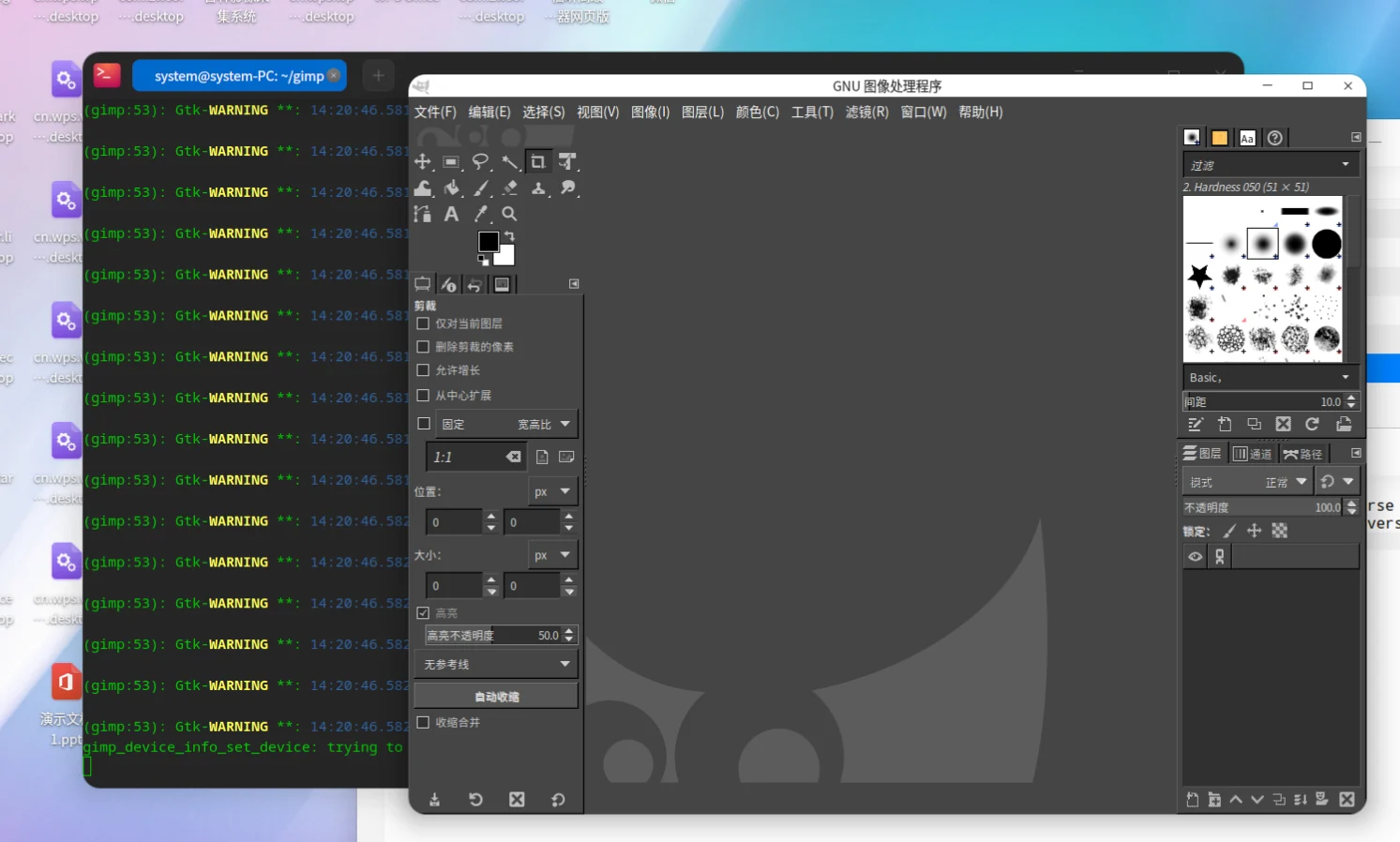
It can be seen that it is running normally and can be easily killed in seconds.
Tips
- Applications created by ll-killer are executed by default
/opt/apps/APPID/files/entrypoint.shentry point, soll-killer run/ll-builder run/ll-cli runSpecific applications will not be started. The specific application startup is specified by the Exec command in the desktop. ll-killer runThe command is Alias forll-builder run.--Pass after double horizontal line Parameters ofll-builder.
Install build results
# 玲珑 >= 1.7.x 版本需要 sudo 权限
ll-cli install *_binary.layer
- Operation results
system@system-PC:~/gimp$ sudo ll-cli install ./gimp.linyaps_2.10.3812.0_x86_64_binary.layer
请输入密码:
验证成功
(3531114) ./libs/linglong/src/linglong/cli/cli.cpp:764 install from file "/home/system/gimp/gimp.linyaps_2.10.3812.0_x86_64_binary.layer"
install layer successfully:100%
system@system-PC:~/gimp$
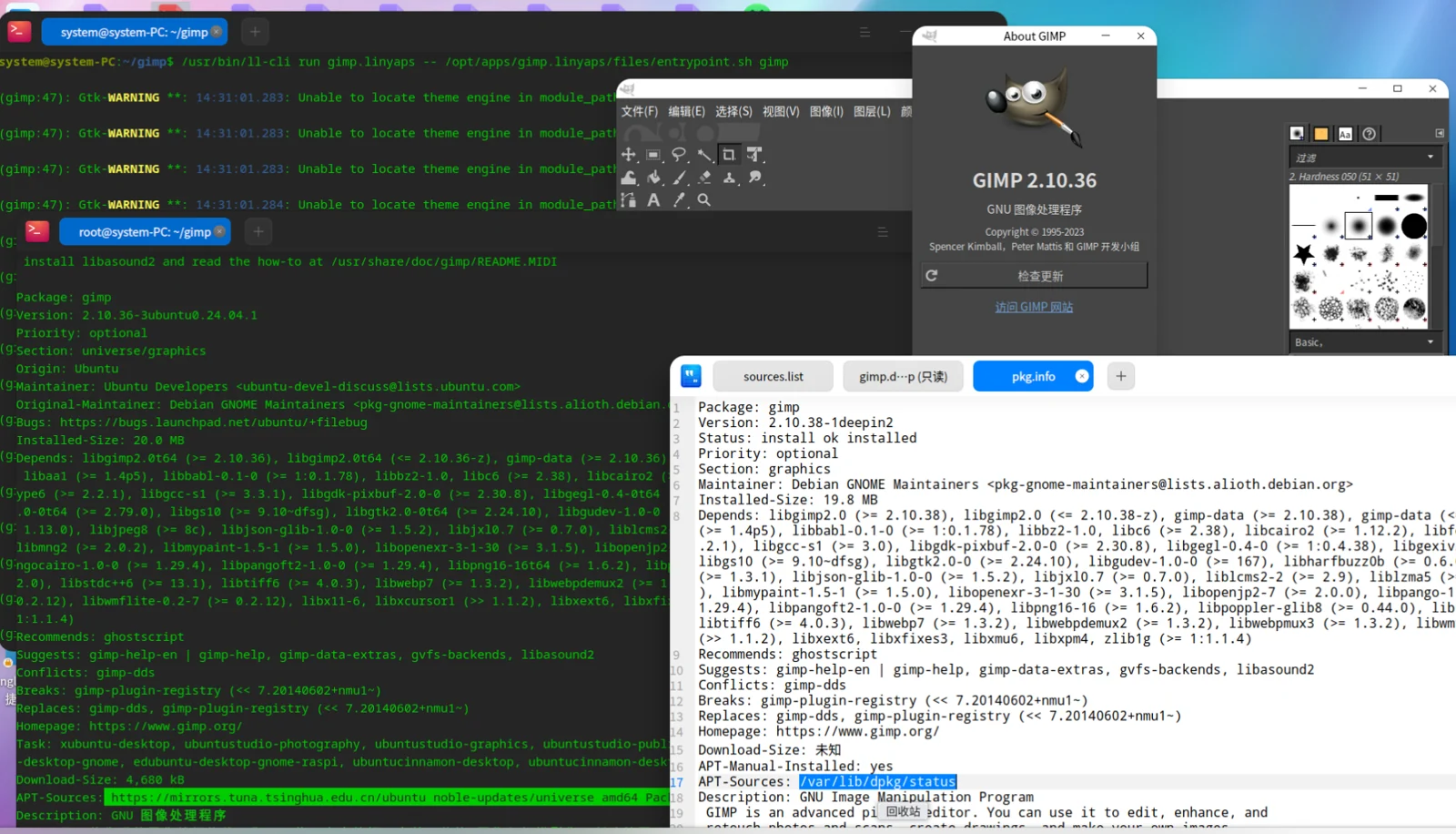
The program runs normally, but the About page shows 2.10.36, not the detected 2.10.38. This is because gimp is also installed on my host. The GIMP version in the deepin source is 2.10.38. When creating the project, a locally installed version was generated. 2.10.38 version pkg.info . But what we package is GIMP in the Ubuntu source, and the specified version is the Ubuntu source. The version inside is only updated to 2.10.36 , so actually packed 2.10.36 version. This issue only occurs when the app is also installed on the host computer.
- Tips : If you package GIMP in non-strict mode, some dependencies will be affected by
ll-builder buildThe environment is already installed but the installation is skipped (such aslibrsvg2-2), causing runtime Ghost dependency , causing the GIMP icon theme to not display properly. - Bug : There is also a design flaw in the Linux desktop environment or DDE encountered here. If there are multiple desktops with the same name in the XDG_DATA directory, only one of the desktop shortcuts will be displayed. Even if you rename the desktop of other software to the same name, double-clicking will not start the desktop you clicked, but will start the shortcut with the same name. Because GIMP is installed on the host here, when I install Linyaps' GIMP, the Linyaps' GIMP shortcut will not be displayed, and it looks like it was not installed successfully.
[BUG] The desktop file with the same name conflicts with the desktop file in /var/lib/linglong/entries/share/applications · Issue #704 · OpenAtom-Linyaps/linyaps
Command summary
The following script contains all commands in this chapter.
echo "[更新APT仓库]"
ll-killer apt -- apt update
echo "[获取包元数据]"
ll-killer apt -- apt show gimp > pkg.info
echo "[创建玲珑项目]"
ll-killer create --from pkg.info --id "gimp.linyaps"
echo "[将包安装至构建环境]"
ll-killer build --ptrace -- apt install -y gimp

## 可选 ldd检查开始
echo "[检查缺失库]"
ll-killer build -- build-aux/ldd-check.sh > ldd-check.log
echo "[搜索缺失库所在包]"
ll-killer apt -- build-aux/ldd-search.sh ldd-check.log ldd-found.log ldd-notfound.log;
echo "[安装找到的缺失库]"
ll-killer build -- apt install -y $(cat ldd-found.log)
## 可选 ldd检查结束

echo "[提交文件到容器中]"
ll-killer commit -- --skip-output-check --skip-strip-symbols
echo "[导出layer文件]"
ll-killer export -- --layer


# 玲珑 >= 1.7.x 版本需要 sudo 权限
echo "[安装layer文件]"
ll-cli install *_binary.layer
- Tip: The above commands have been encapsulated
Makefileif you wish to usemakeTo manage the build process, you can use the following command instead of all the above: The following code was observed in
# 先手动创建sources.list
# ...

# 创建 config.mk 配置文件
make config PKG="gimp" KILLER_CREATE_ARGS="--base org.deepin.base/23.1.0"
# 自动完成项目创建,安装,ldd检查和导出layer文件
make
Advanced usage
1. Customize the root file system and mount mode
You can build-aux/entrypoint.sh , which demonstrates
How the default root filesystem of ll-killer is built.
exec $APP_DIR/ll-killer exec \
    --mount "$APP_DIR/share:$APP_DIR/usr/share:rbind" \
    --mount "rootfs:/run/app.rootfs::tmpfs" \
    --mount "/+$APP_DIR:/run/app.rootfs::merge" \
    --mount "/run/host/rootfs/dev:/run/app.rootfs/dev:rbind" \
    --mount "/dev/pts:/run/app.rootfs/dev/pts:rbind" \
    --mount "/dev/shm:/run/app.rootfs/dev/shm:rbind" \
    --mount "/dev/mqueue:/run/app.rootfs/dev/mqueue:rbind" \
    --mount "/proc:/run/app.rootfs/proc:rbind" \
    --mount "/run:/run/app.rootfs/run:rbind" \
    --mount "/sys:/run/app.rootfs/sys:rbind" \
    --mount "/tmp:/run/app.rootfs/tmp:rbind" \
    --mount "/home:/run/app.rootfs/home:rbind" \
    --mount "/root:/run/app.rootfs/root:rbind" \
    --socket=/run/app.unix \
    --rootfs=/run/app.rootfs \
    --no-bind-rootfs \
    -- "$KILLER_ENTRYPOINT" "${@:-bash}"
--mount options support common mount flags and filesystem types, such as tmpfs/devpts/overlay etc., with additional support fuse-overlayfs and merge Mount mode.
You can System233/ll-killer-go#mount related functions .
Tips : ll-killer exec itself serves as a simplified version of the container that supports running independently without Linyaps and creates an independent file system, it just does not use file-based OCI Configuration to enhance command line calling capabilities.
2. Root file system mount mode
ll-killer Used by default at runtime fuse-overlayfs and merge Two mounting modes for mounting the root file system.
Without additional configuration, just use ** merge **Mode.
Please check the specific mounting rules. build-aux/entrypoint.sh Entry point file.
fuse-overlayfs Mode
- Need to ensure
fuse-overlayfsfor Static compilation may be able to run directly in containers. - needs to be
fuse-overlayfsBinaries copied tobuild-auxdirectory to enable. - Starts quickly, but requires host support
fuseKernel module.
merge mode (default mode)
- If
fuse-overlayfsIf it is unavailable or fails to run, it will automatically fall back tomergemode. Conflict situations in - It is necessary to calculate the merge directory. The more directory conflicts, the longer the merge time will be.
- has good compatibility and is used as a cover-up solution by default.
Mode comparison
| Mode | Startup speed | Dependencies fuse | Compatibility |
|---|---|---|---|
fuse-overlayfs | Fast | Yes | Low |
merge | Slow | No | High |
3. Use ll-killer to assist in processing deb dependencies but not installing them
The purpose of this case is to facilitate traditional manual packagers to search and process dependencies, and use the apt cache function to automatically download the packages that a certain package depends on in the base environment.
Since the operation is performed in a container environment, when multiple packaging operations are performed simultaneously, there will be no ll-pica . In addition, since the native apt function in base is used, the search results are ll-pica of aptly Fuzzy matching is more reliable and downloads faster.
The installation result of
# 创建一个全新的玲珑项目
ll-killer create
# 在容器中利用安装功能下载全部依赖包
ll-killer build -- apt install <你所需的包...>
# 在linglong/apt/cache/apt/archives中获取依赖包,复制到你想要的任何位置
cp -arfT linglong/apt/cache/apt/archives .
- No need to care during the process
apt installis fine as long as it is downloaded.
4. Use ll-killer to assist in processing ghost dependencies
This case shows how to use it alone ll-killer uses the ghost dependency checking function to help manual packagers find undeclared dependency package names in deb packages.
Prerequisites
- Host installed
apt-filesoftware package. The repository specified in sources.listhasContentsIndex.
# 创建ll-killer辅助工具
ll-killer build-aux
# 调用ldd-check.sh工具检查缺失库
ll-builder run --exec build-aux/ldd-check.sh > ldd-check.log
echo "缺失以下文件"
cat ldd-check.log

# 调用ldd-search.sh工具检查缺失库所在的包名
ll-killer apt -- build-aux/ldd-search.sh ldd-check.log ldd-found.log  ldd-notfound.log
echo "找到以下包"
cat ldd-found.log

echo "未能确定以下文件的所在包"
cat ldd-notfound.log
Ending
For more information and usage, please see the command help or project homepage: https://github.com/System233/ll-killer-go
In theory, you can write a script to scan and package the entire repository with one click, but you feel sorry for the hard disk.
There is also a bug that limits the multi-threaded build of Linyaps: ~/.cache/linglong-builder will be occasionally renamed to ~/.cache/linglong-builder.old-xxxxx , causing the build process to fail entirely and be unable to recover on its own.
English edition: Linglong · 18 October 2026. Original publication: 2025-03-07.