The content is transferred from the community forum by ^9星守辰^ | Original link
This tutorial is suitable for learning to convert deb, appimage, and packaged binary packages into Linyaps packages.
There is an official ll-pica conversion tool, but I have always found it difficult to use, so I have always packaged it manually.
Manual packaging is also very simple. Let’s take the WeChat package of appimage as an example.
This is my first time writing. Please forgive me for any mistakes. You are welcome to add and correct me.
Basic working directory: baselinglong.zip
- First create the basic working directory of Linyaps, as shown in the figure
bin/AppRun.sh: software startup file, file name customization
lib: dependent library directory
share/applications: desktop file directory
share/icons: icon directory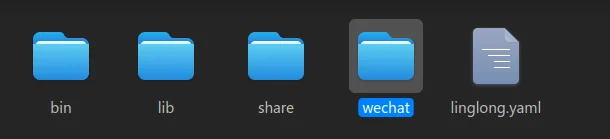
- Obtain the corresponding software package and decompress it
Appimage package command line decompression: chmod +x xxx.appiamge ./xxx.appimage –appimage-extract
deb package command line decompression: dpkg-deb -x xxx.deb ./ - After decompressing the appimage package, you will get a squashfs-root directory. Put this directory into the basic working directory in step 1. I habitually rename this directory to the software name.
- After modifying and adjusting the linglong.yaml, the desktop file can be packaged.
ll-builder build
ll-builder export –layer
linglong.yaml key configuration
package:
id: com.tencent.wechat.linyaps #软件包的唯一标识, 建议最后以linyaps结尾
name: 微信 #软件名
version: 4.0.0.23  #软件版本号, 但是这个版本号必须要四位, 即0.0.0.0的结构
kind: app
description: | #软件描述,建议一句话就可以
微信

base: org.deepin.base/23.1.0  #所需的基础库
runtime: org.deepin.runtime.dtk/23.1.0 #所需的runtime, 可选的, 我打的包很少用到这个

command:
- /opt/apps/com.tencent.wechat.linyaps/files/bin/AppRun.sh #启动命令

build: |
SOURCES="linglong/sources"  #固定的
export PATH=$PATH:/usr/libexec/linglong/builder/helper #固定的
#install_dep $SOURCES $PREFIX #这是使用ll-pica adep安装依赖时才会用到
#install -d $PREFIX/lib
#下面4行cp都是将基础工作目录复制到玲珑容器的对应目录里
# $PREFIX = /opt/apps/com.tencent.wechat.linyaps/files/
cp -r bin/ $PREFIX
cp -r wechat/ $PREFIX
cp -r share/ $PREFIX
cp -r lib/ $PREFIX
Missing dependencies
The appimage package generally rarely lacks dependencies. If a lack of dependencies occurs,
The official tool ll-pica adep seems not as easy to use as it was at first
So I manually copied it from the host and put it in the lib of the basic working directory.
Take /usr/lib/x86_64-linux-gnu/libnotify.so.4.0.0 dependency as an example
The specific file is called libnotify.so.4.0.0 but the name required in the software is libnotify.so.4
In this case, you can create a soft link for this dependency in the lib of the working directory.
ln -s libnotify.so.4.0.0 libnotify.so.4
If the system does not have this dependency, you can go to the debian official website to search and download the corresponding deb package, then unzip it and put it in
Desktop file key configuration
Exec=AppRun.sh #This configuration is the file name of the basic working directory bin/AppRun.sh. Because the PATH in the Linyaps container will eventually include this bin directory, the corresponding file can be found
Icon=wechat #Do not add the suffix of the icon file, it is recommended to use png format
bin/AppRun.sh
#!/bin/bash
/opt/apps/com.tencent.wechat.linyaps/files/wechat/AppRun "$@"

# appiamge包解压后一般都有一个AppRun文件,大部分是shell文件
# 可能会遇到打包完成后, 安装了点图标软件不启动的状况
# 大概率就是 AppRun 里的 APPDIR="$(dirname "$(readlink -f "$0")")" 在玲珑里有问题
# 这时候直接 APPDIR="/opt/pps/com.tencent.wechat.linyaps/files/wechat" 即可
# $APPDIR变量也可能叫别的名字
# 如果是其他类型的包或者二进制文件, 可以直接指定为对应的二进制文件
English edition: Linglong · 18 October 2026. Original publication: 2025-02-26.