On this page
PrefaceLinyaps container operation displayBinary program packaging & secondary distributionOther distributions with similar baselines install binaries built from Linyaps containersSummaryAuthor of this article: Ziggy
Preface
Friends who have heard of Linyaps - a new era Linux desktop application distribution and management solution should know that one of the many core features of the Linyaps solution is: "Through isolation technology, compatibility conflicts caused by upgrades between systems and applications, and applications and applications are completely solved."
Based on this feature and the introduction of Linyaps technical architecture, we can generally know that the Linyaps solution mainly uses sandbox and container solutions to isolate applications and systems. This means that most directories in application containers only have read-only permissions and cannot be used as daily system environments.
At the Linyaps open source community's first university technology salon held in Tianjin recently, I was fortunate enough to reach a simple cooperation with the OpenAtom OpenTenBase open source community - experimentally compiling the source code of the OpenTenBase open source project in the Linyaps container.
Linyaps container operation display
To compensate for the inability of some friends to witness 如意玲珑 and OpenTenBase A live demonstration of "cross-border" sharing in the open source community. I will briefly show you the operation process here.
Preparation
- This sharing is based on
deepin 23distribution, so you need to prepare a version that can build Linyaps applications before performing any of the following steps.deepin 23System environment. For specific steps, please refer to: - Since we need to connect to the Internet to obtain the runtime library of the Linyaps container and possible third-party libraries during the construction process, we need to ensure a smooth network connection during the entire operation process.
- Simply write a version of Linyaps build project configuration file according to the following template
linglong.yaml, to generate a container that meets the requirements
There are mainly the following points that need attention: * Since this operation is to directly enter the container for operation, therefore build Some of the build rules do not need to be written in detail * Since this involves compilation operations, in order to include the required runtime libraries to a maximum extent, we have added runtime Section, specific writing specification reference Introduction to build configuration files Basic knowledge of Linyaps application construction engineering
# SPDX-FileCopyrightText: 2023 UnionTech Software Technology Co., Ltd.
#
# SPDX-License-Identifier: LGPL-3.0-or-later
version: "3"
package:
id: org.opentenbase.pgxc
name: "OpenTenBase"
version: 2.6.0.3
kind: app
description: |
pgxc binary built from OpenTenBase
base: org.deepin.foundation/23.0.0
runtime: org.deepin.Runtime/23.0.1
command:
- /opt/apps/org.opentenbase.pgxc/files/bin/pgxc_ctl
source:
- kind: local
name: "OpenTenBase"
build: |
##Extract res
mkdir -p ${PREFIX}/bin/ ${PREFIX}/share/- Completing preparations
linglong.yamlAfter editing and extracting the relevant source code to the current directory, we can start compiling
Project compilation demonstration
*There is a knowledge point that needs to be inserted here: in the Linyaps container, and building the project configuration file linglong.yaml Sibling build directories will be mapped as /project Directory Everything is ready, we can start compiling
- In order to facilitate operation, we open two shell windows at the same time in the build directory, respectively for
玲珑容器操作and普通操作 - Enter Linyaps container
szbt@szbt-linyaps23:/media/szbt/Data/ll-build/openTenbase$ ll-builder build --exec bashWhen the path changes like the following, it means that we have entered the Linyaps container
szbt@szbt-linyaps23:/project$- Passed
普通操作Window decompress the openTenbase source code into the build directory. I decompress it into a subdirectory separately.
szbt@szbt-linyaps23:/media/szbt/Data/ll-build/openTenbase$ tar -xvf OpenTenBase-v2.6.0-src.tar.zst -C src/- After decompressing the source code, we should correctly choose which compilation system/tool to use before compiling any source code. But the thoughtful thing is,
OpenTenBaseThe open source project has prepared introductory documents for compilation and installation for us, we can read it first OpenTenBase source code compilation and installation to prepare compilation materials - Since it does not exist in the Linyaps container
aptThe explanation of installing dependent packages online, so we will skip it first.依赖安装Steps. However, it should be noted that the libraries/compilers currently provided by the Linyaps container are:gcc12.3, zlib, openssl3, other unspecified libraries may not exist in the container and require us to compile manually (remember the key points, we will test them later)
In summary, we may be missing something suggested in the document libreadline-dev libossp-uuid-dev
- Without further ado, we pass
玲珑容器操作window to enter the source code directory. In order to avoid interference with the source directory as much as possible, I will create a new one here.buildDirectory used for compilation. EnterbuildAfter the directory we enter OpenTenBase source code compilation and installation inconfigureInstructions to configure the build project. According to Basic knowledge of Linyaps application construction engineering , we will--prefixbestow$PREFIXvalue, I finally performed the following operations locally:
../configure --prefix=$PREFIX  --enable-user-switch --with-openssl\
 --with-ossp-uuid CFLAGS=-g\
 LDFLAGS=-L$PREFIX/lib/ CFLAGS=-I$PREFIX/include\
 --with-libs=$PREFIX/lib/ --with-includes=$PREFIX/include\
CPPFLAGS=-L$PREFIX/include- As you can see from the picture, there is an error that prevents the configuration from being completed. We see that
libreadlineLibrary cannot be found, considering Basic knowledge of Linyaps application construction engineering For the directory characteristics mentioned in , I checked the correspondingincludeNo resources related to this library could be found in any directory.
configure: error: readline library not found
If you have readline already installed, see config.log for details on the
failure.  It is possible the compiler isn't looking in the proper directory.
Use --without-readline to disable readline support.
szbt@szbt-linyaps23:/project$ ls /usr/include/ |grep readline
szbt@szbt-linyaps23:/project$ ls /runtime/include/ |grep readline
szbt@szbt-linyaps23:/project$ Combined with this error report, it can basically be judged that the library is missing. According to the prompts, we can use --without-readline parameter to disable this library to skip errors
- After disabling it, we re-
configure, appeareduuidThe relevant library is missing. Since I cannot completely confirm the missing library, I executed./configure --helpto see what parameters the current project supports, and soon I found anduuidrelated parameters, and updated to the following parameters:
../configure --prefix=$PREFIX  --enable-user-switch --with-openssl\
 --with-uuid=e2fs CFLAGS=-g\
 LDFLAGS=-L$PREFIX/lib/ CFLAGS=-I$PREFIX/include\
 --with-libs=$PREFIX/lib/ --with-includes=$PREFIX/include\
CPPFLAGS=-L$PREFIX/include --without-readline- After re-executing, the project configuration is successfully completed, and this step is executed directly.
makeJust operate - In this process, there appeared successively
bisonflexProgram missing error, we return普通操作The window downloads the corresponding source code to the current build directory and enters玲珑容器操作window recompile

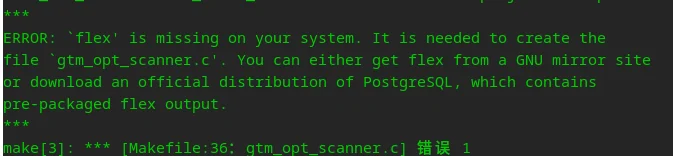
- Recompile
OpenTenBase项目, andreadlineThe relevant error report no longer exists. After recompiling, the first timemakeIt can be completed successfully. - Then we immediately started the second time according to the documentation
make. But there is a problem that the relative path cannot be found.
make: *** 没有规则可制作目标“../src/Makefile.global”。 停止。
- Taking a closer look, this is because I used a separate compilation directory when compiling the upper-level source code, destroying the original
Makefilesettings, so I regenerated the Linyaps container and changed the compilation directory toconfigureSame level directory, press1==>11Compile the sequence completely once - But this time
makeAppeared inreadlineThe header file is missing, which means that even if we disabled this library in the previous step, we still cannot leave this library if we want to complete the compilation of all binary programs.
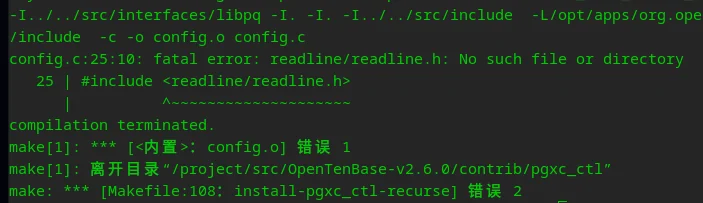
We refer to 1==>10 Steps to recompile readline and its dependent runtime libraries libncurses After that, the second compilation was successfully completed.
./configure --prefix=$PREFIX  --enable-user-switch --with-openssl\
 --with-uuid=e2fs CFLAGS=-g\
 LDFLAGS=-L$PREFIX/lib/ CFLAGS=-I$PREFIX/include\
 --with-libs=$PREFIX/lib/ --with-includes=$PREFIX/include\
 CPPFLAGS=-L$PREFIX/include --with-readline
Compile result test
in completion make install Finally, since the –prefix was modified to $PREFIX, which is also in the container’s default PATH, I checked to see if I could run this binary normally:
szbt@szbt-linyaps23:/project/src/OpenTenBase-v2.6.0/contrib$ pgxc_ctl --help
/bin/bash
pgxc_ctl [option ...] [command]
option:
   -c or --configuration conf_file: Specify configruration file.
   -v or --verbose: Specify verbose output.
   -V or --version: Print version and exit.
   -l or --logdir log_directory: specifies what directory to write logs.
   -L or --logfile log_file: Specifies log file.
   --home home_direcotry: Specifies pgxc_ctl work director.
   -i or --infile input_file: Specifies inptut file.
   -o or --outfile output_file: Specifies output file.
   -h or --help: Prints this message and exits.
For more deatils, refer to pgxc_ctl reference manual included in
postgres-xc reference manual.
So far, it is enough to prove OpenTenBase项目 Can be found in 如意玲珑 Compile and run successfully in the application container!
Binary program packaging & secondary distribution
Despite this, I'm still not satisfied. Another idea came up in my mind: Is there any way to export the binary files compiled in the Linyaps container and package them into deb Waiting for the traditional package format to be provided to distributions that do not yet support the Linyaps environment? Soon, I discovered that the Linyaps container contains tar procedural, combined /project The path can be mapped to the build directory of the host machine, I will $PREFIX Directories are encapsulated as archive files:
szbt@szbt-linyaps23:/project$ tar -jcvf OpenTenBase-v2.6.0-x86_64-binary.tar.bz2 $PREFIX/
OpenTenBase-v2.6.0-x86_64-binary.tar.bz2 return 普通操作 window, and found that we can also read and write this archive file through the host. Then, I packaged the binary file in the archive file into a deb installation package, and the path was $PREFIX Modify to traditional /usr
Other distributions with similar baselines install binaries built from Linyaps containers
After getting the deb installation package, I tried it on different mainstream distributions to confirm whether the binary program built through the Linyaps container is also universal.
deepin 23
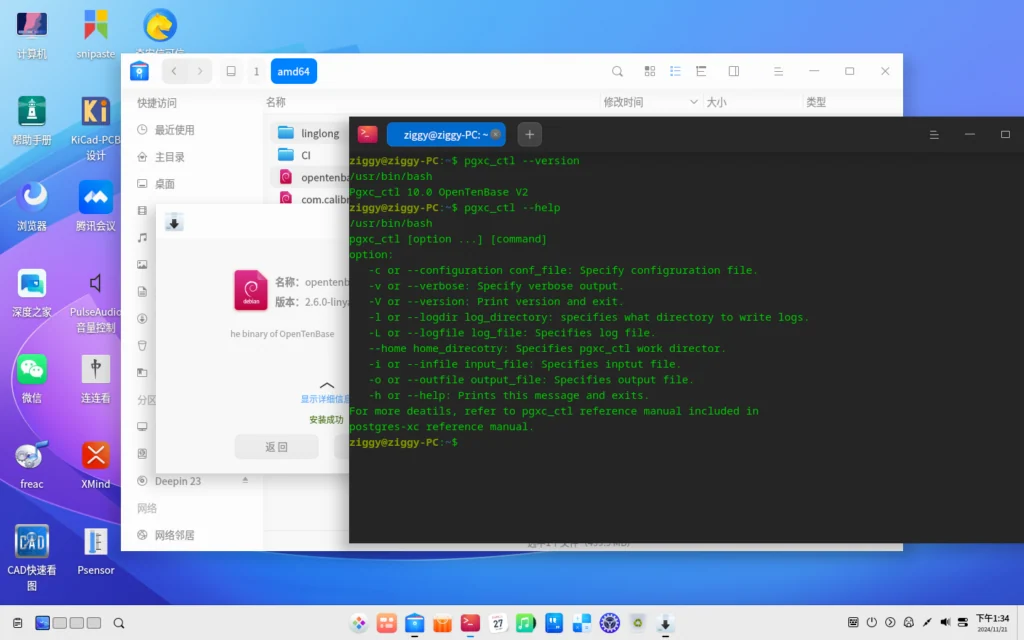
openKylin 2.0
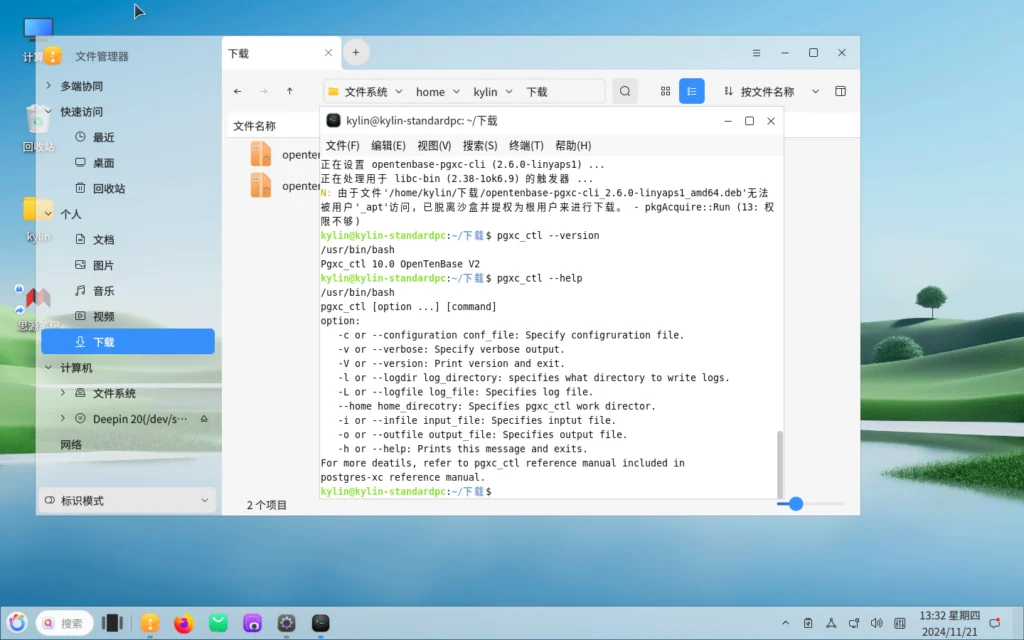
Ubuntu 2404
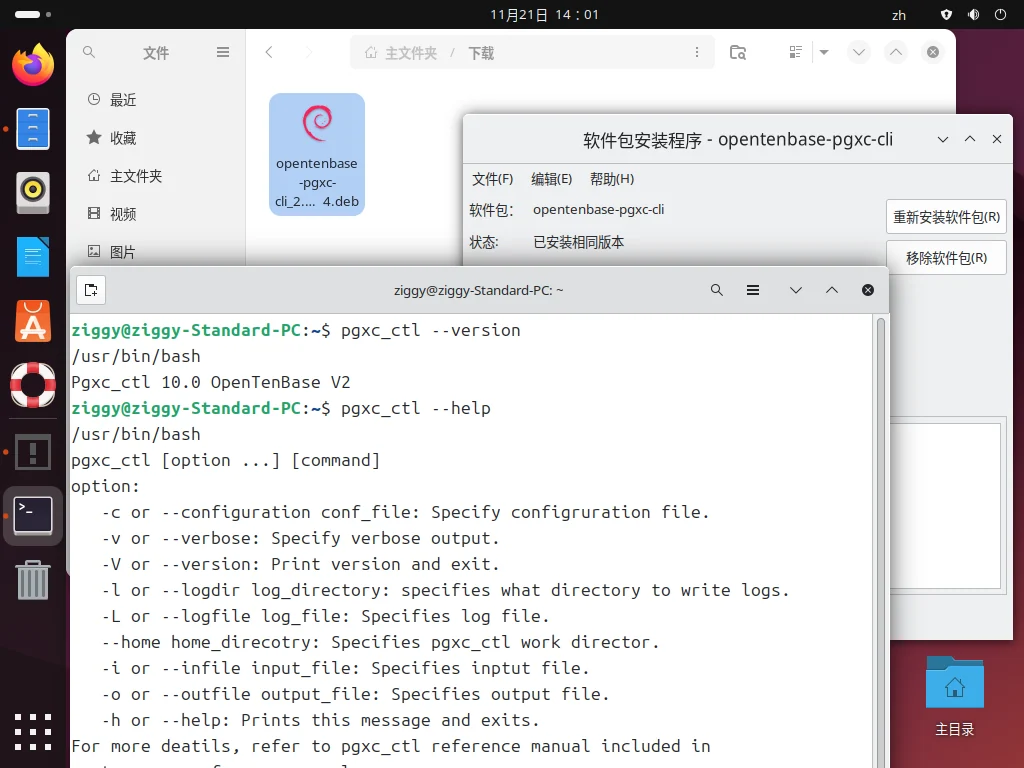
Summary
Obviously, not only applications packaged through the Linyaps container can be used on different distributions (need to support the Linyaps environment). Binary programs compiled through the Linyaps container can also be used on different distributions that meet the runtime requirements (the Linyaps environment is not supported yet)
English edition: Linglong · 18 October 2026. Original publication: 2024-11-22.