The content of this article is reproduced from the public account: Yunshuimushi Author: Chen Zhengyong
Original link: https://mp.weixin.qq.com/s/VE41M9pCsEEMCJGyRwaroQ
When using the Deepin/UOS system, I noticed that a new category of "Linyaps App" was added to the App Store. After some understanding, I found that this is a newly developed domestic software package format - Linyaps. So, what are Linyaps? Why develop such a completely new package format? This article will take you deep into the world of Linyaps.
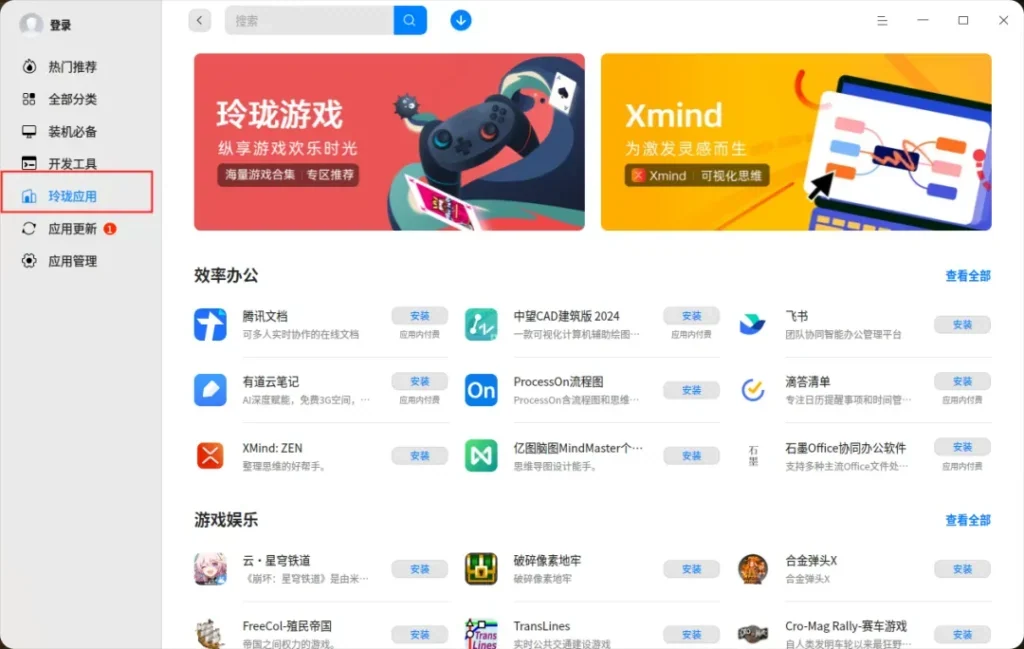
Ruyi Linglong (Linyaps) is a new independent package management toolset that focuses on solving compatibility issues caused by the complexity and cross-dependencies of traditional software package formats under Linux systems.
1
Many users who switch from Windows to domestic Linux systems will be confused: Why do Linux applications not have installation packages like Windows? In Windows, simply double-click the installer to install through the graphical interface and run the app from the Start menu or desktop shortcut. This intuitive operation process makes it easy for computer novices to get started.
In fact, some applications under Linux are also made into installation packages, such as Qt development tools, which have installation interfaces. So why do Linux applications rarely come with installation packages?
Regarding this problem, we also tried to use Qt Installer Framework as the installation package when adapting Xinchuang software. But when sending it to users, the most frequently asked question is: Why is there no response when double-clicking? This has to be said about the differences between Windows and Linux. Under Windows, files with the file name suffix exe and com format are considered executable files, while under Linux, they are judged by file attributes. Files have three flags: read, write, and execute. Only by modifying the executable flag of the file through a command can it be executed. So after sending the package to the user, you have to tell the user to change it to an executable file on the command line. Think about how many users will accept it? Linux borrows some lessons from Windows, calling the corresponding software to open through the suffix name, such as doc, etc., but the judgment of executable programs has always maintained the status quo.
This is not the worst, because in the early days of the development of the Linux operating system, software was mainly released in source code, and users needed to compile it themselves. At that time, Linux systems were mainly used by a group of geeks. And open source is regarded as a standard by this group of geeks. So the steps to get the software at that time were:
tar xvf xxx.tar.gz # 解压软件包
cd xxx
./configure
make
make install
As for the graphical interface, it is looked down upon by geeks.
However, as Linux systems become more and more popular, a large number of less geeky users begin to use Linux systems. This source code compilation method is too unfriendly. The software is becoming more and more complex, compilation is becoming more and more time-consuming, and the environment is different, there may be compilation problems.
In order to solve the complexity of source code compilation, the software package management system came into being. Due to the openness of Linux, it quickly split into two camps, namely deb and rpm:
- DEB format : Developed by the Debian project, using dpkg and apt management tools. The DEB format is widely used in Debian, Ubuntu and their derivative distributions. Domestic systems UOS and Kirin also adopt this format.
- RPM format : Developed by Red Hat, using rpm package management tool, widely used in Red Hat, Fedora, openSUSE and other distributions.
Both package management systems allow users to directly download and install precompiled binary packages and automatically handle dependencies. This greatly facilitates software installation and management, reducing the burden of manual compilation and dependency resolution.
With the development of the Internet, DEB and RPM package management systems continue to improve, introducing more powerful dependency management tools:
- APT : A package management tool in Debian systems that can automatically download and resolve dependency issues over the network.
- YUM and DNF : Package management tool for Fedora and Red Hat systems, providing similar automatic dependency management functions.
These two package management systems have provided long-term and stable solutions for the Linux community and are still used by Linux systems, including domestic systems.
At this time, domestic systems have developed a new software package format. Is this reinventing the wheel?
2
Of course not, we have to talk about the issue of deb packages and rpm packages.
First, different distributions have their own package formats and software repositories. A software packaged for DEB cannot be used directly on an RPM system, and vice versa. Application developers must package and publish separately for each distribution.
Secondly, traditional DEB and RPM packages depend on the specific environment of the system, but this can easily cause software dependency conflicts. To give a simple example, application A depends on Qt 5.12, and application B depends on Qt 5.15. Before B is installed, A can run normally, but after installing B, the version of the Qt library is upgraded, which may cause problems in running A. This is somewhat similar to the "dll hell problem" under Windows. I have previously written "Solution to EasyConnect VPN Problems under Deepin V23". One of the reasons for this problem is package dependency.
There are more problems with the deb package and rpm package. Let’s take a look at the improvements made in the Linyaps package.
- Cross-distro compatibility : The Linyaps package provides a self-contained packaging format. The application and its dependencies are packaged together. In theory, it can run on any Linux distribution that supports Linyaps, reducing cross-distribution compatibility issues.
- Sandboxing and Security: Modern software environments require greater security. Traditional package management systems do not provide sandbox isolation, and software can access system resources at will. The Linyaps package provides a sandbox mechanism where applications run in an isolated environment, limiting their access to system resources, thus improving system security.
- Easy to update and rollback: Linyaps package supports incremental updates, which means only updating the changed parts of the application, reducing download and update time. Quick rollback of app versions is also supported, allowing users to easily revert to previous versions.
- Reduce “dependency hell”: Linyaps application packages all dependencies together to avoid system dependency conflicts. This self-contained approach allows applications to run on different versions of the system without having to worry about whether the system libraries match.
3
Is the Linyaps package intended to replace the existing DEB package?
Not really. The Linyaps package is not intended to completely replace DEB, but to solve some problems that DEB cannot solve, especially in terms of cross-distro compatibility, sandboxing, and ease of use of applications.
There is a coexisting and complementary relationship between them. Lingling packages are mainly used for the distribution of desktop applications, especially applications that require frequent updates. DEB packages are still the preferred method for core system components and applications. They provide different advantages for different scenarios.
Moreover, most of the existing software packages are provided in DEB package format, and it is impossible to migrate to Linyaps package format quickly.
4
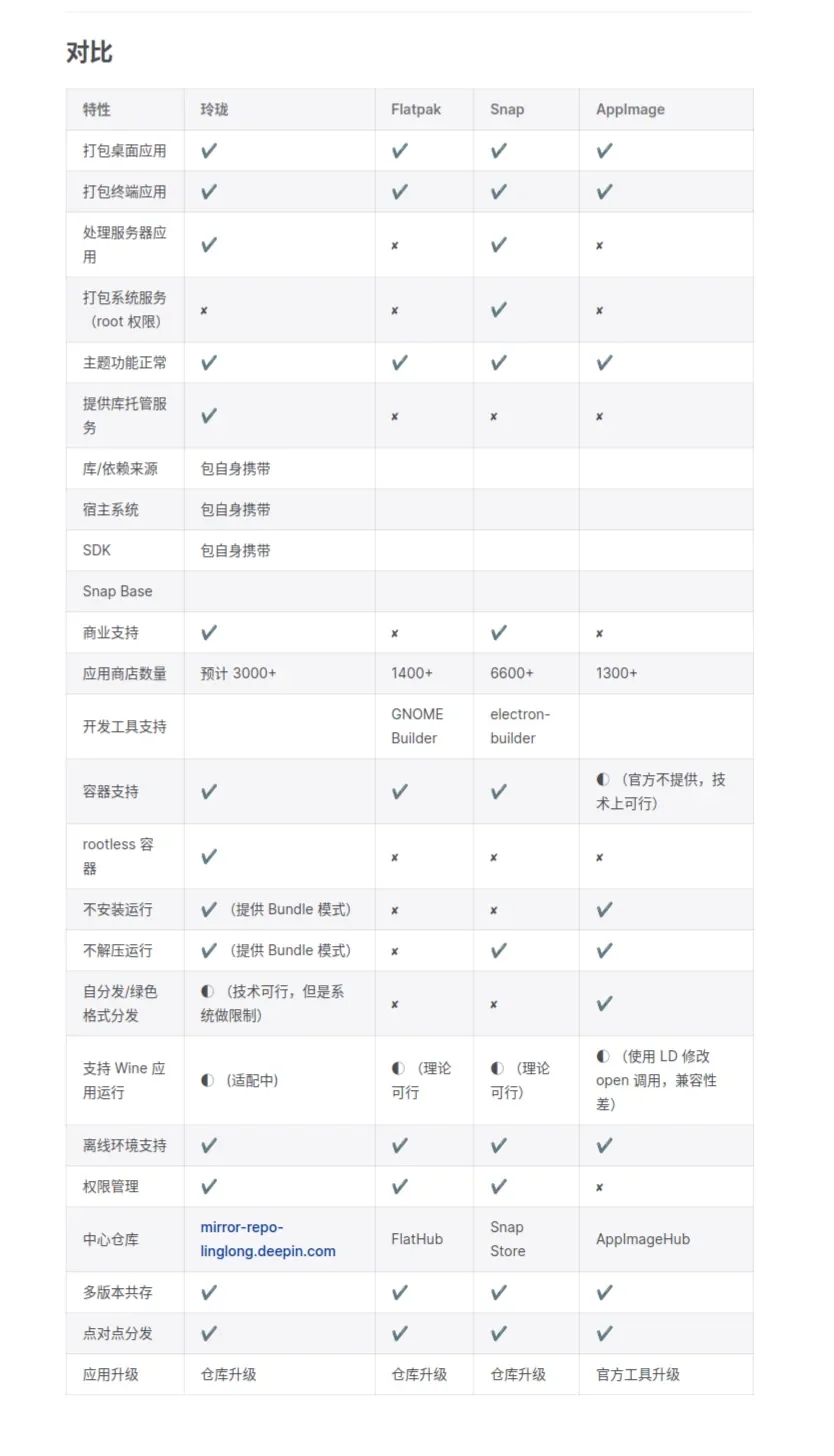
For these problems with DEB or RPM packages, there are actually some new solutions on the market, such as snap and flatpak, as well as a simpler format similar to green software under Windows: AppImage. So what are the advantages of Linyaps bags compared to these competing products? Please see the table below.
5
Will the introduction of Linyaps package format be another barrier to the introduction of domestic systems?
In terms of technical architecture, the biggest feature of Linyaps is its support for cross-distribution versions. Based on User Namespace, CGroup and other mechanisms, Linyaps provides a unified application running environment that is independent of the operating system, which mainly includes libraries and dependencies commonly used in desktop applications such as Qt. These running environments support the coexistence of multiple versions, thus enabling "one architecture, one build".
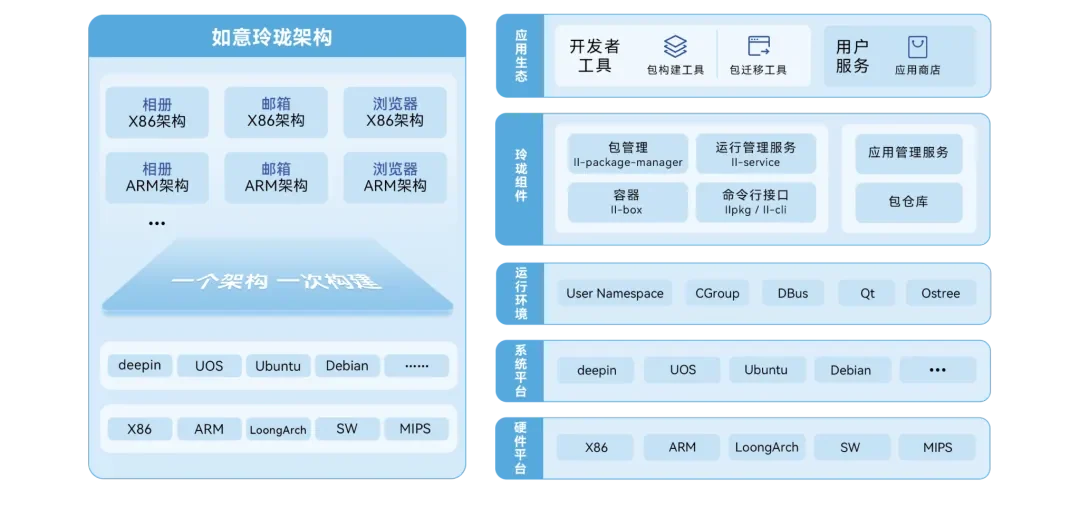
Currently, the Linyaps project has been officially donated to the OpenAtom Foundation. The project already supports multiple distribution versions, including Deepin, UOS, Euler, OpenKylin, Kirin Professional Edition, Ubuntu 24.04, and Debian 12.
6
The introduction of Linyaps marks another innovation in Linux package management. It solves many pain points of traditional package management systems in modern desktop application distribution, especially showing unique advantages in cross-distribution compatibility, sandboxed security environment and dependency simplification. However, DEB and RPM packages will still play an important role in the management of system-level software and server software. Linyaps packages and traditional package management methods do not replace each other, but provide more flexible options for different application scenarios and jointly promote the ecological development of domestic systems.
English edition: Linglong · 18 October 2026. Original publication: 2024-10-21.