On this page
Building Linyaps applications on openKylin 2.0Electron application Linyaps transformationBuilding Linyaps applications on openKylin 2.0
Original text reproduced from: https://bbs.deepin.org/post/278740
Author:Ziggy
Electron application Linyaps transformation
After completing the previous demonstration of Linyaps conversion in tar archive format, we are about to start showing the effect of Linyaps conversion in Electron. Let’s choose one here Electron based Application 思源笔记 , In order to ensure a high degree of standardization and reserve development space for possible future automation, the projects I will demonstrate later have normative characteristics, including but not limited to: Directory standardization and construction process standardization et al.
* In this case 思源笔记 Since the tar archive format is used for encapsulation, some knowledge points will overlap with the previous part.
Material Requirements
Therefore, the following files will be used in this case:
- Electron based application
思源笔记Binaries Corresponding tar archive compressed package - Electron based applications that need to be converted
思源笔记Icon file - Electron based applications that need to be converted
思源笔记desktop file
As you can see, our case contains a tar archive compressed package, the contents of which are binary program files.
Electron based application identification
Before this, you need to confirm whether the application you are about to build and package is an Electron based application, otherwise it will not be applicable to this case. Generally, Electron based applications will have the following characteristics:
- Electron-builder or Node.js, npm, etc. are required when building applications.
- When an application is built as a binary program, it will generally exist in the same directory
chrome-sandboxor other sandbox files
Preparation
Since the Linyaps build tool still has the function of decompressing the tar archive compressed package, I recommend that you decompress the compressed package into the project in advance and prepare other materials before building the project.
In order to save time, I have prepared the above files and decompressed the compressed package to show you the structure of several important directories.
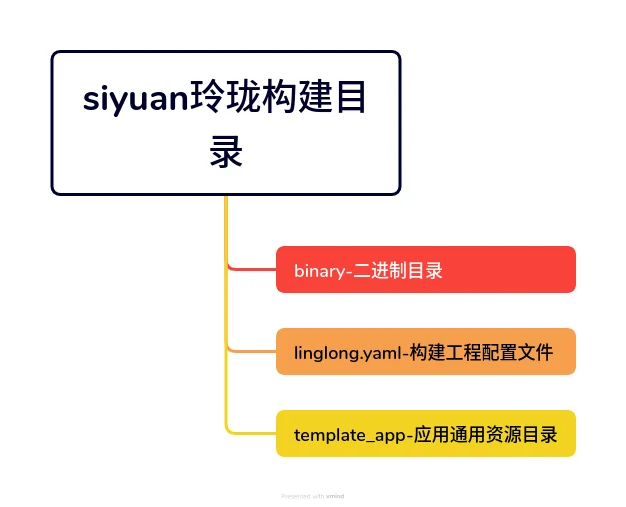
Build directory structure:
ziggy@kylin-standardpc:~/linglong-build/siyuan$ tree -L 1
.
├── binary
├── linglong.yaml
├── template_app
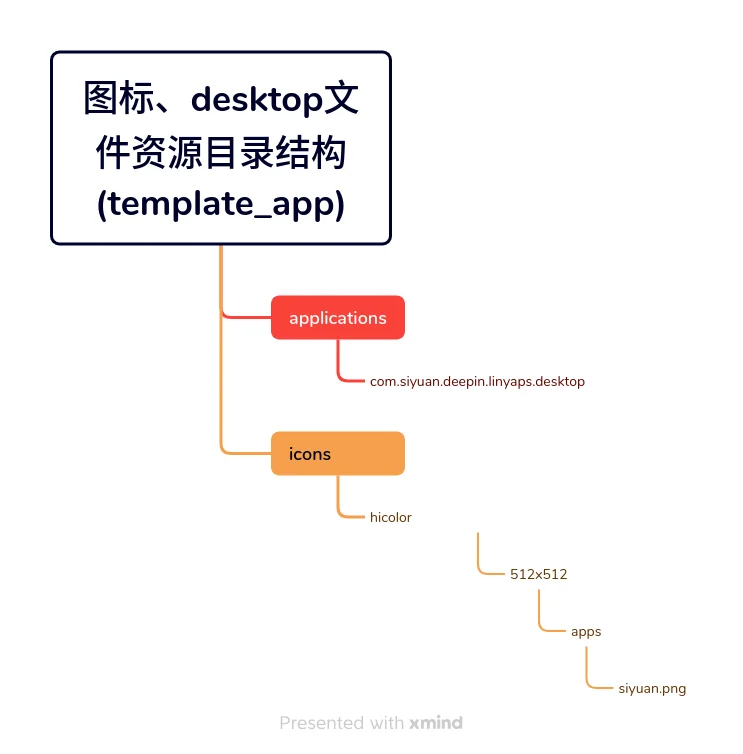
Icon, desktop file resource directory structure (template_app):
template_app/
├── applications
│   └── com.siyuan.deepin.linyaps.desktop
└── icons
    └── hicolor
        ├── 512x512
        │   ├── apps
                └── siyuan.png
During the whole process, we need to focus on two files that need to be changed:
desktop file.
The Exec field must match the path, application id, and execution command after the Linyaps project is built. The execution command is the same as mentioned below. yaml配置文件 in command The value remains consistent.
Case yaml configuration file command value:
command:
  - /opt/apps/com.siyuan.deepin.linyaps/files/bin/start.sh
The Icon field takes into account the current compatibility differences on different distributions, so it is recommended to fill it in directly here. 绝对路径 Otherwise, the icon may not be displayed
Directory paths for reference:
## desktop应用启动文件Exec
Exec=/opt/apps/$id/$version/files/bin/start.sh

## 应用Icon目录
Icon=/var/lib/linglong/layers/main/$id/$version/x86_64/binary/entries/share/icons/hicolor
Two points to note:
- Generally, icon files of different sizes are stored in the hicolor directory. It is recommended to fill in the path of the specific icon file in the Icon field of the desktop application startup file after selecting the appropriate size.
- here
$idRefers to the id of the Linyaps application,$versionRefers to the installed version number of the Linyaps application. You need to fill in the specific actual value.
Desktop file finished product demonstration:
[Desktop Entry]
Name=SiYuan
Name[zh_CN]=思源笔记
Type=Application
Exec=/opt/apps/com.siyuan.deepin.linyaps/files/bin/start.sh %U
Icon=siyuan
#Icon=com.siyuan.deepin
Comment=Fuse blocks, outlines, and bidirectional links to build your eternal digital garden.
Comment[zh_CN]=融合块、大纲和双向链接,构建你永恒的数字花园。
Terminal=false
StartupNotify=true
Categories=Office;
Keywords=markdown;editor;note;encrypt;
Keywords[zh_CN]=markdown;editor;note;encrypt;编辑器;笔记;加密;
yaml configuration file.
At present, what I am sharing with you is the file after modular transformation. You mainly modify the following variable contents and the specific contents written to start.sh.
Due to the standardized design, we mainly modify the directory where the program installation file is located, which is the penultimate line of the template. After confirming that all the content has been modified and preparations are complete, we can start building the export project.
echo "cd $PREFIX/bin/SiYuan/ && ./siyuan --no-sandbox %U" >> $PREFIX/bin/start.sh
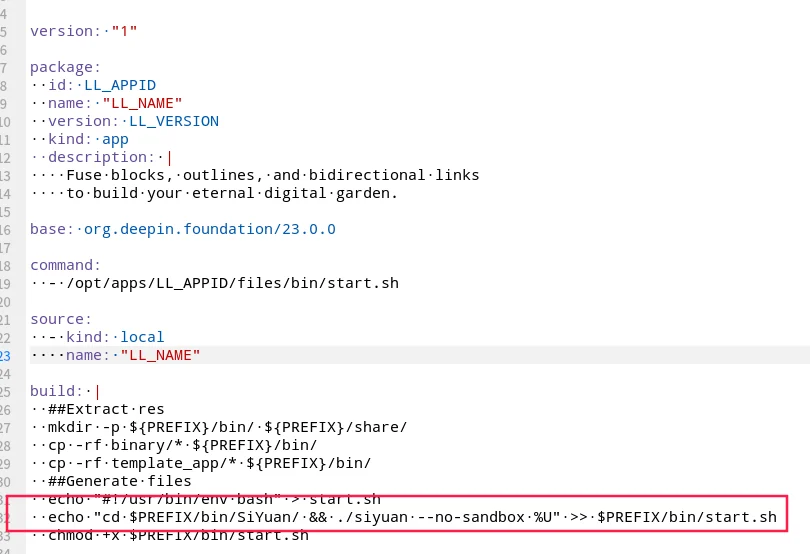
In addition, the path of some copied files may still need to be adjusted according to the actual situation after the compressed package is decompressed. For example, I decompressed it here. 思源笔记 will be generated later SiYuan directory
| Variables need to be replaced | Explanation |
|---|---|
| LL_APPID | Linyaps application id |
| LL_NAME | Linyaps application name |
| LL_VERSION | Linyaps application version |
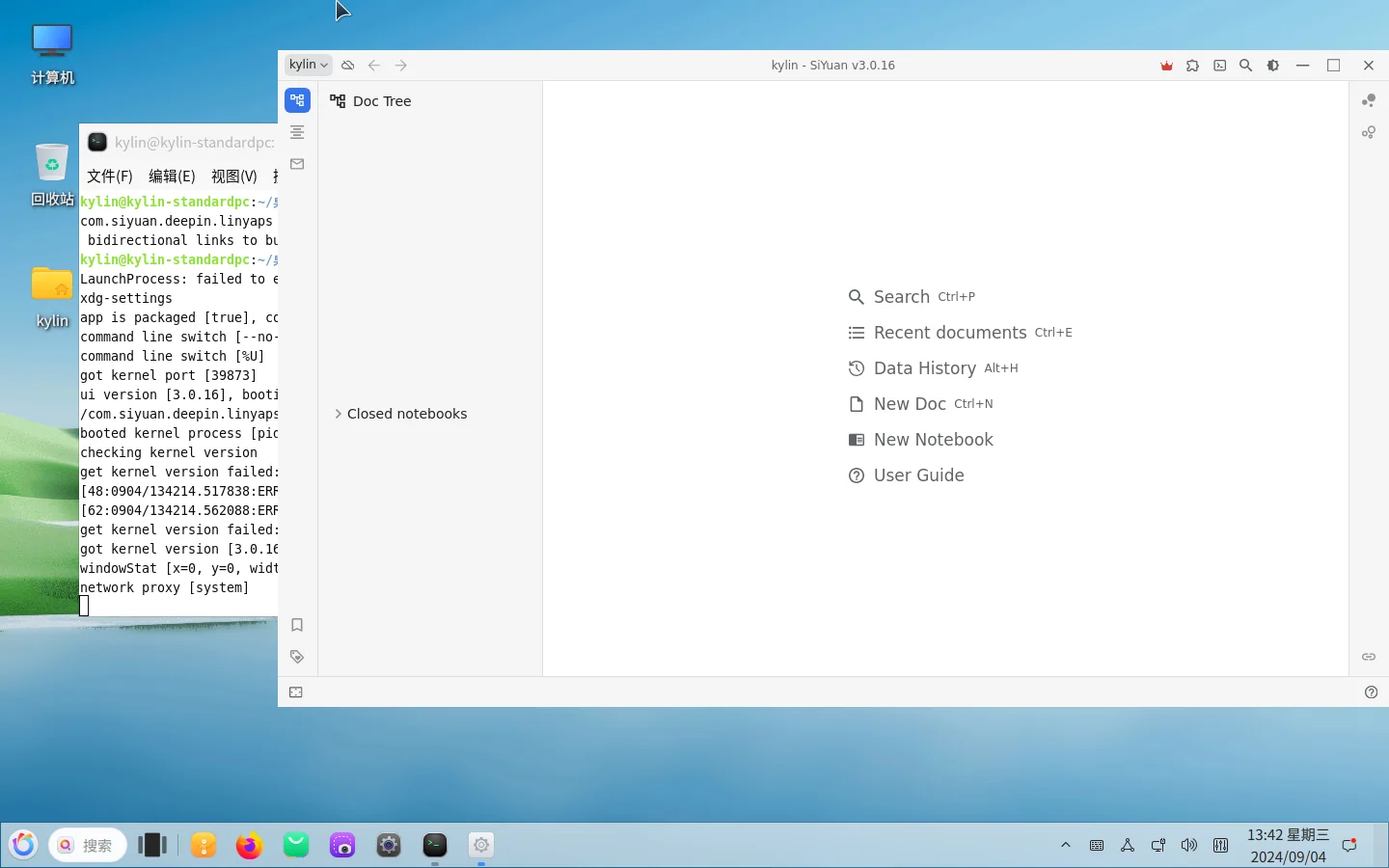
After the build is completed, we perform debugging in the project directory to see if it runs normally
ziggy@kylin-standardpc:~/linglong-build$ ll-builder run
English edition: Linglong · 18 October 2026. Original publication: 2024-09-30.