Pica conversion tool tutorial & adep module application examples on deepin 23 platform
ll-pica is an auxiliary tool in the Linyaps application building tool system. It currently provides the ability to convert deb packages into Linyaps packages, generates the linglong.yaml file required to build Linyaps applications, and relies on ll-builder to implement application construction and export. As of now, the Pica conversion tool currently only supports use on the deepin V23 environment.
ll-pica currently only fully supports the conversion of software packages that comply with the application store packaging specifications. If the source deb package itself has problems such as unclear dependencies and unclear runtime function compatibility, the conversion may be successful and the operation may be abnormal.
It should be noted that deepin V23 RC2 only comes pre-installed with the Linyaps main program and running components. ll-pica is a build component and needs to be installed by yourself. For specific installation methods, please refer to the Linyaps documentation library Installation board
Combined with active migration scripts to easily convert local deb packages
Through a summary and analysis of the results of recent Linyaps ecological activities, it is known that the Pica conversion tool is used to convert Electron based applications in the application store to the Linyaps version with a higher success rate and more template-like nature. Therefore, in this case, "Baidu Cloud Disk" in the deepin V23 application store will be selected as a demonstration application.
In addition to the Pica conversion tool in the Linyaps component, recent Linyaps ecological activities also provide convenient scripts for use with the Pica conversion tool to convert traditional deb format applications in the deepin app store to Linyaps format.
Opening the tool manual, we can learn that before starting the conversion task, we need to prepare the corresponding package name of the application to be converted in the app store.
After obtaining the above materials, open the script modification workspace and enter the package name during execution to convert the application and export the Linyaps installation file "layer" with one click. The latest version of the script already supports automatic installation of the Linyaps installation file after exporting, so after the conversion and build are successful, you can directly check the application startup result through the launcher.
adep module application examples
The adep module is an important function in ll-pica. It is used to add other software packages that have not been declared by the source deb package when using ll-pica to convert deb applications. This can solve the problem of missing dynamic runtime libraries when some applications are built and run.
It should be noted that the adep function needs to write dependent package information to the "linglong.yaml" configuration file to which the build project belongs. If it does not exist in the current directory or the specific yaml configuration file is not specified, this usage cannot take effect.
This time we selected the "Thunder Linux version" in the deepin V23 application store for demonstration. After obtaining the package name information, we used the script to export the application as a Linyaps installation file "layer" through ll-pica as described above.
After the build was completed, the "Thunlei" startup entrance appeared successfully in the launcher, but you soon found that clicking on this entrance did not start the application normally. At this time, we can open the debugging channel through the command line, through “ll-cli run package_name” The format replaces the package name with “package_name” , check whether there is an error message output. In addition, you can also use another more convenient method. Each time the project saves the configuration file, do not perform build and export operations, enter the directory where the yaml of the current build project is located, and execute ll-builder run Run when coming.
As expected, executing the command to start the application returns “libdbus-glib-1.so.2” The error report that the runtime library is missing means that although the application automatically obtains and processes the dependency condition information recorded in the deb package when converting to Linyaps format using ll-pica, judging from the returned debugging results, the package maintainer did not correctly fill in all the runtime libraries and dependency packages required for the application to run when encapsulating the deb package, resulting in the failure to install the corresponding runtime library in the Linyaps environment after conversion.
As mentioned earlier, the adep module under ll-pica supports adding dependencies separately, but before that, we need to determine the name of the software package containing the runtime library. The general naming format of runtime library packages can be briefly understood as "lib library", such as “openssl3.2” The package name of the corresponding runtime library is “libssl3” .
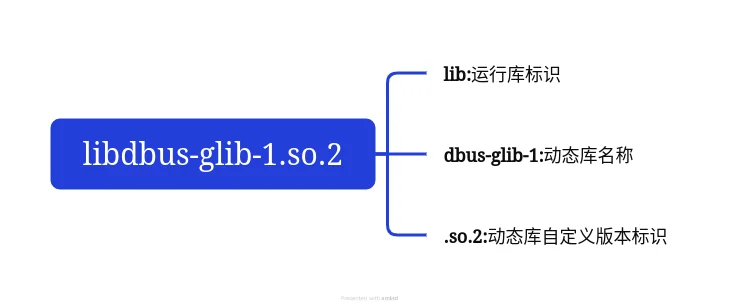
Currently deepin V23 is compatible with the apt package management tool, so we can confirm the package name of the runtime library through the following two methods:
- Fuzzy search
In this case, it can be seen that the missing runtime library is "libdbus-glib-1.so.2". From the above naming rules of the runtime library package name, we can guess that the package name corresponding to the library may be "libdbus-glib", so the related package name list can be obtained through apt search
ziggy@ziggy-linglong1:~$ apt search libdbus-glib
Usually after performing the above operations, you will get a candidate list of several software packages. At this time, we can comprehensively judge which package we need to use by comparing the package name, description and other information. Generally speaking, lib class packages
ziggy@ziggy-linglong1:~$ apt search libdbus-glib
正在排序... 完成
全文搜索... 完成
libdbus-glib-1-2/未知,now 0.112-2 amd64 [已安装]
  deprecated library for D-Bus IPC

libdbus-glib-1-2-dbgsym/未知 0.112-2 amd64
  debug symbols for libdbus-glib-1-2

libdbus-glib-1-dev/未知 0.112-2 amd64
  deprecated library for D-Bus IPC (development files)
Although this solution is a fuzzy search, it requires certain basic knowledge of the operator. If you are not familiar with mainstream runtime libraries, I recommend that you use the following precise search solution.
- Exact search
In addition to the built-in search function that supports searching for software packages, the apt package management tool can also install the "apt-file" module to provide enhanced functions. It is mainly used to view the files contained in each software package in the repository source and to search whether a file exists in a package in this repository through file name information.
Applied to this example, we can search and confirm whether there is software in the repository source that contains this file based on the dynamic library file name returned by the above operation.
Before starting the search, you need to refresh the apt-file related index cache
root@ziggy-PC:~# apt-file updateziggy@ziggy-PC:/$ apt-file search libdbus-glib-1.so.2
libdbus-glib-1-2: /usr/lib/x86_64-linux-gnu/libdbus-glib-1.so.2
libdbus-glib-1-2: /usr/lib/x86_64-linux-gnu/libdbus-glib-1.so.2.3.5 After the search results are precipitated, we can get a series of fuzzy search results. If the uniqueness of the file is high enough, a more precise result will be output. For example, in the current repository source, “libdbus-glib-1.so.2” only “libdbus-glib-1-2” The software package contains this file, so the results can be obtained quickly. Note: "apt-file" only supports indexing software packages contained in all current repository sources. If the software package containing this file does not exist in all current repository sources, the correct results cannot be obtained.
After the above operation, we learned that this round of "Xunlei" cannot run after being converted into Linyaps application. It is a dynamic runtime package. “libdbus-glib-1-2” is missing, so we will use it next “ll-pica adep” module to add missing runtime dependency packages. It should be noted that the adep module supports direct Internet access to obtain dependency packages and import them into the Linyaps project. In order to easily add missing libraries, you need to meet the following conditions:
- The dependency package you add needs to exist in the current system repository source
- When adding dependencies, you only need to fill in the package name. Specifying a specific version number is not currently supported. Therefore, it is recommended to ensure that the runtime can solve the problem before adding dependencies and importing the project.
- When executing the "ll-pica adep" operation, the yaml configuration file to which the project belongs must exist in the current directory, otherwise you need to specify the yaml configuration file that depends on the added destination project.
ziggy@ziggy-PC:/$ ll-pica adep -d "libdbus-glib-1-2" -p /path/to/linglong.yamlSince the directory where the command is executed here is the directory where the project yaml is located, there is no need to specify the path where the yaml is located separately.
ziggy@ziggy-PC:/$ ll-pica adep -d "libdbus-glib-1-2"By doing this, you can easily import the missing library into the project. After the addition is completed, we manually build and export it, and verify whether the startup process problem has been solved by running it.
English edition: Linglong · 18 October 2026. Original publication: 2024-09-02.