Original author: mozixun
Original address: https://bbs.deepin.org/zh/post/276254
The following is the text part:
This article will describe in more detail what Linyaps is, the background of its birth and the problems it wants to solve.
The article refers to deepin’s official introduction to Linyaps: https://www.deepin.org/zh/deepin-linglong/
The background of the birth of Linyaps
As we all know, computer installation software requires an assistant-like system component, which is like the application and function options of Windows. It tells the user "what software is installed" on this computer, allows the user to "uninstall this software", and after running the installation program, it can also identify "upgraded this software", so that the user can smoothly install/uninstall/upgrade the software.
However, in ancient Linux distributions, since there was no good GUI support, software installation relied on First download the .tar source code file, unzip it and enter the folder, enter make install under super user permissions to compile and then install, enter make uninstall to uninstall. . This is an almost impossible task for non-technical users.
So in this context, first-level package managers such as dpkg/rpm/pacman were born.
The birth of a first-level package manager
Package (LCTT Translation: Hereinafter referred to as "package") This concept is used to solve the complexity in the software installation and upgrade process. The package combines multiple data files required for software installation and upgrade into a single file, which will facilitate transmission and reduce storage space (by compressing the file) (LCTT translation: reducing storage space is no longer important now). The binary executable file (that is, the program file) in the package has been precompiled according to the compilation flag selected by the developer. The package itself includes all required metadata, such as the name of the software, description of the software, version number, and dependency packages required to run the software, etc.
These first-level package managers are responsible for Put the binary file of the corresponding path in the program that the developer has compiled into the corresponding directory. (For example, to install QQ, you need to place the compiled QQ program files in /opt/QQ, so when dpkg installs the QQ software package, it will automatically place the program files in the installation package in the /opt/QQ directory according to the path written by the developer), so installing the software becomes very simple.

But this brings another problem, such as There is software A that requires .NET version 4.5 instead of 5.0 or 6.0, and installing .NET requires other components like software A to run. , when installing software:
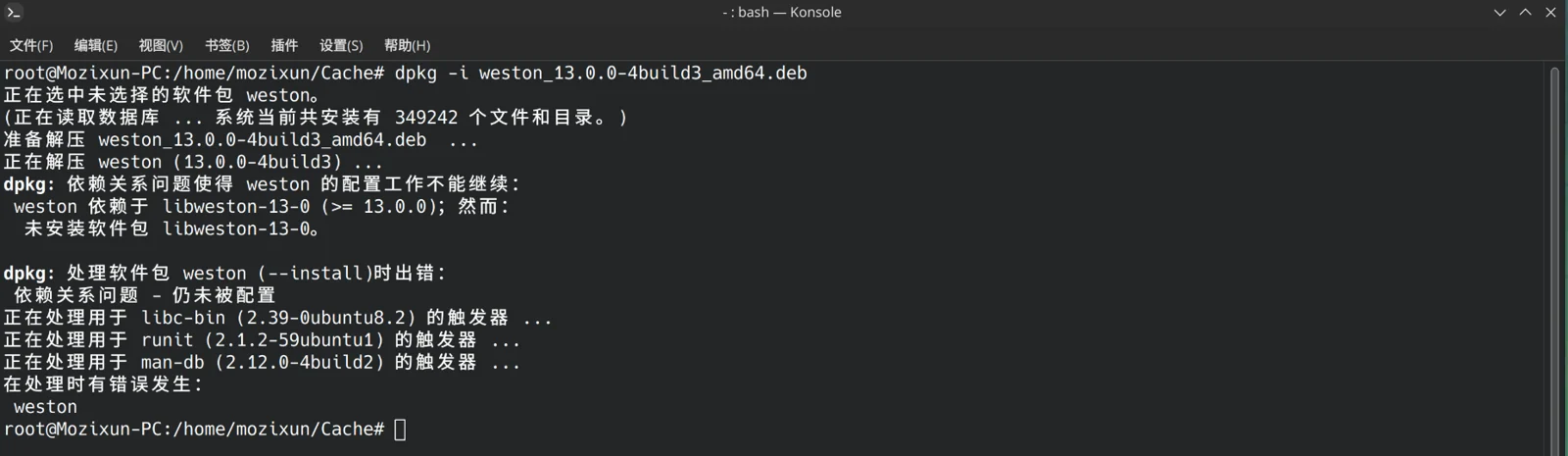
So dpkg/rpm specially invented a function called "dependency resolver". Taking dpkg's .deb software package as an example, the developer writes in the debian/control file who this package conflicts with and who it depends on, and then dpkg can first install it when the application is installed. Check whether this application and the components it requires will conflict with the existing system and application components of the computer. If there is a problem, an error will be reported as shown above, but even so, dpkg will be unable to cope with this situation:

Then I installed other dependencies and found:
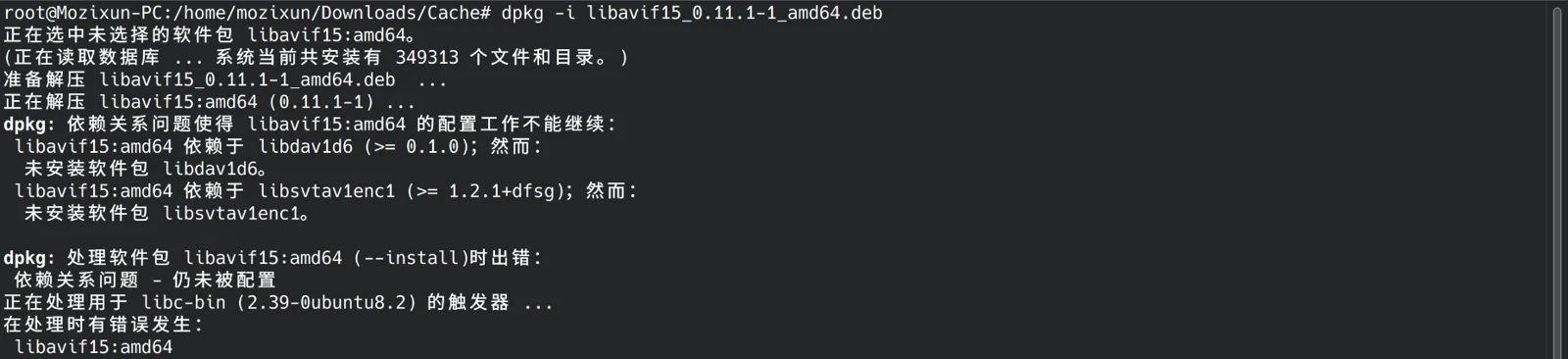
So tools such as apt/yum/dnf appeared immediately. Their function is to match first-level package managers such as dpkg/rpm. Directly download and install all dependencies required for the target application from the corresponding software repository , instead of opening a browser to specifically query and download one by one, a "golden partner" emerged: apt and dpkg specifically manage installation packages in .deb format; yum/dnf and rpm specifically manage application packages in .rpm format, making application installation more convenient
Problems encountered by the first-level package manager
However, package managers such as dpkg will cause three serious problems due to the use of dependency resolvers. Here is a simple example: 1. There is a software called XXX that depends on a software called shenmo and the version is 99. Then the user needs a software called YYY, and the YYY software depends on the shenmo software, but the version is 100. Since dpkg directly places the program files into the system directory when installing the software, only one version of shenmo can be installed. This leads to the embarrassing situation that if you use XXX, you cannot use YYY, and if you use YYY, you cannot use XXX.
2. For example, there is a software called Aitutu, which relies on a software called xserver with version 113, and the dependent software cannot be upgraded. As soon as the software is upgraded, it will explode. As a result, one day, Gfdgd_xi, the developer that xserver depends on, had a sudden inspiration, changed a lot of code and launched it. Version 114 was sent. Also because dpkg directly places program files into the system directory, only one version of xserver can be installed. Ultimately, as soon as the user upgrades the xserver software, Aitutu cannot open it. These two problems are one side of the so-called "dependency hell"
3. When installing .deb with dpkg, you must use the super user to execute the installation script. If there is a rogue businessman, add a line in the script.
rm -rf /*

那整个系统会直接报废
Therefore, for developers, developers must always pay attention to dependency updates and code submissions. Users are frightened when using the system every day for fear that the software cannot be opened as soon as a component is updated. Naturally, users are not willing to use Linux distributions, and developers are not willing to spend energy on Linux distributions. Naturally, the application ecosystem of Linux distributions is stagnant.
The birth of the secondary package manager
In order to solve this problem, after the Linux kernel supports containerization technology, new secondary package managers Flatpak and Snap were born: software packages in this format are almost completely decoupled from the system environment and no longer rely on library files on the system (the same is true for AppImage), and application distribution gradually becomes simpler. – From: https://www.deepin.org/zh/deepin-linglong
In layman’s terms, it is the application running on Flatpak and Snap Another world : Developers package under the specifications of the secondary package manager and can "customize" the application A sub-operating system level operating environment (called Runtime) can prevent applications from crashing because the underlying system is too new. You can also add dependencies and various versions required for application operation. , its detailed principle is as follows:
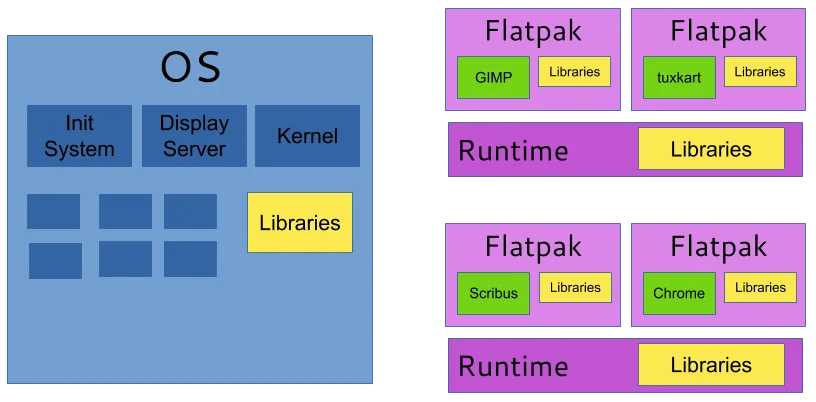
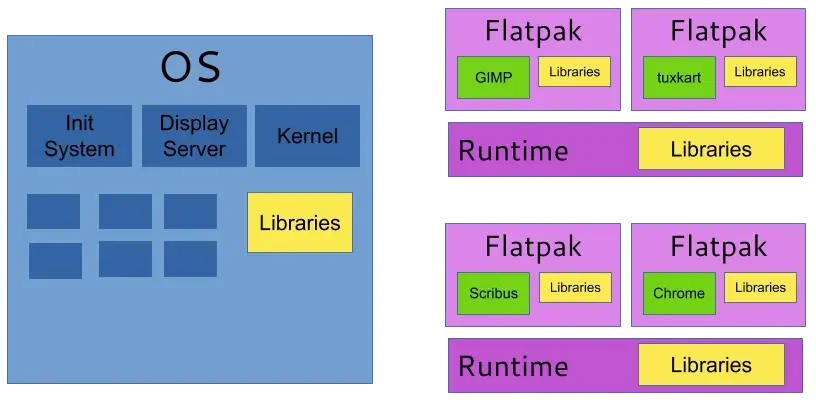
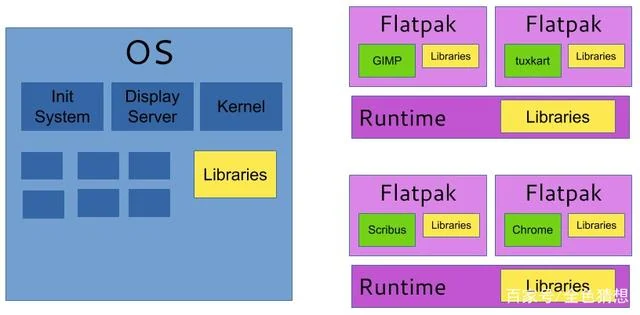 In this way, you don’t have to worry about application crashes caused by system and component upgrades, and Flatpak does not allow applications to run with root privileges, making applications more secure.
Current issues with secondary package managers
However, containerized distribution of applications like secondary package managers brings more serious problems: 1. Disk IO and running memory usage are high 2. Application opening speed is delayed again and again 3. Developers package runtime randomly: one runtime for you and another runtime for you , so I installed several small software but took up N GB of disk space, because they all installed Runtime (Flatpak even needs to be packaged from the XServer/Wayland Client driver, so the packaged application size is not necessarily large, but the size of various Runtimes explodes on the spot, such as:
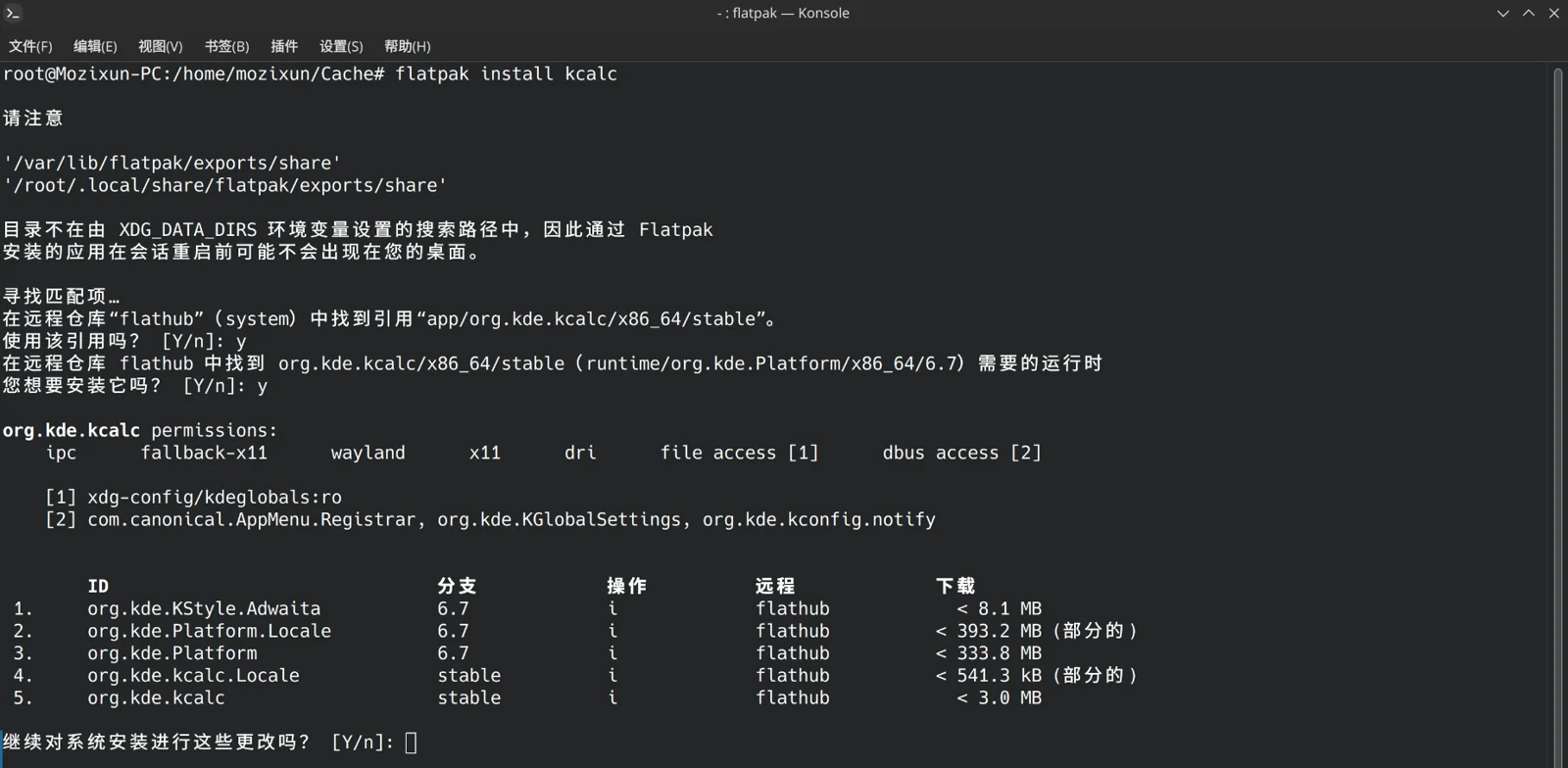
In fact, the size of a KCalc is less than 3MB, but the Runtime environment it requires requires More than 1GB , and this Runtime can only be used by KDE suites, and other applications must be downloaded separately!
Coupled with the slow running speed (shown in the picture below), some people criticized Flatpak and Snap:
https://blog.csdn.net/leopardsaga/article/details/121504580
If Linux distributions are so bloated to run applications, then why not just use Windows to get it right in one go?
So Linyaps came into being under this background
What problem does Linyaps want to solve?
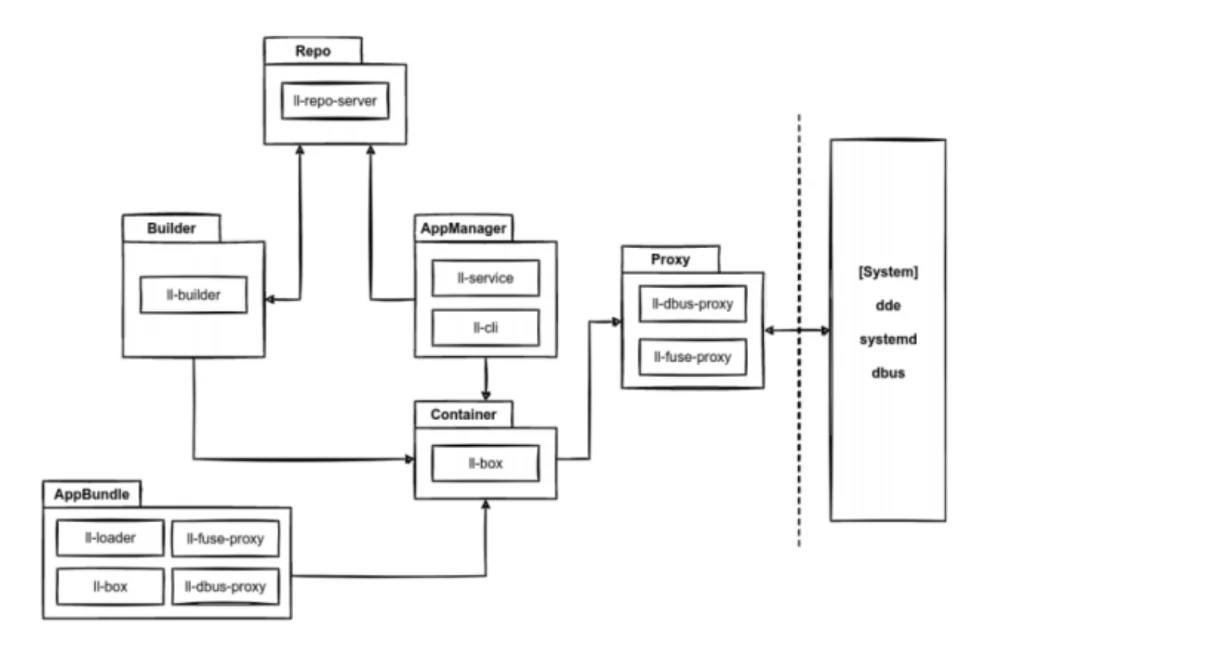
(Working principle of Linyaps )
Linyaps is a secondary package manager like Flatpak/Snap (in fact, the introduction of Linyaps is biased. The goal of Linyaps is not to replace dpkg, but to allow applications installed through dpkg but not related to the operating system to run across distributions). The goal of Linyaps is 1. Solve the problem of excessive expansion of secondary package manager application size, misuse of runtime, excessive expansion of occupancy, and slow application opening speed. 2. Solve the problem of excessive permissions during application installation and strictly regulate application permissions. 3. Solve the problem of application running dependency.
1.Linyaps Unified release of Runtime (two versions, 20 and 23, 20 is the deepin v20 sub-run environment, 23 is the deepin v23 sub-run environment), which greatly reduces the disk usage of the runtime required for the application

2. Linyaps deeply optimizes the Runtime and reuses the host system for some components unrelated to the application in the Runtime to reduce the size of the Runtime and improve the application opening speed. At the same time, developers can directly develop based on the existing Runtime to save more effort.
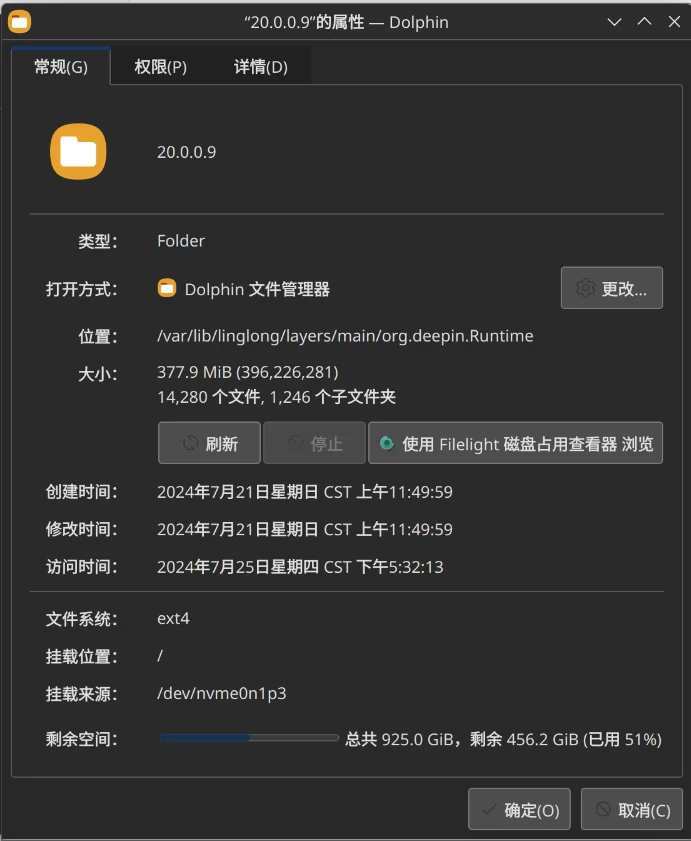
3. Cross-distro support has always been one of the important tasks of Linyaps. Linyaps currently has good support for cross-distribution versions.
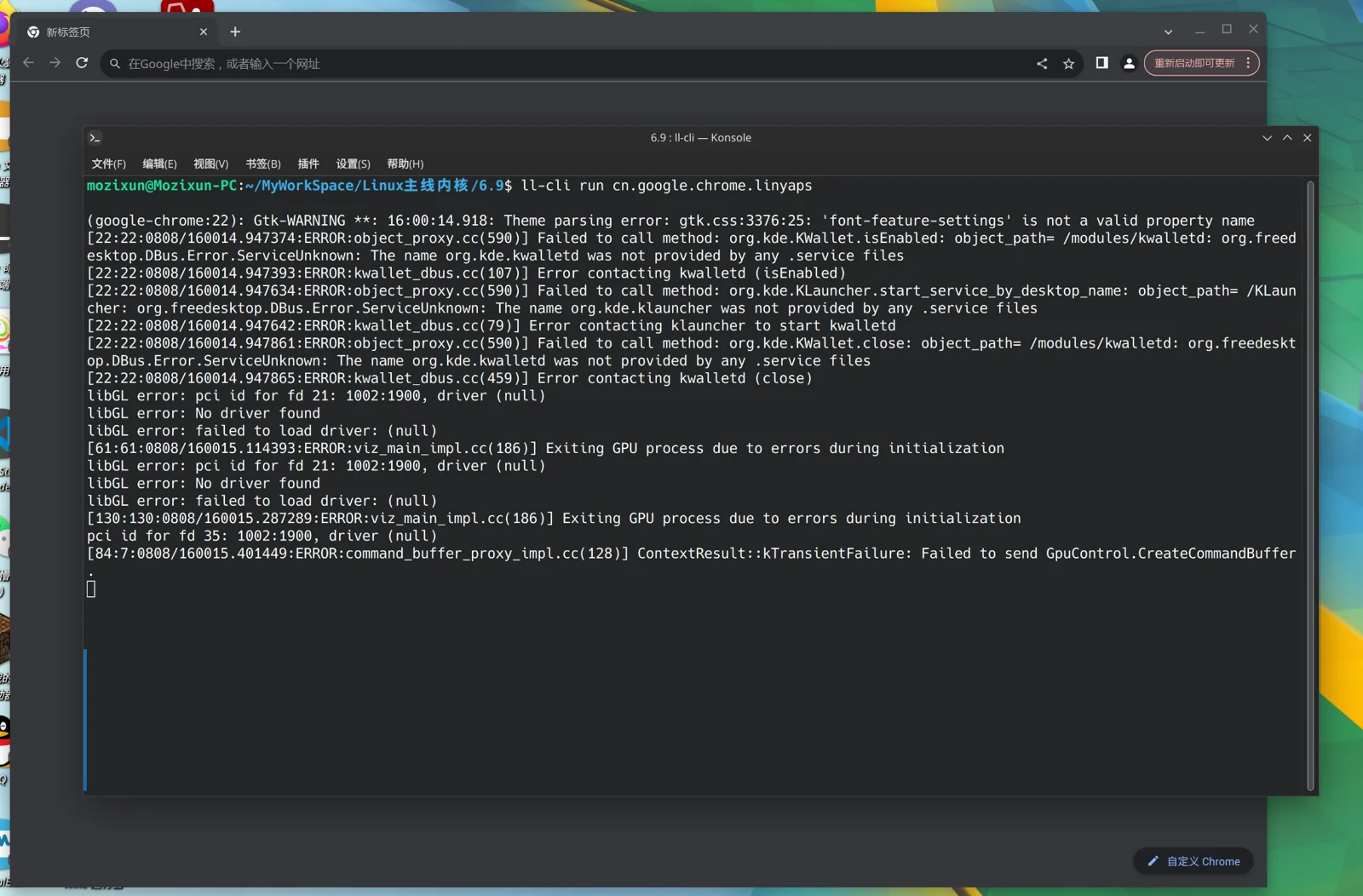
The application performance test of Linyaps has the following data:
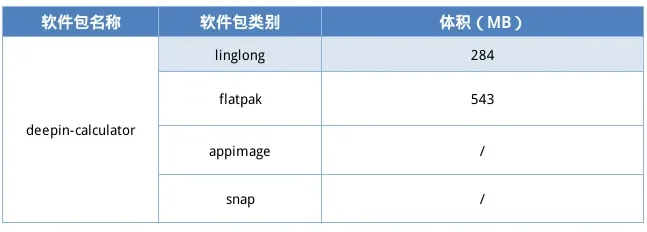
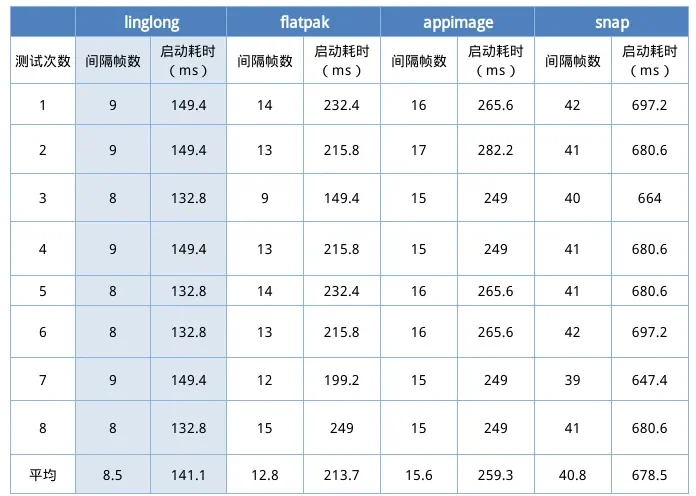
What will the birth and improvement of Linyaps bring?
Linyaps package manager will truly realize that application installation = opening, greatly improving the speed of opening containerized applications; bringing a more stable and faster experience to users; making applications easier to package and distribute, bringing developers a convenient application development experience, greatly promoting the construction of the Linux application ecosystem, contributing to the localization of operating systems and Linux community projects, and creating a better future for Linux distributions!
English edition: Linglong · 18 October 2026. Original publication: 2024-08-12.