What is Linyaps?
Linyaps - an open source software package format self-developed by UnionTech Software , used to realize application package management, distribution, sandbox, integrated development and other functions together with dpkg, rpm and other package management tools.
In the deepin 23 Preview stage, the arrival of independent and innovative package formats will solve the long-standing dependency and security issues of Linux. Likewise, it will form the basis for building independent upstream.

The birth of Linyaps
Where did the name "Linyaps" come from? The Eight Treasures Linyaps Tower contains another world like the universe of mustard seeds. It looks like seven layers but is not, to show the changes in Taoism. We take the word "Linyaps", integrate the ideas of "isolation" and "layering", launch a new Linux package format, manage the system environment of the application runtime in layers, and provide a sandbox environment, committed to managing complex and cross-dependencies under the Linux system, as well as overly loose permission control issues.
Characteristics of Linyaps
Maybe you are wondering: As an independent upstream foundation, Linyaps, what are its advantages? Let’s take a look at this picture!
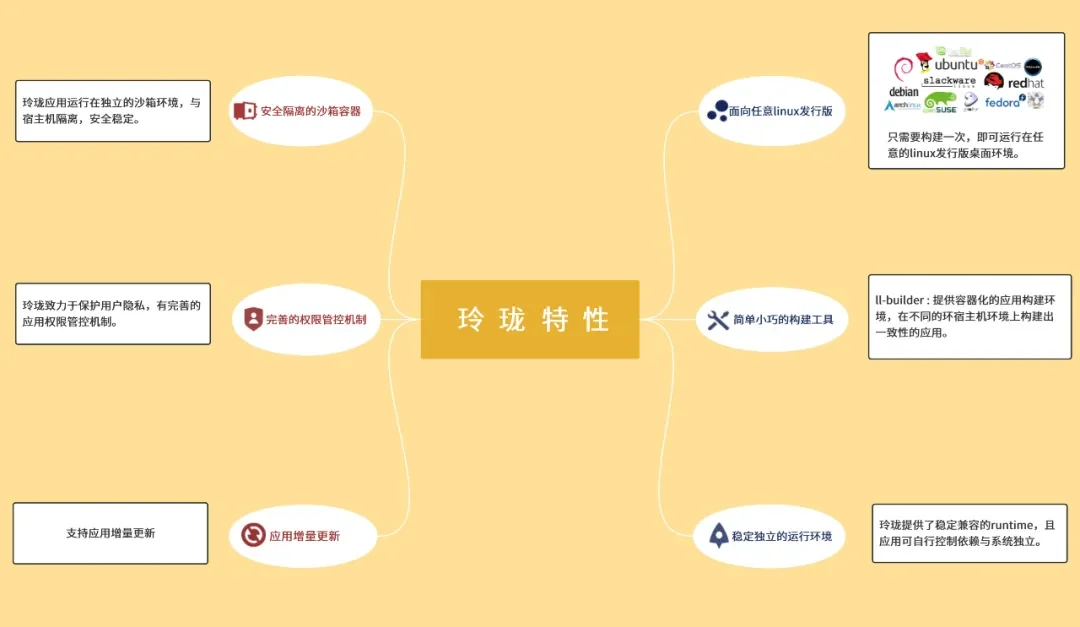
First, It will be oriented to any Linux distribution and only needs to be built once to run in any Linux distribution desktop environment;
Second, It provides simple and compact construction tools, which are convenient and easy to use;
Third, It has a stable and independent operating environment, provides a stable and compatible runtime, and the application can control its dependencies and be independent of the system;
Fourth, It contains a securely isolated sandbox container. Linyaps applications run in an independent sandbox environment, isolated from the host, safe and stable;
Fifth, It has a complete permission control mechanism and is committed to protecting user privacy;
Sixth, It also supports applying incremental updates.
All in all, it improves ease of use and security, and protects user privacy to a great extent.
Traditional package management issues
First, the maintenance cost of different distributions is high. Since the two package formats, deb and rpm, are completely separated, developers need to build and maintain packages separately for different distributions.
Second, compatibility issues are difficult to solve. deb and rpm allow complex cross-dependencies (or circular dependencies) between packages. This requires extremely strong professional knowledge to maintain the package management system. If you are not careful, it will cause a complete system failure that is difficult to repair. System upgrades may cause application dependencies to be destroyed, causing compatibility issues.
Third, security is difficult to control. Package management under traditional Linux systems is more oriented to system administrators rather than application developers and users, giving packages more permission to modify the system. Application developers can easily bury more security risks without being familiar with the system.
Selected solution
Faced with the above problems of traditional package management, the industry already has some solutions for general independent package formats. It is dedicated to helping developers run the same version of applications on all Linux distributions.
In order to achieve this goal, they will isolate the system from the application, thus encapsulating a system-independent operating environment, and the application no longer relies on the operating environment provided by the operating system itself. In addition, common independent package formats are also working hard to enhance security. They usually use "sandboxes" to isolate applications from the host to prevent viruses carried by malicious programs from infecting the entire system.
However, these solutions also have some problems: in order to make the application independent of the operating system, the universal software package format encapsulates dependencies into a separate running environment, which will inevitably cause the application size to become larger; and to ensure versatility, a huge runtime environment is required, which will occupy more disk space. This problem also exists for applications. The application needs to add some unique dependencies to the application itself, making the software size larger than the traditional package format and causing a loss in performance.
In addition, security also needs to be enhanced. For example, some solutions in independent package formats start the sandbox with root privileges, leaving the potential for various privilege escalation attacks, which may cause security issues.
Linyaps solution
Linyaps, built for compatibility and security. It is committed to managing various compatibility issues caused by the complex dependencies of traditional software package formats under Linux systems, as well as security risks caused by too loose permission control.
In the selection of technical solutions, we drew on the excellent ideas of mainstream universal independent package formats, managed the application/runtime/system environment in layers, separated the application's running dependencies to build a more general runtime, and provided a complete mechanism to support the release version to deeply optimize the runtime, taking into account universality and lightweight, to avoid excessive disk space consumption and performance impact.
At the same time, the "sandbox" containerization mechanism is used to run applications to isolate the application from the system and reduce the possibility of the application causing damage to the system. In addition, the root permissions of the "sandbox" are restricted by default to prevent the application from obtaining excessive permissions when running and reduce the risk of user data being damaged.
In terms of software distribution, Linyaps supports incremental online distribution and also supports bundle format for offline distribution. When distributing offline, you can double-click to run it without installing the application. There is no need to uninstall the application, just delete the package file, which is very convenient to use.
English edition: Linglong · 18 October 2026. Original publication: 2022-10-04.