Linyaps
As a new type of independent package management toolset, Linyaps mainly provides a layered and isolated operating environment to solve the compatibility issues caused by the strong dependence of traditional package management systems and the security issues caused by loose permissions. Currently, Linyaps supports 4 distributions, including deepin, UnionTech UOS, Debian and Ubuntu. Linyaps' isolation technology can completely decouple applications and systems, thereby completely solving problems such as compatibility conflicts caused by upgrades and adaptations between systems and applications, and between applications and applications. For developers, this can effectively reduce development costs; for customers, it can reduce enterprise operation and maintenance costs; and for the entire industry, it will help the steady development of the industry.
Install Linyaps
This article will introduce you to the installation of UOS 1070 and deepin V23 Linyaps.
Note: This document applies to 1.5.0, please use ll-cli –version to check your Linyaps program version.
Linyaps consists of three parts:
ll-box sandbox container, provided by linglong-box;
ll-cli manages and runs Linyaps applications, provided by linglong-bin.
1、UOS 1070
echo "deb [trusted=yes] https://ci.deepin.com/repo/deepin/deepin-community
/linglong-repo/ unstable main" | sudo tee -a /etc/apt/sources.list
sudo apt update
sudo apt install linglong-builder linglong-box linglong-bin
2、deepin V23
Currently supports amd64 and arm64 architectures.
sudo apt install linglong-builder linglong-box linglong-bin
Install pica tool
This tool currently provides the ability to convert deb packages into Linyaps packages, generate the linglong.yaml file required to build Linyaps applications, and rely on ll-builder to implement application building and export.
1、UOS 1070
Currently supports amd64 and arm64 architectures.
According to the Linyaps installation steps, add the Linyaps repository source
sudo apt install linglong-pica
2、deepin V23
Currently supports amd64 and arm64 architectures.
sudo apt install linglong-pica
Invite you to experience the 10-minute quick build
1. Build examples from scratch
uses deepin-calculator as an example of building a Linyaps application from source code. The appid of the Linyaps application needs to be named using the inverted domain name.
1) Create
mkdir org.deepin.calculator
Create the linglong.yaml file in the directory
touch org.deepin.calculator/linglong.yaml
Enter directory
cd org.deepin.calculator
Edit linglong.yaml using a text editor
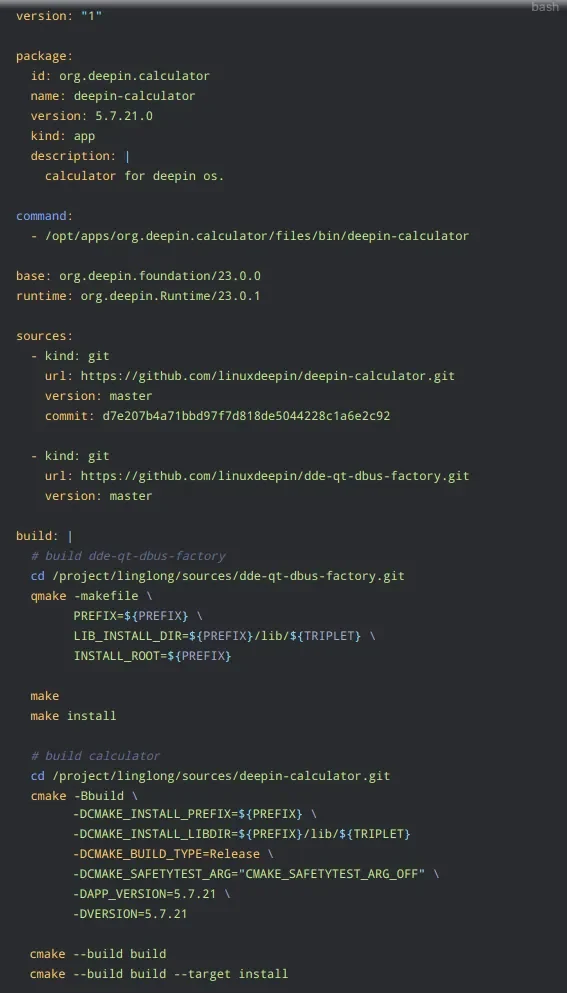
The linglong.yaml file follows the yaml syntax specification.
2) Build
ll-builder build
Wait for the Linyaps application to be built.
3) Run Linyaps application
ll-builder run
ll-builder run successfully runs and the output is as follows:
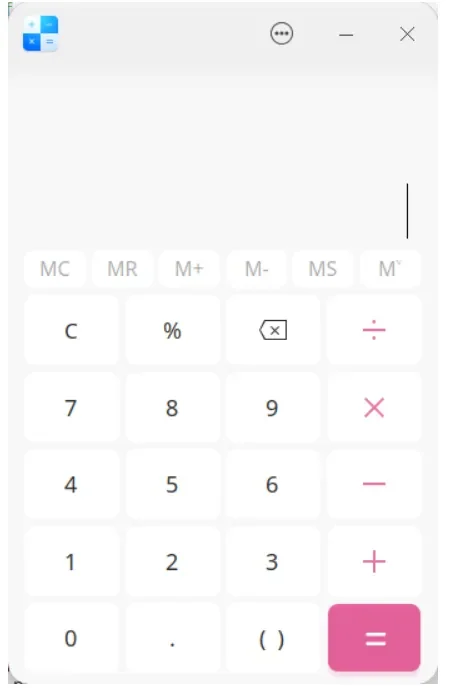
In order to facilitate debugging, you can use the additional –exec /bin/bash parameter to replace the program that is executed by default after entering the container, such as:
ll-builder run –exec /bin/bash
2. Convert deb application
Taking Baidu Netdisk as an example, we introduce the process of converting deb packages to Linyaps packages. Currently, only software that follows app store packaging specifications is supported.
1) Get the deb package file
apt download com.baidu.baidunetdisk
2) Conversion application
ll-pica convert -c com.baidu.baidunetdisk_4.17.7_amd64.deb -w work -b
Enter directory
cd work/package/com.baidu.baidunetdisk/amd64
3) Install layer file
ll-cli install ./com.baidu.baidunetdisk_4.17.7.0_x86_64_runtime.layer
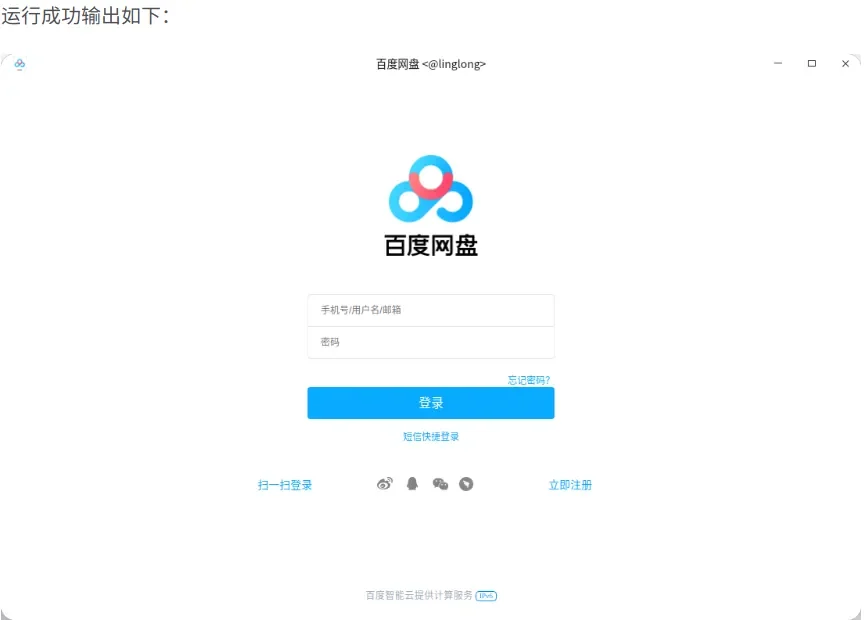
4) Run the application
ll-cli run com.baidu.baidunetdisk
FAQ
1. Common construction problems
1) cmake type build fails with -lxxx, but both ldconfig and pkg-config can query the library information.
The link library path is not in the regular path, the new path is /runtime/lib.
Add environment variable LIBRARY_PATH=<libpath>, which is currently included in the build environment by default.
2) Linking the static library fails during building and requires re-building using fPIC.
Use the -fPIC parameter when building static libraries.
3) Failed to start box during build, as shown below:

The kernel does not support unprivilege namespace. Enable unprivilege namespace to solve the problem.
sudo sysctl -w kernel.unprivileged_userns_clone=1
4) qtbase is built successfully, but the qt application cannot be built, prompting module and mkspec related errors.
There is a problem with the lower version of fuse-overlay mount, which causes the file content to be contaminated during qtbase commit and cannot be used normally. Use fuse-overlayfs >= version 1.7.
2. Common operating problems
1) The application runs and reads the application installation resource files under /usr/share. Why does the reading fail?
2) The font library file cannot be found when the application is running? Why can the corresponding font library be read when the deb package is installed?
3) What is in the Linyaps application runtime? Can I add some library files to it?
4) The application runs in a container. Can a configuration file be created in any path of the container during operation?
5) Where is application data saved? Where can I find it outside the container?
6) The application provides a dbus service file, how to place it? What to write in the Exec section?
7) After the application is installed, the launcher cannot be found?
8) Why does the icon appear as a small black dot?
9) Why does the icon appear as a gear?
10) In which path are the icons stored?
Other formats are stored according to resolution, such as 16X16
png/xpm → $PREFIX/share/icons/hicolor/16X16/apps/
11) Why do the xdg-open and xdg-email that come with the application fail?
Linyaps specially handles xdg-open and xdg-email in the runtime, so the application is prohibited from executing the xdg-open and xdg-email executable files or scripts it carries.
12) The application’s use of system environment variables does not take effect, why?
13) The library files required for application operation are not found. How to provide them?
14) Why does the Qt WebEngine rendering process crash when the application is running?
15) When the application is running, the libqxcb.so library cannot be found or qtwebengine reports an error?
16) Can the application carry the database file itself and write data to the database during operation?
17) Why does executing a binary with suid and guid permissions fail?
18) The uab offline package format cannot be used as input method under Debian and Ubuntu?
19) How to know which packages are installed in the container environment?
English edition: Linglong · 18 October 2026. Original publication: 2024-07-01.